If you’ve been running a digital agency for a while, you’ve probably built up a good list of clients. And if you started before discovering the largest CMS WordPress, it’s likely that some of those clients have websites built on Webflow. So, it’s a scenario you’re familiar with: an old client reaches out with a seemingly simple request – a ‘small update’ to their Webflow-based website. However, this ‘small update’ often reveals itself as a more complex challenge. Maybe they want to expand their website capabilities, but they’re struggling with integrating advanced functionalities. Or perhaps they have specific design requirements that go beyond what Webflow can handle, leaving you and your team scratching your heads over how to implement these custom features and integrations.
If this sounds like a situation you’ve found yourself in, you’re not alone. Many of WLA’s clients have faced similar dilemmas, and the idea of migrating websites from other CMSs to WordPress is the solution we usually suggest. This article is here to guide you through that transition, helping you make the leap from Webflow to WordPress for your clients’ websites.

Is it the right move for agencies?
As mentioned in our introduction, you’re no stranger to the scenarios that play out. Let’s address these common challenges that digital agencies face with other CMSs:
Your client, a growing online retailer, wants to expand their e-commerce capabilities. The vision is clear, but the path isn’t. What initially appeared to be a minor update to their website, presents a series of struggles. Integrating new payment gateways becomes an unexpected hurdle. While both platforms support e-commerce, WordPress, in tandem with WooCommerce, stands as the ultimate champion. WooCommerce even outperforms dedicated e-commerce platforms. With Webflow, e-commerce features come with the right plan, but WordPress’s versatility is unmatched. If you want to know more about WooCommerce you can check out this article:
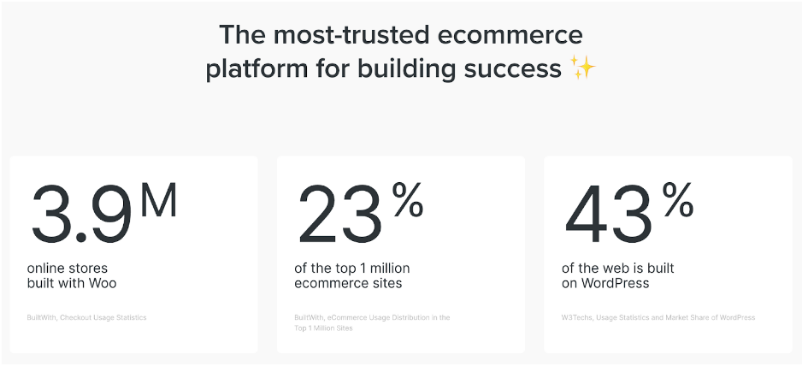
Another client has a specific vision in mind. They yearn for a website design that stands out, reflects their brand identity, and delivers unique functionalities tailored to their industry. Yet, Webflow’s limitations become apparent as you strive to implement these custom features and integrations. Webflow is designed for those who want a more straightforward and streamlined way to create a professional-looking website. But if you want more advanced capabilities, Webflow’s limitations become apparent and you should consider going from Webflow to WordPress. With WordPress, you can use a larger library of pre-built themes and if you crave even more advanced design control, you can try building a custom theme.
It’s during moments like these that the thought inevitably creeps in – “If only all these websites were on WordPress…”.
Why WordPress?
Let’s discuss additional facets that set WordPress apart:
Vast ecosystem:
Webflow, while competent, can’t quite match the vast plugin ecosystem of WordPress. WordPress’s wealth of plugins covers nearly every conceivable need, from SEO optimization to e-commerce enhancements. This expansive toolkit not only saves time but also equips your agency to create feature-rich websites that Webflow’s limited selection of integrations may struggle to achieve.
Integrations with third parties:
Another reason to consider moving from Webflow to WordPress is that the latter enables seamless connections to various tools and services, from CRMs to email marketing platforms. This level of integration ensures your agency’s workflows remain streamlined and efficient, a contrast to potential workarounds required in Webflow.
Content management:
WordPress block editor streamlines content creation and updates. You don’t need to be a tech wizard to navigate it, making it more accessible for content creators. In contrast, Webflow’s content editor may feel limiting, especially when compared to the intuitive flexibility of WordPress.
Budget-friendly:
Having a simple static Webflow website costs $144 per year and for more dynamic functionality and a premium template, the price could go up to $240-450. WordPress is a more cost-effective solution. A simple WordPress website is around $50-$70 per year, and for more advanced features it could be $150-$350 per year.
For a deeper understanding of the advantages of WordPress websites you can read this article:
Making the decision
Webflow has made its mark as a powerful and trending online CMS. However, as we’ve explored, there comes a point when it reaches its limits. That’s where the move from Webflow to WordPress comes into play. WordPress isn’t just another CMS, it’s the largest. With WordPress, there are fewer limitations and you’re equipped with an expansive toolkit.
In your agency, if the schedules of people with the expertise to tackle these issues are packed, we’re here to guide you through this transition, With our decades of experience. Work with us to migrate your client’s Webflow website to WordPress, and we’ll ensure the job is done properly and quickly. Contact our Sales team.