

A WordPress website (like any website) is more than a pretty cover and a chunk of code. It’s a tool for marketing, and it’s an important one. By reading this post, you will learn about the costs associated with getting a new WordPress website, how to make sure it converts into more sales for your company, and why the heck it costs you 10 to 500 times as much as simply buying a premium WordPress theme.
I’m guessing you found this post because you’re either researching the costs for getting yourself a new website, or because you’re an agency/freelancer looking for a reference on the costs for developing different types of WordPress sites for your clients.
Either way, you’ve come to the right place. I’ve written it for both audiences, but I speak to the future owners of the website with the ambition to lay out the details of what drives cost for the WordPress websites they are seeking. However, there’s one restriction. I will assume that you (future website owner) are looking into how to build a website with professionals helping you all the way, with a web agency or marketing agency in charge of the project. Also, the numbers aren’t guaranteed to be fully accurate for you, they are based on experience mixed with our internal data and every project has its own unique requirements to consider. Enjoy!
Introduction: What am I paying for?
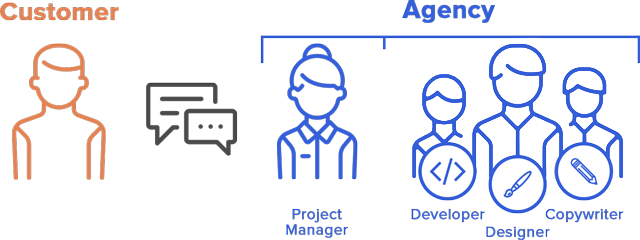
Although a website is eventually made up of software code, the development normally represents only a fraction of the WordPress website costs to you as the customer. The reason is simple: it’s not the code that’s doing the heavy lifting for you as a website owner, it’s the message and the format for the communication to your customers. This is the job for a marketing agency or web agency. They make sure to understand your needs and match that with the best way to communicate with your customers via the new website, with the ultimate goal to make your business successful.
Here’s an example of the steps involved that will end up on your bill in one way or the other:

Step 1. Hire a Professional Agency
Your company decides you need a new website, so you reach out to a marketing agency in your city that has a good reputation and a serious website. They seem to know what they’re doing. Remember that an agency with a good track record is a safer bet that you’ll get a site that works for you – but that guarantee also comes with a premium price.
Step 2. Map Out What You Need
Over the next weeks, they will meet with you, talk to you, research your industry and competition, your marketing message and brand, and figure out how you can reach more customers with your offerings.
Step 3. Design Your Road to Success
Then they put their creatives to work, in order to translate and package your message into the content, design and functional specifications for your new website. In addition, they might work on new advertisements in print and for paid search, maybe updating the brand and create videos or take photos that reinforce the message.
Step 4. Develop & Deliver Your Website
When you have agreed on the designs put forward by your agency, it’s time to bring the designs to life. We will go through this stage more below, but you can count on having a front-end developer hammering the keyboard for around 16-160h depending on the complexity of your site in order to bring it to life. After quality assurance and your approval, it is brought live from the test server to your domain, coolcompany.com or whatever it might be.
As you see, the main value is created in the phase where the agency figures out what you need. Your customers will not judge you by the quality of the code on your website, but by the quality and effectiveness of its content, logic, and design. Therefore, that is what you’ll primarily be paying for, and what distinguishes a great agency from your friend’s friend who last weekend at the sports bar offered to code a website for you if you paid the next round.
WordPress Development Agency
Experience WordPress development with our custom-coded websites. Perfect for agencies, our reliable service ensures timely delivery and client satisfaction.
How Much Does a Typical WordPress Website Cost?
If you’re looking to get an advanced corporate website with a custom 100+ product eCommerce solution or custom database integrations, I’m afraid I don’t have much more to tell you. It’s time to pick up the phone and start scheduling meetings with some bigger agencies that can take you through the process. You’re looking at $25k+, and to be honest you will be better off talking to a sales representative or project manager at a marketing agency or web agency than reading about what I have to say in this blog post.
However, if you’re looking to get a “normal” WordPress site with 5-25 pages, maybe a booking solution, standard eCommerce solution, some forms and great design – you’re gonna want to keep reading.
Custom Theme vs Premium Theme: What’s the Difference?
Before getting into the details, let me just clarify the difference between a custom WordPress site and a theme-based WordPress site. Many people associate WordPress with the free and premium themes that most bloggers and some small businesses use for their sites. These come with a basic design that can be configured to a limited extent using gauges and settings from the WordPress admin view. The website is built by taking the standard format and adding images, colors, logos and text to the template. It’s like the Swiss army knife, or the coloring book of websites.
Custom WordPress sites on the other hand are “one-off themes”, allowing the designer to create whatever web design they envision for you. Then they let a developer build the site based on that blueprint. The site can still be updated with content, images and WordPress updates from the admin view (which is one of the main reasons for choosing a WordPress site in the first place), but it will have less flexibility in changing the design without development skills. Those with development skills will experience even more flexibility than premium themes… More on this in our other blog post.
The rest of this post assumes that you will want a custom built WordPress site, since that’s usually preferable for most businesses.
Three Typical Categories of WordPress Websites
To simplify, we have chosen to talk about three different categories of websites based on their complexity, but remember that every website is unique, just like your business is. Your agency will put together a package that serves you the best, and it may include additional services or a focus on content or visuals that make your best solution different from the baseline outlined here.
A. The Brochure Website: $2,000 – $6,000

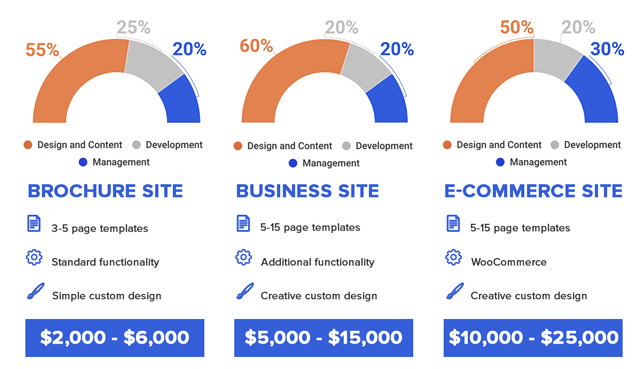
The simplest category would be the “Brochure” website, which features 3-5 types of pages (e.g. home, services, blog, contact) and some basic functionality such as a form and social media buttons.
The cost for a site like this would likely be around $2,000 – $6,000, depending on how much effort you want the agency to spend on the content and design. You get what you pay for, so choose an agency that you can afford and let them get the job done for you. Examples of businesses that would prefer these sites are local stores, dentists, industrial subcontractors and restaurants.
B. The Business Website: $5,000 – $15,000

The next category of websites either hold more content, get more creative in their design or have additional functionality that allows their visitors to interact with them. Typically they would have 5-15 page designs, some animations and sliders, maybe a login feature or membership page, or a bookingor listings feature. This type of site is common for marketing agencies, hotels, real estate agencies and various other midsize companies that take showcasing their products and services seriously. The cost for these sites are normally around $5,000 – $15,000, but it’s good to remember that they will also likely require more maintenance and hosting costs to ensure steady operation.
C. The Standard eCommerce Website ($10,000 – $25,000)
The third and last category that we’ll bring up here is the entry level of eCommerce sites. And don’t get me wrong, they can go a long way, but to me it doesn’t make sense to run a $2M/y webshop with a $25k website since a three days of downtime would cost more than the whole site. In a study by Forrester on 150 online retailers, the average maintenance cost for their websites was around 7% of their revenue ($12k/month for a $2M/y retailer). (Source)
However, if you have a moderate revenue coming through your webshop or you’re getting started and can settle for a close-to-standard eCommerce solution, then configuring the standard woocommerce plugin will satisfy your needs and keep the budget reasonable. How the elements of the site build up to the total cost will be discussed further below, but count on paying around $10,000 – $25,000 for a serious website featuring a webshop.
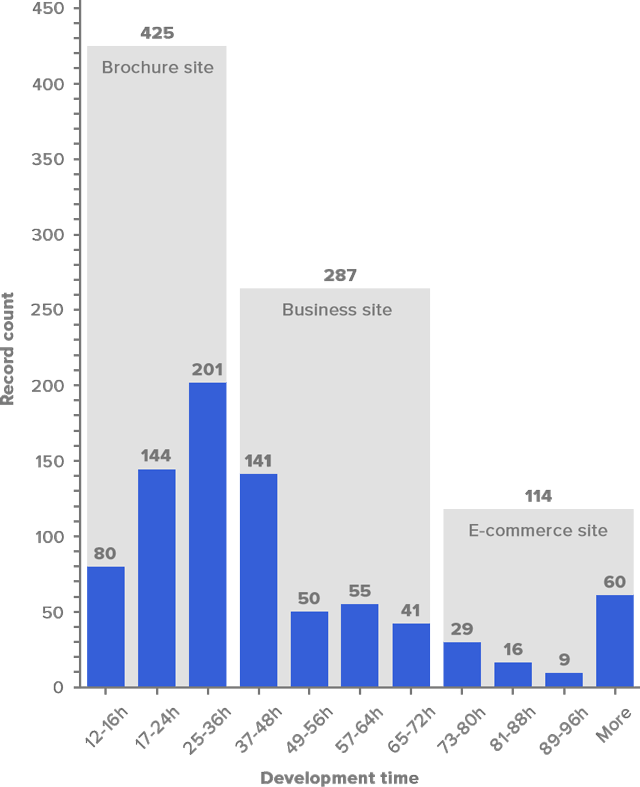
Looking at the sites we normally develop, most of them would fall into the “Brochure site” category:
Additional WordPress Website Costs to Consider
As we pointed out above, when planning your WordPress website, the development expenses are only part of the WordPress website pricing. There are several other costs that impact the total investment required to get a fully functional and optimized WordPress site. Below is a detailed breakdown of additional WordPress website costs to consider, covering domain registration, hosting, themes, and plugins.
Domain & Hosting Costs

Domain Registration
Every website needs a domain name, which is essentially your website’s address on the internet (e.g., www.coolcompany.com). Domain costs typically range from $10 to $30 per year, depending on the domain provider and additional features like domain privacy.
Hosting Options
Hosting is where your site’s files are stored and accessed by visitors. Choosing the right hosting plan is crucial for your website’s performance and security. The main types of hosting to consider include:
- Shared Hosting: The most affordable option, ideal for small sites with low traffic. Expect to pay $2.95 – $10/month.
- VPS Hosting: Offers dedicated resources for better performance. Pricing starts around $20 – $80/month.
- Managed WordPress Hosting: Specifically optimized for WordPress, includes security features, automatic updates, and expert support. Costs range from $25 to $200/month.
Choosing a hosting provider that meets your needs will influence your WordPress website pricing significantly, especially if you expect high traffic or require advanced security features.
Theme Costs
Themes are the backbone of your site’s design and user experience. As we explained above, there are several options to choose from depending on your budget and design requirements. Let’s look at their average costs:
- Free Themes: These are a good option for beginners or low-budget projects. However, they often lack advanced features and customizability.
- Premium Themes: Typically priced between $30 and $100, premium themes provide more customization options, support, and are better optimized for SEO and mobile responsiveness.
- Custom Themes: For businesses seeking a unique design tailored to their brand, a custom theme can range anywhere from $3,000 to $10,000 or more. While more expensive, a custom theme can offer better performance and scalability.
The theme you choose will directly impact your site’s design flexibility and long-term costs, making it an important consideration in your overall WordPress web design cost.
WordPress theme development
Enhance your agency’s offerings with our expert WordPress theme development services. Custom-coded themes designed to meet your clients’ needs.
Plugin Costs
Plugins add essential functionality to your WordPress site, such as SEO optimization, eCommerce capabilities, and advanced security. While many plugins are free, premium plugins offer additional features and better support. Here’s what to expect:
- Free Plugins: Provide basic functionality, but may lack support or advanced features.
- Premium Plugins: Range from $15 to $200/year depending on the functionality. Common examples include:
- Gravity Forms: $59/year, for creating complex forms and surveys.
- WooCommerce Extensions: $30 – $299/year, depending on the eCommerce features you need.
Hidden Plugin Costs: Consider the potential costs for plugin licenses, renewals, and compatibility issues with other plugins or themes, which can increase the long-term cost of maintaining your WordPress site.
SEO and Marketing Costs
A well-optimized site is critical for visibility and growth. Here’s an outline of costs associated with SEO and marketing tools for your WordPress website:
SEO Tools and Services
- Free Plugins: Yoast SEO and Rank Math offer great free versions.
- Premium SEO Plugins: Yoast SEO Premium ($89/year) and Rank Math Pro ($59/year) offer more features.
- Hiring an SEO Expert: For businesses looking to invest in professional SEO, costs typically range from $1,000 to $5,000/month.
Marketing Tools for WordPress
- Email Marketing: Mailchimp ($10 – $299/month).
- Social Media Integration: Buffer ($15 – $99/month).
- Lead Capture Tools: OptinMonster ($14 – $80/month).
Ongoing Maintenance & Updates

Keeping your WordPress site secure and performing well requires ongoing maintenance and updates. Here are some typical costs to consider:
- Regular Updates: WordPress core, themes, and plugins require regular updates to maintain security and functionality.
- Developer Maintenance Services: Hiring a developer for ongoing maintenance can cost between $100 and $300/month.
- Managed Maintenance Plans: For more comprehensive support, managed plans range from $50 to $150/month.
- Backup Solutions: Automated backups are essential for preventing data loss, with prices ranging from $5 to $50/month.
- Annual Hosting Renewal Fees: Hosting costs often renew at a higher rate after the first year.
Recommendation: Here is a website maintenance checklist template that you might find useful.
eCommerce Website Extra Costs
If you’re planning to build an eCommerce site, there are several additional costs to consider due to the complexity of managing products, payments, and customer data. Here’s what you need to budget for:
WooCommerce Plugin and Extensions
The core WooCommerce plugin is free, but most eCommerce sites require premium extensions for features like memberships, subscriptions, and complex product options. These can cost between $30 and $299/year.
Payment Gateway Fees
Payment processors like PayPal and Stripe typically charge around 2.9% + 30¢ per transaction. For high-volume stores, consider exploring lower-fee options.
Security and SSL Certificate Costs
A secure site is crucial for online transactions. SSL certificates range from $50 to $150/year, depending on the provider.
Custom Features for eCommerce
Advanced features like product configurators, inventory management, and custom checkout processes can add anywhere from $1,000 to $5,000 to your overall WordPress website costs.
By accounting for these additional costs early in the planning process, you can better estimate your total WordPress website pricing and ensure that your site has all the features needed to achieve your business goals.
Anatomy of a Website and the Costs of WordPress Development
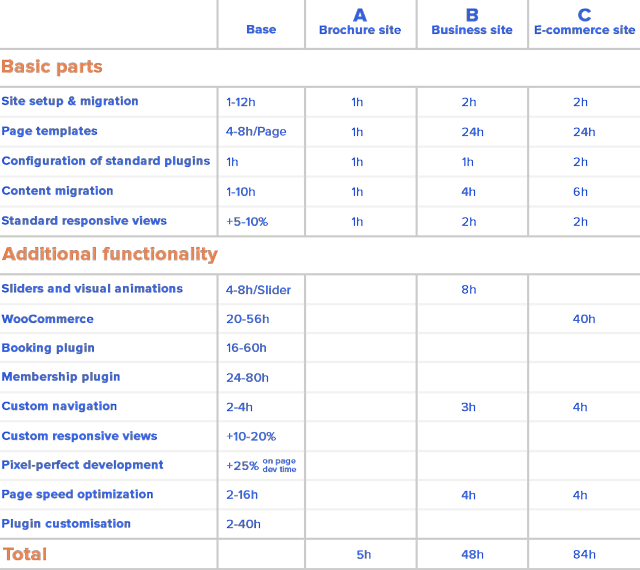
In this section, we go through the common features that we include in the WordPress sites we build for our clients. We also indicate the time necessary to code them, which gives you an idea of how they contribute to the total development cost, since that’s where our core capabilities lie and that we can share with the world.
The Basics
What can you expect a basic WordPress website to include? At the very least, you will want to provide a homepage with information and images about your organization.
To give an example, our fixed-price projects by default assume a minimum set of features for every website:
- 5 pages: typically most websites have at least “About Us”, “Contact,” “Services,” and “Testimonials”, in addition to a landing page (WordPress 101: In WordPress, each page template needs to be created only once, so if you want 10 products to have their own content on the same page design, that counts as only one “page template” for the designer and developer). If a requested page type is not based on an existing template, we estimate 4-8 hours per additional template.
- Installation of our standard plugins: GravityForms, LoginLockdown, Yoast, Google Analytics for WordPress, Black Studio TinyMCE Widget, and Duplicator (click on the links to learn more about what each is for). If a client wants additional plugins installed, we also include this at no additional charge (this does not include plugin customization — see below)
- 10 pages of content migration: many if not most people are trying to revamp an old website, so a basic level of included content migration is useful.
- Social media feeds
- Responsive development: responsive views for mobile and tablet are included by default, unless particular designs for how the responsive views should look are requested (see below for more on this)
This set of features gives you some sense of a starting point — the minimum you should probably include for your website.
Visual Elements
Movement has become a common feature of modern WordPress websites. Sometimes that involves actual animation, but more commonly it includes variations on sliders.
- Sliders: we quote 4+ hours for incorporating any premium slider. However, if you are open to using the Slick slider, we include it in the default functionality.
- Carousel: despite a distinct name, these are simply a variation on sliders so we quote them in the same way, 4+ hours for its inclusion.
- Parallax: while less popular than sliders and carousels, this feature is also quicker to implement. We usually estimate less than 2 hours for adding it.
- Specific Responsive Views: as noted above, our websites include responsive views by default. These are implemented based on the developer’s good judgment and the framework defaults. If specific designs for responsive views are requested, this will add between 4-16 hours to the quoted time. While this is a wide range, it depends on how complex and large the overall site is. Count on 10-20% additional time compared to the normal templates, and remember they will require additional time for the designer as well.
Navigation
Navigation is essential to whether your website’s visitors easily find what they are looking for. Different options can offer greater simplicity on the one hand, and greater detail on the other.
- Sticky Nav: while this isn’t typically a feature included by default (since not everyone wants it), we can include a standard sticky nav for free. These take less than a half hour to build. However, if the request involves that the header changes at all after scrolling, we typically add around 2 hours. (Example)
- Mega Menu: essentially an extended version of a sticky nav, we estimate an additional 2-4 hours for this feature depending on its complexity. (Example)
eCommerce
If you want to sell products directly from your website, an eCommerce store is a natural choice. For WordPress websites, WooCommerce is the best developed and optimized option.
- WooCommerce: Default functionality for adding WooCommerce and its internal pages includes building a color scheme that matches the rest of the site, making sure the settings are appropriately implemented, filling in a few products to check that products show up properly, and creating standard gallery settings for products. For this type of default work, we normally quote 20 hours.
- WooCommerce customization: If you’re looking to both implement and customize the standard WooCommerce features and settings, this may add an additional 20-36 hours. (Note that this is the widest estimate range given — WooCommerce requests vary more than other features and are harder to generalize.)
- Additional WooCommerce requests: If the request involves a WooCommerce add-on, but not necessarily a full customization, we quote such add-ons starting at 6+ hours.
Additional Customization
While we install any plugin at no additional cost, plugin customization is quoted hourly. Plugin customization can involve a very wide range of tasks, simple or complicated. We have done plugin customization for anywhere from 2-40 hours extra. For a more specific (and informative) estimate of what your plugin customization might cost, contact your agency (or one of our sales managers if you are the agency).
Overview of the Anatomy of Typical WordPress Websites
So How Much Does a WordPress Website Cost
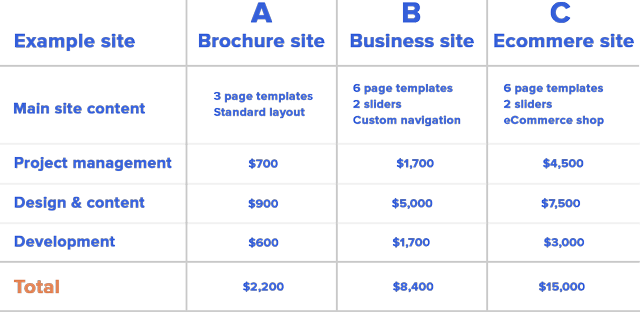
Depending on how your agency sources their development, with internal or external developers, the development time translates into different costs for them. It’s reasonable to account for at least $35/h for an internal developer’s time (which is the same as we charge), which brings the WordPress website development cost for the three example sites in the table above to around $600, $1,700 and $3,000 respectively. Assuming that the development portion of the site is 25%, 20% and 20%, here’s a rough estimate of what you would be paying for each:
Want to see how our custom-built websites look in real life? Have a look at our WordPress portfolio.
Conclusion
In conclusion, if you need a website built and you want it to be made by professionals, expect to pay $2000 and up depending on the functionality and sophistication of design and content that you want. WordPress website costs from our three common categories of projects would be:
- The Brochure Site: $2200 ($2,000-$6,000)
- The Business Site: $8400 ($5,000-$15,000)
- The eCommerce Site: $15000 ($10,000-$25,000)
If you want to get away with something cheaper, ask your friend or a freelancer to do the work for you. Or even do it yourself with a premium theme. But once your business picks up speed, you’ll likely get a good return on investment from upgrading your site. The numbers for development time above can be used as a base for figuring out also how your design requests will translate into additional costs in general, not only to development but often also in content, design, and the overhead needed to nail down the specifications.
Remember, the website is only one part of your marketing efforts. SEO, AdWords, branding etc. will be other tools in your marketing agency’s toolbox that they will recommend you use to put your website to work on all the visitors that will be crowding it. And if you ever need expert help with WordPress development, reach out to White Label Agency, and let’s bring your website vision to life!
Best of luck with your project!
FAQs
How much does a WordPress website cost?
Brochure Site (3-page templates, standard layout):
Project Management: $700
Design & Content: $900
Development: $600
Total: $2,200
Business Site (6-page templates, 2 sliders, custom navigation):
Project Management: $1,700
Design & Content: $5,000
Development: $1,700
Total: $8,400
E-commerce Site (6-page templates, 2 sliders, eCommerce shop):
Project Management: $4,500
Design & Content: $7,500
Development: $3,000
Total: $15,000
These prices are estimates and can vary depending on the size of the website, the complexity of the design, and the experience level of the agency.
How much does it cost to host a website in WordPress?
The cost of hosting a WordPress website can vary widely based on the type of hosting plan you choose and the hosting provider. Here’s an overview of common WordPress hosting options and their costs:
Shared Hosting:
Suitable for beginners, personal blogs, or small websites with low traffic.
Cost: $3 to $10 per month.
Providers: Bluehost, SiteGround, and DreamHost often offer affordable shared hosting plans.
Managed WordPress Hosting:
Provides optimized performance, automatic updates, and enhanced security.
Ideal for small to medium-sized businesses and websites with moderate to high traffic.
Cost: $20 to $100+ per month.
Providers: WP Engine, Kinsta, and Flywheel specialize in managed WordPress hosting.
VPS (Virtual Private Server) Hosting:
Offers a dedicated portion of server resources, which increases site speed and reliability.
Suitable for websites with high traffic or custom requirements.
Cost: $20 to $80 per month.
Providers: InMotion Hosting, A2 Hosting, and Bluehost provide VPS hosting.
Dedicated Hosting:
You get an entire server dedicated to your website, providing maximum resources and control.
Ideal for large businesses or websites with very high traffic.
Cost: $80 to $500+ per month.
Providers: Liquid Web, HostGator, and Bluehost offer dedicated hosting options.
Cloud Hosting:
Offers scalability, allowing you to adjust resources as your traffic fluctuates.
Suitable for growing websites or eCommerce stores.
Cost: $10 to $200 per month.
Providers: Cloudways, Amazon Web Services (AWS), and Google Cloud offer cloud hosting options.
Additional Costs:
Domain Name: Usually $10 to $20 per year.
SSL Certificate: Some hosting providers include it for free; otherwise, it can cost $10 to $100 per year.
Backups and Security: Some hosting plans include these, but they may be an extra $5 to $30 per month if added separately.
Summary:
Basic Hosting: $3 to $10 per month for beginners or small websites.
Professional Hosting: $20 to $100+ per month for managed hosting.
Enterprise Hosting: $100+ per month for high-traffic websites or those needing dedicated resources.
These estimates provide a general idea, but exact costs depend on the hosting provider and any additional features or services you choose.
Are WordPress websites free?
WordPress websites can be both free and paid, depending on your needs and the features you want. Here’s a breakdown:
WordPress.com (Free and Paid Plans):
Free Plan: WordPress.com offers a free plan, which includes a basic website with limited storage, a WordPress.com subdomain (e.g., yoursite.wordpress.com), and ads displayed by WordPress. It’s suitable for simple blogs or personal websites.
Paid Plans: To remove ads, use a custom domain (e.g., yoursite.com), and access more features like increased storage, premium themes, and eCommerce capabilities, you can choose from various paid plans. These start at around $4 per month and can go up to $45+ per month for business and eCommerce plans.
WordPress.org (Self-Hosted, Free Software):
WordPress.org itself is free to download and use, but it requires you to have your own hosting and domain, which are not free.
Costs:Domain Name: $10 to $20 per year.
Hosting: Starting from around $3 to $10 per month for shared hosting, with costs rising based on the type of hosting you choose.
With a self-hosted WordPress.org website, you have full control over customization, themes, plugins, and monetization, but you’re responsible for managing hosting, maintenance, and security.
In Summary:
WordPress.com: Free and paid options available, with limitations on the free plan.
WordPress.org: Free software, but requires paid hosting and a domain name.
So while the WordPress software itself is free, creating a professional and fully functional WordPress site will generally incur costs for hosting, domain registration, and any premium features you choose.
Can I publish my WordPress site for free?
Yes, you can publish a WordPress site for free, but there are some limitations depending on the option you choose. Here’s how you can do it:
1. Using WordPress.com’s Free Plan:
How it Works: WordPress.com offers a completely free plan, which allows you to create and publish a website without any upfront costs.
Features: With the free plan, you get a WordPress.com subdomain (e.g., yoursite.wordpress.com), limited storage, and basic customization options.
Limitations:You can’t use a custom domain (like yoursite.com) unless you upgrade to a paid plan.
WordPress.com places ads on free sites, which you can’t control or remove unless you upgrade.
Access to plugins, advanced themes, and extensive customization options is limited.
Best For: Simple blogs, personal sites, or hobby projects where you don’t need extensive customization.
2. Using a Free Web Hosting Service with WordPress.org:
How it Works: You can download WordPress.org software for free and host it on a free hosting provider (such as InfinityFree or 000webhost).
Features: Full control over WordPress’s features and customization options, since you’re using the self-hosted version.
Limitations:Free hosting often comes with limitations like slower speeds, less storage, ads placed by the host, and lower reliability.
Free hosting services may lack support and security features, which can put your site at risk.
Best For: Testing WordPress.org’s capabilities or learning how to use WordPress without committing to a paid hosting plan. Not recommended for professional or high-traffic sites due to reliability concerns.
Is a WordPress plan worth it?
Yes, a WordPress plan can be worth it, depending on your goals, budget, and needs. Here’s a breakdown of the benefits and when investing in a WordPress plan might be a good choice:
1. Benefits of a Paid WordPress Plan:
Custom Domain: Paid plans allow you to use a custom domain name (e.g., yoursite.com), which enhances your brand’s credibility and professionalism.
No Ads: On free plans, WordPress.com displays ads on your site. Paid plans remove these ads, giving you full control over the user experience.
Increased Storage: Free plans have limited storage, which may be restrictive if you plan to upload a lot of media. Paid plans offer more storage capacity.
Better Design and Customization Options: Paid plans include access to premium themes and more advanced design customization, allowing you to create a unique look for your site.
E-commerce Capabilities: Higher-tier plans (like the WordPress.com Business or eCommerce plans) enable e-commerce features, letting you set up an online store directly on your site.
Access to Plugins (Business Plan and Higher): On WordPress.com, plugins are only available with the Business plan or higher. Plugins add essential functionalities, such as SEO tools, advanced forms, and e-commerce options.
Customer Support: Paid plans come with priority customer support, which is invaluable if you need help managing your site.
2. When a WordPress Plan is Worth It:
Professional and Business Websites: If you’re building a site for a business, paid plans are generally worth it to project a professional image, avoid ads, and access advanced customization.
E-commerce Sites: If you want to sell products or services online, a WordPress eCommerce plan provides essential tools to set up and manage an online store.
Scalability Needs: For websites expecting high traffic or complex functionality, a higher-tier plan or a self-hosted WordPress.org site with managed hosting might be necessary.
Bloggers and Content Creators: Paid plans offer additional tools to monetize content, improve SEO, and enhance design, making it a good investment for serious bloggers.
3. When a Free Plan Might Be Enough:
Personal or Hobby Websites: If you’re creating a simple blog, portfolio, or hobby site, the free plan can be sufficient.
Testing and Experimentation: For those new to WordPress or web design, starting with a free plan allows you to learn the basics without a financial commitment.
Bottom Line:
A WordPress plan is worth it if you need a professional-looking site, e-commerce capabilities, advanced customization, or plan to grow your site. For casual use or testing, the free plan is a good place to start. As your needs evolve, upgrading to a paid plan can provide better features, support, and control over your site.


