


Many SEO reports fail. They’re either confusing data dumps or surface-level updates that miss crucial insights. Your clients don’t need another spreadsheet—they need to understand if their SEO investment is paying off.
This guide shows you how to create an SEO report that matters. You’ll learn which metrics tell the real story, how to spot meaningful trends, and how to present findings that drive action. Skip the fluff, focus on impact, and build meaningful reports.
What is an SEO Report?
SEO reports do two crucial things: spot working strategies and what needs fixing. A solid report helps you:
- Track how your site ranks and performs
- See if traffic and conversions are growing
- Find weak spots in your content and links
- Plan your next moves
Think of it as your project’s scorecard. It shows the wins, flags the problems, and maps out what’s next.
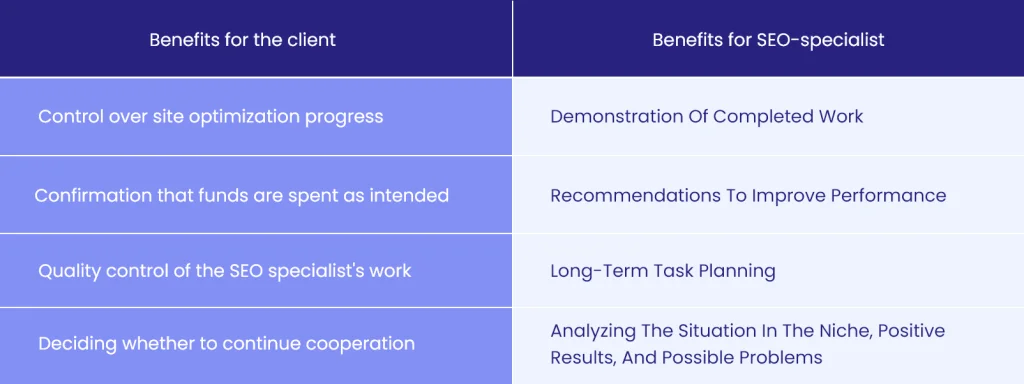
What Does a Good SEO Report Look Like?
A good SEO results report must correspond to 4 characteristics.
Clear Structure
Your clients shouldn’t need a map to navigate your report. Begin with an executive summary that hits the main points, then dive into specifics, breaking up complex information into digestible chunks.
Use tables and graphs to make your report clearer. Besides SEO results, include an action plan and recommendations.
Sometimes, you’ll need to include extra elements, like a glossary explaining SEO terms. Remember, your client is likely to be sharing this with their boss or team members, so make it easy to understand.
Data-Driven Insights
To build meaningful insights, one must have flexibility with the data provided. This is possible with APIs, like SE Ranking SEO API, which allows you to work with large datasets and multiple projects. You’re not attached to any interface, so you can bend and mold it to use as needed. Take data from multiple projects and display it on the same dashboard if related or used in a comparative manner.
Raw numbers are useless in the absence of meaning, so tie the data back to the real impact on your client’s business. Benchmark current performance versus period-over-period. Highlight trends, seasonality, and other anomalies. Whenever an important event occurs, either a surge or decline, show why it matters.
Practical Solutions to Existing Issues
Don’t just point out problems—offer clear fixes. If rankings have dropped, explain why and outline specific steps to recover. If pages are not performing, provide actionable improvements.
Your solutions should be realistic and prioritized based on impact and effort. Break down complex fixes into manageable tasks your client’s team can implement.
Clarity and Impact
Ditch the SEO mumbo-jumbo. Use plain, understandable language. Focus on business outcomes. Use charts and graphs to help make key points, but avoid over-graphing. Conclude with clear steps and recommendations that lead back to their business goals.
Effective Tools for Crafting SEO Reports
The right tools put you well on the way to producing truly accurate, insightful SEO reports. SE Ranking’s Report Builder is a great option, especially for agencies, as it automates reports that can track and present important metrics. The tool pulls data directly from your campaigns and allows customization in the content and visual elements.
Beyond basic reporting, SE Ranking has all the tools necessary for agencies to effectively run their client SEO campaigns. For more in-depth analysis, many pair it with Google Looker Studio, which creates custom templates for more robust insights.

Source: SE Ranking
Don’t underestimate the power of Google Search Console and Google Analytics data. While these tools lack integrated reporting, you can integrate them seamlessly with Looker Studio and SE Ranking to provide a more holistic reporting layer beyond surface metrics.

Source: Google Search Console
Think of these tools as pieces of a puzzle: each one adds something important to your reporting setup. The key is to choose the right combination that will match your agency’s needs and your client’s goals.
What to Include in an Informative SEO Report
Here are the 7 things to include in the SEO report for clients.
Organic Traffic Metrics
Monthly organic traffic is not just a number—it’s the pulse of your SEO effort. Begin with overall traffic trends, month-over-month, and year-over-year changes. Then, break down traffic by pages to see which ones are rockstars and which need more elbow grease. Check user behavior metrics like time on page and bounce rate. These tell you if people are finding what they’re looking for.
Track new versus returning visitors. A healthy mix shows you’re both attracting new people and keeping them interested. Pay attention to traffic sources. Are visitors finding you through branded searches or finding you through topic-related keywords? If mobile traffic is lagging behind desktop, work on mobile optimization.
Note huge jumps and falls. Perhaps that increase in traffic came from a landing page redesign; maybe that decrease took place during a holiday. It adds context to your client’s understanding of what is really happening.
Keyword Ranking Analysis
Focus on movements that matter. Instead of listing every keyword change, highlight those tied to your client’s business goals. Show which keywords jumped to the top 10 search results, which fell off, and which needed attention. Group keywords by topics or intent on spotting bigger trends.
Pay attention to SERP features, too. Which featured snippets did you win? Which did you lose? These prime spots often drive more clicks than regular rankings. Watch for seasonal keywords needing different strategies at other times of the year.
Mention when you rank for new relevant keywords you were not targeting. That’s a good sign your content strategy is working. If some keywords aren’t moving despite your efforts, explain why and what needs to change.
Backlink Quantity and Quality
Raw backlink numbers don’t tell the whole story. Highlight what new links came from authority sites in your client’s industry. Flag toxic, rank-severing links. Track lost links—sometimes, good links just disappear and need to be replaced.
View anchor text distribution. Too many exact-match anchors are likely to raise search engine flags. Show them how your link profile compares against competitors. Are they receiving links from places that you should also target? What type of content garners them the most links?
Don’t forget about internal linking. Show how the changes to your internal linking structure help distribute link equity deeper to important pages.
Technical Audit Results
Focus on issues that directly impact rankings and user experience. Priority problems might include slow page loads, broken links, or mobile usability issues. Show what you fixed and what still needs work.
Track Core Web Vitals trends—they affect both rankings and user experience. If you spot duplicate content issues or crawl errors, explain their impact in plain terms. Show how fixing technical problems improved performance.
Watch out for schema markup opportunities. The right structured data will help you grab those fancy SERP features.
Content Performance Overview
What SEO content drives the most traffic? Drives the most leads? Ranks for the most keywords? These insights will help you craft your future content strategy. Show how new content performs versus old content.
Track time to rank and start driving traffic for new content. Suggest updates or improvements if certain content is underperforming. Check user engagement metrics, such as scroll depth and time on the page, and if users are reading your content at all.
Identify gaps in your content by pointing out what you’re missing and whether your competitors have covered this topic.
Competitors’ Performance Insights
Track competitors’ organic visibility trends. Is their growth quicker or slower? What type of content do they produce that works the best? Learn from their mistakes, not just the wins.
Watch for shifts in strategy. Are they targeting different keywords, or are they suddenly publishing a new type of content? Note when they gain or lose any features you’re targeting within the SERPs.
Observe which of their pages rank highest in the search results. Why do they work? How can you make something better? Monitor their backlink gain and identify potential good links to acquire.
Conversion and Other Business Goals
Connect SEO efforts to real business outcomes. Demonstrate how organic traffic is converted into leads, sales, or anything else that matters to the client. Segment conversion rate by landing page and traffic source.
Track micro-conversions, too-newsletter sign-ups, resource downloads, or video views. They show engagement, even when people aren’t ready to buy. If the conversion rate drops, explain why and how to fix it.
Look at the entire conversion path. Which keywords bring in people who actually convert? How many touches does it take before someone converts? That helps prove SEO’s role in the bigger marketing picture.
How Long Does it Take to Create an SEO Report?
While modern tools have made this process significantly faster than ever, day-long jobs are now pretty much nonexistent. You are still able to set up your template and generate reports in under a minute with automated reporting tools. You will, however, need more time to analyze data and produce meaningful insights.
Plan on 2-4 hours to create an in-depth report from scratch. For monthly reports using existing templates, expect to spend 1-2 hours adding context, spotting trends, and writing helpful recommendations.
Conclusion
A great SEO report is a roadmap for improvement. Focus on the metrics that matter most to your client’s business outcomes. Keep it clear, actionable, and free of unnecessary jargon. Regular reporting builds trust in your work and demonstrates real value.
Remember to adapt your reports based on client feedback and changing business needs. The best SEO reports aren’t about showing what has happened but guiding what must happen further.


