- A Simplified Site Editor
- Template Management Gets an Overhaul
- Block-Level Collaboration Through Notes
- Hide Blocks Without Deleting Them
- New Core Blocks
- Command Palette Expansion
- What’s New for Developers
- WordPress Outsourcing Services
- Performance Optimizations
- PHP 8.5 Compatibility
- Testing and Compatibility
- Dedicated team
- Preparing for WordPress 6.9
- Partner with WLA to Make the Most Use of New WordPress Features
WordPress 6.9 arrives on December 2, 2025, marking the second major release this year. After WordPress leadership initially planned just one release for 2025, increased contributor capacity opened the door for this additional update.
WordPress 6.9 focuses on refining the editing experience, introducing collaboration tools, and expanding developer capabilities. While there’s no new default theme this time around, the release brings meaningful improvements to how agencies and their clients work with WordPress.
The beta has been available for testing since October 21, and we’ve been exploring what’s new.
A Simplified Site Editor
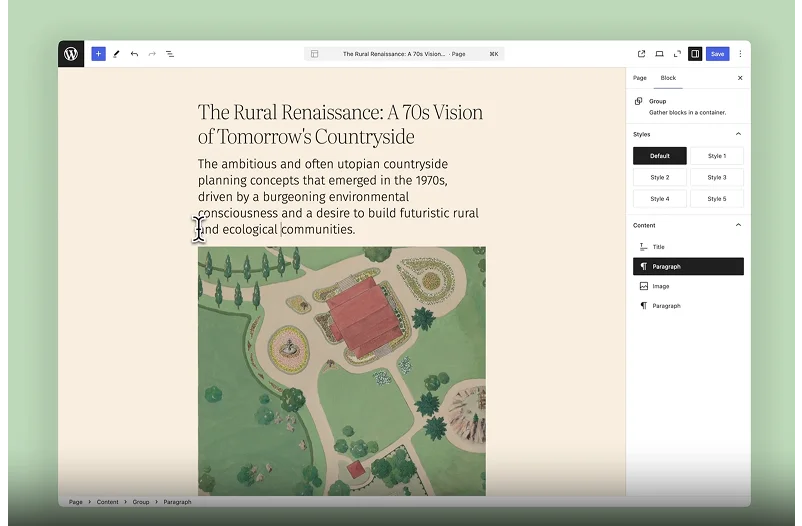
The Site Editor has matured significantly over the past few years. The new WordPress release introduces a simplified editing mode that separates content editing from design tooling.
Users who simply want to update text or swap images now will be able to do so without navigating through complex styling options. At the same time, designers retain full access to advanced tools when they need them. The goal is to reduce overwhelm for content editors while preserving power for those who want it.
At WLA, we see this as a positive shift. Our agency partners often work with end clients who find the full Site Editor intimidating. A simplified view for basic edits makes WordPress more approachable for non-technical users.
Template Management Gets an Overhaul
Template management receives a significant upgrade in WordPress 6.9. You can now create multiple templates for the same page type and switch between them easily.
Here’s what’s included:
- Multiple templates per slug, with the ability to activate or deactivate them
- Draft templates before publishing, similar to how content drafts work
- Custom templates that persist when switching themes
- Improved template management through standard REST API endpoints
For agencies building sites for multiple clients, this flexibility simplifies workflows. You can test different layouts without overwriting existing templates, and theme switches become less risky.
Block-Level Collaboration Through Notes

One of the more practical features in WordPress 6.9 is Notes, previously called Block Comments. This feature allows team members to leave comments directly on specific blocks within the editor.
Comments can be viewed, replied to, and resolved, creating a workflow similar to what you’d find in Google Docs. For agencies managing content review processes, this eliminates the need for external feedback tools in many cases. The initial scope focuses on block-level commenting, with potential for expansion in future releases. While it won’t replace comprehensive project management tools, it addresses a common pain point in collaborative WordPress workflows.
Hide Blocks Without Deleting Them
WordPress 6.9 introduces the ability to hide blocks from the frontend while keeping them editable in the backend. This is useful for staging content, testing alternate designs, or holding space for sections that aren’t quite ready.
It’s a non-destructive approach that encourages experimentation. It is reported that future versions may expand this functionality to include screen-size-based visibility, which would open up interesting responsive design possibilities.
New Core Blocks
Several new blocks are included in WordPress 6.9:
- Accordion block for collapsible content sections
- Terms Query block for displaying taxonomy terms
- Math block for mathematical expressions
- Time-to-Read block showing estimated reading time
- Icon block for adding custom icons
- Stretchy Type block for responsive text sizing
The Paragraph and Heading blocks also gain a Fit Text option that automatically adjusts text to fill its container. These additions align with modern design standards and reduce reliance on third-party plugins for common functionality.
Command Palette Expansion

The Command Palette, introduced in earlier releases, is now available throughout the entire WordPress admin in version 6.9. You can open it with Ctrl+K (Windows) or Cmd+K (Mac) to quickly navigate, search, and trigger actions without leaving your keyboard.
This universal access makes WordPress more efficient for power users and sets the stage for future AI integrations.
What’s New for Developers
WordPress 6.9 brings some useful technical updates, too. The new Abilities API is basically a list of functions that AI tools and automation systems can tap into. There’s also a plugin coming out around the same time that uses something called the Model Context Protocol (MCP) – this could let you manage your site by just talking to it, or set up automated workflows.
The Interactivity API got an upgrade as well, with a better way to handle page navigation that loads HTML, CSS, and JavaScript more smoothly. The Block Bindings API now works with more blocks and can pull in data from custom fields or outside sources.
Performance also got better across the board. The HTML API runs faster and handles tricky situations better, which helps when you’re building complex sites. There are improvements to how WordPress handles data, with more options for filtering and organizing information.
WordPress Outsourcing Services
Enhance your agency’s capabilities with our WordPress outsourcing services. Get expert development, design, and maintenance support tailored to your needs.
Performance Optimizations
WordPress 6.9 includes several performance enhancements: faster page transitions, smarter resource handling, improved caching, and a new template output buffer system. These refinements result in faster rendering and reduced load times across sites. Database and RSS caching optimizations also contribute to overall performance gains.
PHP 8.5 Compatibility
WordPress 6.9 is fully compatible with PHP 8.5, which releases in late November 2025. Running on PHP 8.5 ensures better performance, enhanced security, and long-term support for upcoming WordPress versions. If your hosting doesn’t yet support PHP 8.5, PHP 8.3 or 8.4 will work well with WordPress 6.9.
Testing and Compatibility
The beta phase for WordPress 6.9 began on October 21, 2025. Multiple beta releases and release candidates are refining features and addressing bugs before the final December 2 release.
You can test WordPress 6.9 using:
- The WordPress Beta Tester plugin
- WP-CLI with wp core update –version=6.9-beta1
- The WordPress Playground instance
- Local development environments
Testing in a staging environment is very important. Most actively maintained themes and plugins should remain compatible, but verifying before updating production sites is always safer.
Dedicated team
Scale your agency with a dedicated WordPress developer. With great communication, we make sure to keep your builds on track and on time.
Preparing for WordPress 6.9
Here’s what agencies should do before December 2:
Review your hosting setup and ensure PHP 8.3 or higher is available. Test your most-used themes and plugins in a staging environment with the beta. Back up all sites before updating. Check with plugin and theme developers about their WordPress 6.9 compatibility status.
For sites running older PHP versions, now is the time to plan upgrades. WordPress 6.9’s compatibility with PHP 8.5 signals the platform’s commitment to modern web standards.
Partner with WLA to Make the Most Use of New WordPress Features
At WLA, we work with 600+ agencies and build 3,000+ websites every year. We’ve been doing WordPress development for over 12 years, so we know how to handle updates like this smoothly. Whether you need help testing the new features, upgrading your sites safely, or taking advantage of the improved Site Editor and collaboration tools, we’re here to help.
Our team can handle everything from compatibility testing to full site migrations, so your agency can focus on serving clients while we take care of the technical work. Get in touch with us today to talk about how WordPress 6.9 can work for your agency.