


- What is an API?
- The Two Main WordPress APIs: REST API vs. XML-RPC
- Why Developers Use the WordPress API
- Setting Up the WordPress REST API
- Basic REST API Requests: GET, POST, PUT, DELETE
- Securing the WordPress REST API: Keep Your Data Safe
- Customizing the WordPress REST API: Tailor It to Your Needs
- How Digital Agencies Leverage the WordPress REST API (Practical Use Cases)
- Making WordPress Headless: Leveraging the REST API for Modern Frontends
- Conclusion: WordPress REST API
If you’re a web developer or run a digital agency, you’re probably always looking for ways to customize, automate, or integrate WordPress with other systems. That’s what the WordPress API is about—it gives you the ability to interact with WordPress beyond what the dashboard allows, offering a whole new world of functionality.
In this guide, we’ll break down the WordPress API, focus on the WordPress REST API, and show you how to put it into action with real-life examples, step-by-step instructions, and tips for security and customization.
WordPress Development Agency
Experience WordPress development with our custom-coded websites. Perfect for agencies, our reliable service ensures timely delivery and client satisfaction.
What is an API?
Let’s start with the basics. An API (Application Programming Interface) is a tool that lets different software applications talk to each other. If you’ve ever used a mobile app to check the weather or login to a website using your Google account, you’ve interacted with APIs without even realizing it.
In the context of WordPress, APIs allow developers to connect and interact with WordPress programmatically, without needing to manually log into the admin dashboard. You can automate tasks, build custom apps, or integrate WordPress with external systems (like social media platforms or CRMs).
The Two Main WordPress APIs: REST API vs. XML-RPC

WordPress has two main ways to interact with its data externally: the REST API and the older XML-RPC API. Both WordPress APIs allow external applications to communicate with WordPress, but each has its strengths. Let’s break them down.
What is XML-RPC API?
The XML-RPC API is WordPress’ vintage API, still functional but less flexible and efficient than modern alternatives. It’s mostly used for legacy integrations, especially for older systems that require remote management of WordPress sites. However, due to its limitations in speed, security, and extensibility, it’s no longer recommended for new projects.
What is the WordPress REST API?
The WordPress REST API is a modern solution for developers. It uses JSON (JavaScript Object Notation), a lightweight data format that is easy for both humans and machines to work with. The REST API makes it possible to interact with WordPress data using HTTP requests (GET, POST, PUT, DELETE), making it a faster, more secure, and scalable option for developing applications and integrations.
Think of the REST API as a remote control for your WordPress site. Whether you want to fetch blog posts, update content, or build a custom app that interacts with WordPress, the REST API can handle it—all without logging into the dashboard.
Why Developers Use the WordPress API
Now, you might be wondering, “Why should I bother with the WordPress API at all?” Great question! The short answer: it gives you superpowers. By using the WordPress API, you can automate repetitive tasks, connect WordPress to other platforms, and create custom features that would otherwise be impossible. Here is how:
- Customization: The API lets you extend WordPress’ functionality far beyond its out-of-the-box features. Want to add a custom form? Build a tailored eCommerce experience? The API gives you the control to do it.
- Integration: Need WordPress to communicate with other platforms, like a CRM, a third-party app, or even a mobile app? The REST API is the bridge that connects them all.
- Automation: Stop doing repetitive tasks manually. The API allows you to automate workflows, such as pulling in data from an external system or syncing content across multiple platforms.
Projects
Outsource WordPress projects with confidence. We provide fixed-price white-label development and dedicated management with no upfront payment.
Setting Up the WordPress REST API
The great news is that if you’re using WordPress 4.7 or later, the REST API is already built-in and enabled by default. There’s no need to install additional plugins to access its basic functionality. However, to make the most of it, you might want to ensure everything is properly configured for your specific use cases.
How to Enable and Use the WordPress REST API
- Ensure Your Permalinks are Enabled: For the REST API to work properly, make sure your permalinks are set to something other than “Plain.” Go to Settings > Permalinks in your WordPress dashboard and select an option like Post Name.
- Authenticate Requests: While the REST API is open for read-only requests (like fetching posts), you’ll need to authenticate users for actions that modify data, such as creating or updating content. Common methods include:
Now that you’re set-up, let’s dive into the basics of making API requests.
Basic REST API Requests: GET, POST, PUT, DELETE

Interacting with the WordPress REST API involves using simple HTTP methods to communicate with WordPress. These methods are:
- GET: Retrieve data from your site (e.g., fetching posts, pages, or users).
- POST: Create new data (e.g., adding a new blog post or user).
- PUT: Update existing data (e.g., editing a post or changing user information).
- DELETE: Remove data (e.g., deleting a comment or user).
Example: Fetching WordPress Posts Using REST API (GET Request)
To fetch posts from your WordPress site, you would send a GET request to the appropriate REST API endpoint. Here’s how it works:

This request retrieves your site’s posts in a format called JSON, which is easy for developers to work with. The response might look like this:
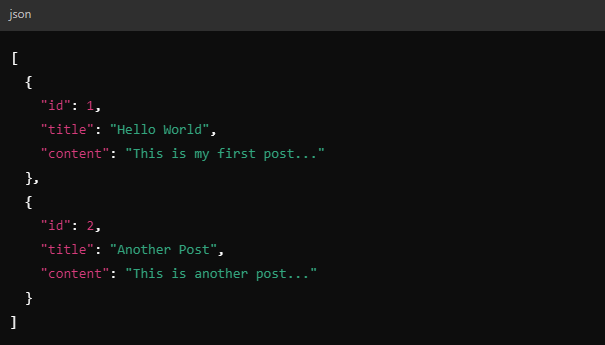
You can further customize this request by filtering or sorting the results, for example, by specifying the number of posts returned:

Now that you know how to make basic requests, let’s talk about securing your API.
Securing the WordPress REST API: Keep Your Data Safe

As powerful as the REST API is, it’s important to remember that security should always be a priority. The open nature of APIs makes them a potential target for unauthorized access or attacks if not properly secured. Here are some best practices to protect your API endpoints.
Recommended Tools for Securing the WordPress REST API
- JWT Authentication for WP REST API Plugin: Use JWT (JSON Web Tokens) for secure authentication. This plugin helps you issue secure tokens that can be used to verify users or apps making API requests.
- OAuth 1.0a Server Plugin: If you’re connecting third-party applications, OAuth is the gold standard for authorization. This plugin helps you integrate OAuth securely, allowing external apps to interact with your WordPress site.
- Wordfence Security Plugin: Wordfence provides comprehensive security for your site, including monitoring API traffic for malicious requests. It’s an all-in-one security tool that can help protect your site from API attacks.
- SSL (Secure Sockets Layer): Always use SSL (HTTPS) for your WordPress site, especially when dealing with API requests. SSL ensures that data sent between the client and server is encrypted and secure.
Best Practices for API Security
- Limit API Access: Restrict access to sensitive API routes based on user roles or permissions. For example, only admins should be allowed to delete or modify certain data.
- Rate Limiting: Implement rate limiting to prevent abuse, like brute force attacks or denial-of-service (DoS) attacks.
- Monitor API Traffic: Set up real-time monitoring of your API using tools like Activity Log to keep an eye on all interactions with your API. This helps you detect suspicious activity early.
Follow the link to discover more essential plugins for website development with WordPress.
Customizing the WordPress REST API: Tailor It to Your Needs
As we noted above, one of the best things about the WordPress REST API is how easily you can customize it to meet your specific needs. Instead of working with the default endpoints, you can extend the API by adding custom routes, filtering responses, or even building features that fit your project’s requirements.
Real-life Example: Custom API for a Real Estate Website

Let’s say you’re building a real estate website. Your site lists properties, but you want to create a custom mobile app that allows users to filter properties by city, price, and size. With the WordPress REST API, you can create a custom endpoint that responds only with property listings based on specific criteria—no need to show irrelevant data.
You could create a new route like this:

When a user selects their filters (e.g., properties under $500,000 in New York), the app sends a GET request to this custom API endpoint. The callback function could return exactly the properties that match their search, making the experience smoother and faster for users.
Suggested Tool: WPGraphQL
If you need more control over querying and filtering WordPress data, check out WPGraphQL, an open-source plugin. It lets you query WordPress data in a more dynamic way than REST, especially for more complex filtering and querying scenarios, like the one described above.
How Digital Agencies Leverage the WordPress REST API (Practical Use Cases)
While learning the technical aspects of the REST API is useful, seeing it in action helps illustrate its potential. Let’s explore some more real-world examples of how agencies and developers are using the WordPress REST API to solve complex problems and improve client projects.
1. Building Custom Dashboards for Clients
Scenario: You run an agency that manages multiple WordPress sites for different clients, each with unique requirements. Rather than logging into each site separately, you decide to build a custom dashboard for your clients that pulls in important data—like traffic statistics, the latest posts, or even user engagement metrics—from all the WordPress sites you manage.
How It Works: Using the WordPress REST API, you can create a centralized dashboard that communicates with each site in the background. With a few simple GET requests, you can pull in real-time stats and data from various WordPress installs and display them in one place. This helps you keep track of all sites more easily, and your clients can access the same consolidated data without having to log into different WordPress dashboards.
Suggested Tool: InfiniteWP
Use InfiniteWP (for WordPress management), which integrates with the REST API to help you manage updates, backups, and site data across multiple WordPress sites in one dashboard.
Are you an agency seeking remote programmers? Have a look at our guide on hiring remote developers in digital agencies.
2. Syncing Content Across Multiple Platforms
Scenario: You run a news blog that publishes multiple articles daily. Your audience reads your content on your WordPress site, but many also follow your mobile app. Rather than publishing content on WordPress and manually updating your app, you want to sync content automatically across platforms.
How It Works: By connecting your mobile app to the WordPress REST API, you can automate the syncing of content. Whenever you publish a new post on WordPress, a POST request triggers the mobile app to fetch the new article automatically, displaying it to your users without any manual work on your part. The REST API keeps your mobile audience as updated as your website readers.
Suggested Tool: Zapier
Use Zapier to automate this workflow by connecting WordPress to your app. With Zapier’s integration with the WordPress REST API, you can trigger actions (like publishing content) across platforms like social media, apps, or other websites.
Making WordPress Headless: Leveraging the REST API for Modern Frontends
Another exciting way to use the WordPress REST API is by turning WordPress into a headless CMS. In this setup, WordPress manages the content, but a modern frontend framework like React or Gatsby renders the content for users. The API acts as the bridge between WordPress (the backend) and the frontend (e.g., React app).
Check out our guide on Headless WordPress to learn more.
Real-Life Example: Building a Custom E-commerce Frontend

Imagine your client wants an e-commerce website with a custom, lightning-fast user interface built with React. Instead of relying on standard WooCommerce templates, you can use WordPress as the backend to manage products, while React handles the entire front-end experience.
With the REST API, you can build the product catalog in WordPress (using WooCommerce) and then fetch the product data in real time using GET requests. React would handle everything users see, from product listings to cart management and checkout, while WordPress remains in the background, managing inventory, orders, and customer data.
Suggested Tools: WPGraphQL for WooCommerce and Next.js
WPGraphQL for WooCommerce enables advanced e-commerce headless setups by querying WooCommerce data with GraphQL, offering more flexibility in building custom stores. Next.js, a React framework, allows for the creation of fast, scalable frontends that integrate seamlessly with WordPress via the REST API.
Looking for developers to launch an e-store? Go through our guide on how to find a perfect e-commerce website developer.
Conclusion: WordPress REST API
The WordPress REST API is a powerful tool that opens up endless possibilities for developers and agencies alike. From automating workflows and syncing content across platforms to building custom dashboards or headless applications, the REST API allows you to take WordPress far beyond a typical content management system.
Whether you’re building an e-commerce site, mobile app, or a custom dashboard for a client, the flexibility of the WordPress API means you can easily extend and tailor WordPress to your needs. With the right tools and resources, the REST API can truly transform your WordPress development workflow and unlock new potential for your projects.
Ready to take your WordPress development to the next level? At White Label Agency, we specialize in providing seamless WordPress solutions for digital agencies. From custom development to site management and maintenance, we act as your invisible partner, delivering top-notch websites tailored to your needs. Let us handle the technical work so you can focus on growing your agency. Get in touch with us today to discover how we can support your next project!


