


- Overview of Platforms: Wix vs WordPress
- Ease of Use: Wix vs WordPress
- Design and Templates: Wix vs WordPress
- Features and Functionality: Wix vs WordPress
- Pricing: Wix vs WordPress
- Support and Community: Wix vs WordPress
- Performance: Wix vs WordPress
- Pros and Cons: Wix vs WordPress
- Wix vs WordPress: Get the Best Platform for Your Website
When it comes to building a website, two of the most popular platforms that often come up in discussions are WordPress and Wix. Both offer powerful tools to create stunning websites, but they cater to different users with distinct needs.
Wix is a fully hosted website builder designed for ease of use, offering a drag-and-drop interface with built-in features. WordPress, on the other hand, is an open-source content management system (CMS) that provides greater customization and flexibility but requires more technical knowledge.
This WordPress vs Wix comparison will break down their key differences in terms of performance, customization, ease of use, SEO, pricing, and more. Whether you’re a blogger, business owner, or developer, this guide will help you determine which platform best suits your website needs.
Overview of Platforms: Wix vs WordPress

When choosing a website platform, it’s essential to understand the key differences between Wix and WordPress. Each platform offers unique features and is designed for different types of users. Below, we’ll break down what each platform offers and who it’s best suited for.
Wix: Simplicity and Convenience
Wix is a user-friendly website builder that provides an all-in-one solution for beginners and small business owners who want to create a website without coding skills.
Key Features of Wix:
- Drag-and-drop editor – Easily build pages with a visual interface.
- AI-powered website creation – Wix ADI (Artificial Design Intelligence) generates a site based on user preferences.
- Built-in hosting – No need to manage servers or external hosting.
- Pre-designed templates – Hundreds of customizable templates for various industries.
- App Market – Extend functionality with apps for eCommerce, booking systems, and SEO tools.
- 24/7 Customer Support – Live chat, phone, and help center resources.
Who is Wix Best For?
- Beginners who need a quick and easy website setup.
- Small business owners who want built-in tools without technical complexities.
- Freelancers, bloggers, and portfolio creators looking for a low-maintenance website solution.
WordPress: Power and Flexibility
Unlike Wix, WordPress is an open-source content management system (CMS) that provides full control over website design and functionality. However, there are two versions of WordPress that users should be aware of:
- WordPress.com – A hosted platform with limited customization, suitable for bloggers and small websites.
- WordPress.org – A self-hosted version that offers full flexibility, allowing users to install themes, plugins, and make custom modifications.
Key Features of WordPress:
- Unlimited Customization – Choose from thousands of themes and plugins.
- Full Control – Modify code, optimize for SEO, and customize functionality.
- Scalability – Suitable for everything from blogs to large business websites and online stores.
- Robust SEO Capabilities – Advanced SEO tools and integrations.
- WooCommerce Integration – A powerful eCommerce solution for online stores.
- Community and Developer Support – A vast global network of contributors.
Who is WordPress Best For?
- Businesses and agencies looking for custom website development.
- Bloggers, content creators, and news websites that need advanced content management.
- Developers and designers who want full creative and functional control.
- eCommerce businesses that need scalable and feature-rich solutions.
In the WordPress vs Wix debate, the best choice depends on your technical skills, budget, and long-term goals. Wix is ideal for simplicity, while WordPress excels in flexibility and growth potential.
Ease of Use: Wix vs WordPress
When comparing Wix vs WordPress, ease of use is a major deciding factor. Some users prefer a simple, intuitive interface, while others need advanced customization options. Below, we’ll explore how each platform handles usability and website creation.
Wix: Beginner-Friendly Website Building
Wix is designed for ease of use, making it an excellent choice for users who want to build a website quickly without dealing with technical complexities.
Drag-and-Drop Editor
Wix’s intuitive drag-and-drop editor allows users to visually design their site by simply moving elements like text, images, and buttons into place. No coding knowledge is required, making it easy for beginners to create a professional-looking website.
Artificial Design Intelligence (ADI)
For users who want an even faster setup, Wix ADI automatically generates a website based on answers to a few simple questions. This AI-powered tool creates a fully functional site within minutes, allowing users to customize it further if needed.
Why Wix is Easier to Use
- No need to learn coding or website management.
- Instant setup with pre-designed templates.
- Intuitive interface with drag-and-drop functionality.
- AI-powered design assistance for beginners.
WordPress: More Power, But a Learning Curve
While WordPress offers unmatched customization, it has a steeper learning curve compared to Wix. Users must familiarize themselves with its interface, plugins, and themes to take full advantage of its capabilities.
Learning Curve
Unlike Wix, WordPress doesn’t provide a built-in drag-and-drop editor by default. Instead, users must work with the WordPress Block Editor (Gutenberg) or install third-party page builders like Elementor or Divi for a similar drag-and-drop experience.
Managing a WordPress website also involves learning about:
- Hosting and domain setup.
- Installing and updating themes and plugins.
- Understanding the WordPress dashboard and settings.
Customization Flexibility
While WordPress requires a learning curve, it provides unlimited customization options. Users can modify themes, install plugins, and even edit the website’s code to tailor it to their exact needs.
Why WordPress Requires More Effort
- Setup involves choosing a hosting provider and installing WordPress.
- Users need to manage themes, plugins, and updates.
- Learning the interface and best SEO practices takes time.
- Advanced customization requires coding knowledge (HTML, CSS, PHP).
Which One is Easier to Use?
If you want a simple, beginner-friendly platform, Wix is the better choice. However, if you’re willing to invest time into learning and want complete creative control, WordPress is the superior option.
Design and Templates: Wix vs WordPress
When it comes to design flexibility, Wix and WordPress take very different approaches. Wix offers a streamlined experience with pre-designed templates, while WordPress provides unmatched customization through themes and plugins. Let’s explore how each platform handles design and templates.
Wix: Pre-Designed Templates with Limited Customization
One of Wix’s strongest features is its extensive library of templates, making it easy for users to create a professional website without starting from scratch.
Number and Variety of Templates
Wix offers over 800 designer-made templates across multiple industries, including business, portfolio, eCommerce, and personal websites. Each template is fully responsive, ensuring mobile-friendly designs.
Customization Options
Wix’s drag-and-drop editor allows users to tweak templates by changing fonts, colors, images, and layouts. However, once a template is chosen, it cannot be switched without rebuilding the site from scratch.
Customization limitations of Wix:
- No full access to the website’s underlying code.
- Limited ability to add custom functionalities beyond Wix’s built-in tools.
- Can’t switch templates without redesigning the entire site.
WordPress: Ultimate Flexibility with Themes and Plugins
In the WordPress vs Wix debate, WordPress is the clear winner in terms of design freedom. It offers thousands of themes and allows full customization through coding and plugins.
Availability of Themes
WordPress provides over 11,000 free and premium themes from the official WordPress repository and third-party marketplaces like ThemeForest and TemplateMonster. Users can switch themes anytime without losing content, making redesigns much easier than Wix.
Customization Through Coding and Plugins
Unlike Wix, WordPress allows users to modify their site’s HTML, CSS, and PHP, giving full control over design and functionality. Additionally, users can install page builders like Elementor, Divi, and Beaver Builder for a drag-and-drop experience similar to Wix.
Customization advantages of WordPress:
- Modify the code for a unique design.
- Use plugins to enhance styling and functionality.
- Switch themes anytime without affecting content.
- Advanced customization with child themes and CSS edits.
Which One is Better for Design?
If you want a simple, ready-to-use design, Wix is a great option. However, if you need complete creative control, WordPress is the superior choice due to its vast theme selection and customization flexibility.
Wix to WordPress
Migrate from Wix to WordPress effortlessly. Get improved flexibility, SEO, and functionality with our professional migration service. Learn more!
Features and Functionality: Wix vs WordPress
When comparing Wix vs WordPress, the features and functionality of each platform play a crucial role in deciding which is best for your website. Below, we’ll break down key aspects like blogging, eCommerce, SEO tools, and security to see how these platforms measure up.
Blogging Capabilities
Blogging is a fundamental part of many websites, and both WordPress and Wix offer tools for creating and managing blog content.
Content Management
Wix: provides a simple blog editor that allows users to create and schedule posts with a clean, user-friendly interface. However, it lacks advanced categorization and tagging features.
WordPress: was originally designed as a blogging platform, making it far more powerful for content-heavy sites. It offers categories, tags, custom post types, and advanced formatting options, making it the superior choice for serious bloggers.
Commenting Systems
Wix: Comes with a basic built-in commenting system, but lacks robust spam filtering tools. Users may need third-party apps for enhanced moderation.
WordPress: Includes a built-in commenting system with spam protection via Akismet, and it supports third-party comment plugins like Disqus and Facebook Comments.
🏅 Winner for Blogging: WordPress is the best choice for content-heavy websites and professional blogs due to its advanced content management system (CMS) and customization options.
E-Commerce: Wix vs WordPress
Both platforms allow users to build an online store, but they take different approaches.
Built-in Tools (Wix) vs. Plugins (WordPress)
Wix: has a built-in eCommerce system, making it easy for beginners to set up an online store without extra plugins. It includes features like product pages, payment processing, and checkout management.
WordPress: relies on WooCommerce, a powerful, highly customizable eCommerce plugin that adds full online store functionality.
Payment Gateways
Wix: Supports Wix Payments, PayPal, Stripe, and a few others, but has limited flexibility compared to WordPress.
WordPress: With WooCommerce, users can integrate over 100 payment gateways, including PayPal, Stripe, Square, Apple Pay, and cryptocurrency payments.
Inventory Management
Wix: Basic inventory tracking with limited scalability.
WordPress (WooCommerce): Advanced inventory management, allowing for bulk product uploads, automated stock tracking, and integrations with ERP systems.
🏅 Winner for E-Commerce: WordPress (WooCommerce) provides greater flexibility, scalability, and customization, making it the best choice for serious online businesses. Wix is more suited for small stores with simple requirements.
Woocommerce Developer
Streamline your Woocommerce projects by hiring a Woocommerce developer from our team. We’ve got you covered for your ecommerce projects.
SEO Tools: Wix vs WordPress
Search engine optimization (SEO) is crucial for driving organic traffic. Let’s compare how Wix and WordPress handle SEO.
Built-in SEO Features
Wix: Includes basic SEO tools, such as meta tags, alt text, and a simple SEO setup wizard. However, it has limited control over advanced SEO settings like structured data and page speed optimization.
WordPress: Offers full SEO control, allowing users to customize every aspect, including permalinks, metadata, breadcrumbs, and more.
Third-Party SEO Plugins
Wix: SEO capabilities are built-in, but users cannot install external SEO plugins like Yoast or Rank Math.
WordPress: Supports powerful SEO plugins such as Yoast SEO, Rank Math, and All in One SEO, which provide in-depth keyword analysis, schema markup, and XML sitemap generation.
🏅 Winner for SEO: WordPress offers better SEO flexibility, deeper optimization options, and access to third-party plugins, making it the preferred choice for businesses focusing on organic search growth.
Security: Platform Protection and User Responsibilities
Security is essential for keeping websites safe from cyber threats.
Platform Security Measures
Wix: Managed security – Wix handles all server security, updates, and SSL encryption automatically.
WordPress: Requires manual security management, but users have full control over protection measures.
User Responsibilities
Wix: Security is entirely managed by Wix, so users don’t have to worry about updates or vulnerabilities.
WordPress: Users must handle updates, security plugins, backups, and hosting security. Recommended security plugins include Wordfence, Sucuri, and iThemes Security.
🏅 Winner for Security: Wix is easier for beginners as it offers built-in security, while WordPress requires more user management but provides better security options for experienced users.
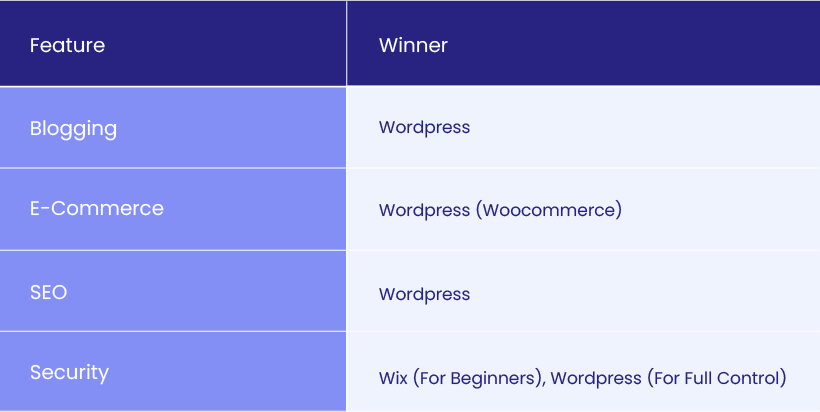
Overall, WordPress wins in blogging, eCommerce, and SEO, making it the best choice for users looking for scalability and customization. However, Wix is a great option for beginners who prefer a simpler, all-in-one solution with built-in security.
Pricing: Wix vs WordPress
Cost is a major factor when choosing between Wix and WordPress. While Wix offers a straightforward pricing model with tiered plans, WordPress provides more flexibility but requires users to manage hosting and additional costs. Below, we’ll break down the pricing structure of each platform.
Wix: Fixed Pricing Plans with Built-In Features
Wix operates on a subscription-based pricing model, meaning users pay a monthly or annual fee to access website-building tools, hosting, and additional features.
Wix Plan Tiers and Features
Wix offers a variety of plans, categorized into Website Plans and Business & eCommerce Plans:

Additional Costs with Wix
While Wix’s pricing includes hosting, there are additional costs to consider:
- Premium apps – Some advanced features require paid apps from the Wix App Market.
- Email hosting – Wix does not include email hosting, so users may need Google Workspace ($6/month).
- Transaction fees – Wix Payments charges a processing fee on eCommerce transactions.
Best for: Beginners and small businesses that prefer an all-in-one package with predictable costs.
WordPress: Flexible Pricing Based on Needs
Unlike Wix, WordPress is free and open-source, but users need to pay for hosting, domain registration, and optional premium themes/plugins.
WordPress Hosting Expenses
WordPress requires a hosting provider, which can range from budget-friendly to premium options:
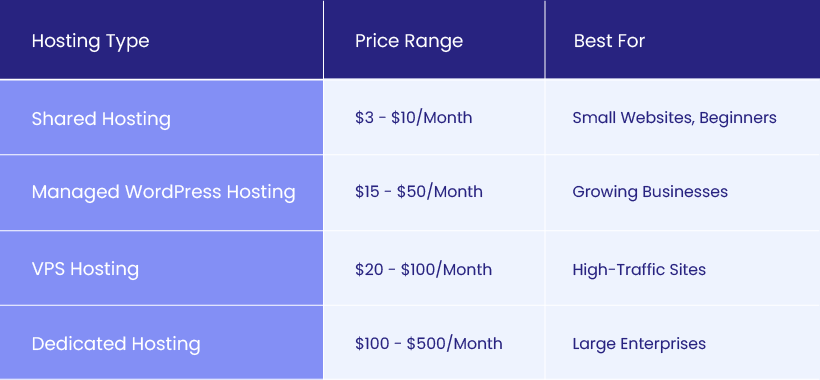
Popular hosting providers for WordPress include Bluehost, SiteGround, Kinsta, and WP Engine.
Domain Registration Costs
.com domains typically cost $10 – $20 per year.
Some hosting providers offer free domains for the first year.
Premium Themes and Plugins
- Free themes – Available in the WordPress repository.
- Premium themes – Cost $30 – $100+ from marketplaces like ThemeForest.
- Essential plugins – SEO, security, and performance plugins can range from free to $200/year.
Best for: Users who want full control over their website’s costs and customization.
Which Platform is More Affordable?

Final Verdict: Wix vs WordPress Pricing
Wix is better for users who want simple, all-inclusive pricing.
WordPress is more cost-effective for users willing to manage hosting and extra expenses.
If you want predictable costs and built-in features, Wix is a great choice. But if you prefer more control over pricing and customization, WordPress is the better long-term investment.
Support and Community: Wix vs WordPress
When choosing between Wix and WordPress, having access to reliable support can make a big difference in managing your website efficiently. Wix offers direct customer support, while WordPress relies on its large open-source community for help and troubleshooting. Let’s break down the support options for each platform.
Wix: Direct Customer Support with Help Center Resources
One of the advantages of Wix is its built-in customer support, making it easier for beginners to get assistance when needed.
Customer Support Options
Wix provides multiple ways to get help:
- 24/7 Support – Available via phone and live chat for paid users.
- Priority Support – Included in higher-tier plans (VIP and Business VIP).
- Email Ticketing – Allows users to submit detailed support requests.
Help Center Resources
Wix also offers a comprehensive Help Center with guides, FAQs, and video tutorials covering topics like website setup, SEO, and troubleshooting. Additionally, Wix has a community forum where users can ask questions and share tips.
Best for: Beginners who prefer direct customer support and guided troubleshooting.
WordPress: Strong Community Support with Extensive Resources
Unlike Wix, WordPress does not have official customer support, since it is an open-source platform. However, it has a massive global community that provides free resources and assistance.
Community Forums
WordPress users can find help in multiple community-driven support channels:
- WordPress.org Support Forums – The official forums where users discuss issues and share solutions.
- Facebook and Reddit Groups – Active communities that provide real-time support.
- GitHub and Developer Communities – For advanced users looking for coding and plugin-related solutions.
Third-Party Tutorials and Documentation
Since WordPress is widely used, there are countless online tutorials from experts and developers. Some of the best resources include:
- WPBeginner – Beginner-friendly guides.
- Yoast and Rank Math Blogs – SEO-focused WordPress tutorials.
- YouTube Tutorials – Channels dedicated to WordPress troubleshooting and customization.
- Online Courses – Platforms like Udemy and Coursera offer in-depth WordPress courses.
Best for: Users who are comfortable troubleshooting issues through online guides and community forums.
Performance: Wix vs WordPress
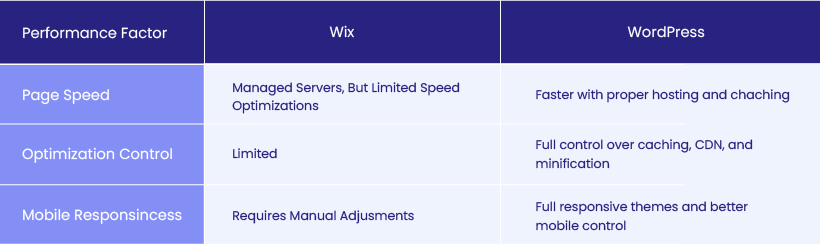
Website performance plays a crucial role in user experience, SEO rankings, and conversion rates. When comparing WordPress vs Wix, factors like page speed and mobile responsiveness determine how well a website performs across different devices. Let’s examine how both platforms handle performance optimization.
Page Speed: Which Platform Loads Faster?
Website speed affects bounce rates, search rankings, and overall user satisfaction. Both Wix and WordPress have different approaches to optimizing performance.
Factors Affecting Load Times
Wix: Since Wix is a fully hosted platform, all websites run on its built-in infrastructure. While this ensures stability, it also means users have limited control over performance optimization.
WordPress: relies on external hosting providers, meaning website speed depends on the hosting plan, caching, and optimization techniques used.
Optimization Techniques
Wix Performance Features:
- Automatically optimized servers and CDN (Content Delivery Network) integration.
- Limited options for advanced performance tweaks.
- Image compression is automated, but not customizable.
WordPress Optimization Techniques:
Faster hosting options: Users can choose high-performance hosting like Kinsta, SiteGround, or WP Engine.
Caching plugins: Popular tools like WP Rocket and W3 Total Cache improve speed.
CDN integration: Users can add Cloudflare for faster content delivery.
Lazy loading: Reduces load time by loading images only when they are visible on the screen.
🏅Winner for Page Speed: WordPress allows for more advanced optimization, making it faster when properly configured. Wix is decent for small sites but lacks deep performance control.
Mobile Responsiveness: How Well Do Wix and WordPress Adapt?
With mobile traffic surpassing desktop usage, having a fully responsive website is essential.
Template Adaptability
Wix: offers mobile-optimized templates, but users must manually adjust elements to ensure a smooth mobile experience.
WordPress: themes are designed to be fully responsive, meaning they automatically adapt to different screen sizes without manual adjustments.
Customization for Mobile Devices
Wix: Has a separate mobile editor, allowing users to tweak their mobile site layout. However, changes made in mobile mode do not always sync perfectly with the desktop version.
WordPress: Themes and page builders like Elementor and Divi allow for precise mobile customization, including adjusting fonts, spacing, and visibility for mobile users.
🏅 Winner for Mobile Responsiveness: WordPress provides more flexible mobile customization, while Wix requires manual tweaks that may not always align seamlessly with the desktop site.
Which Platform Performs Better?
WordPress offers better speed optimization and mobile flexibility, making it the preferred choice for users who want full performance control.
Wix provides a stable but less customizable experience, making it better suited for smaller websites with minimal performance demands.
Pros and Cons: Wix vs WordPress
Both Wix and WordPress have their strengths and weaknesses. While Wix is a beginner-friendly platform with a simple setup, WordPress provides unmatched flexibility and customization. Below, we’ll break down the advantages and limitations of each platform to help you decide which is best for your needs.
Wix: Advantages and Limitations
Advantages of Wix
- Easy to Use – Wix’s drag-and-drop editor makes website building simple, even for beginners.
- All-in-One Solution – Includes hosting, security, and built-in features, so users don’t need to manage external services.
- Quick Setup – Users can launch a website within minutes using Wix ADI (Artificial Design Intelligence).
- 24/7 Customer Support – Offers live chat, phone, and email support, which WordPress lacks.
- Pre-Designed Templates – Over 800 customizable templates for different industries.
- Automatic Updates and Security – Wix handles all updates and security patches, reducing maintenance concerns.
Limitations of Wix
- Limited Customization – Unlike WordPress, Wix does not allow full code access, making advanced customization difficult.
- Cannot Change Templates – Once you choose a template, you cannot switch to a different one without rebuilding your site.
- Less Scalable for Large Sites – Wix works well for small websites but lacks the power needed for high-traffic and enterprise-level websites.
- SEO Limitations – While Wix offers built-in SEO features, it lacks advanced optimization tools available in WordPress.
- Higher Long-Term Costs – Wix’s monthly pricing can become expensive, especially when adding premium apps.
- E-Commerce Restrictions – While Wix supports online stores, it’s not as scalable as WooCommerce (WordPress).
✅ Best for: Beginners, small business owners, and those who want a hassle-free website solution.
WordPress: Advantages and Limitations
Advantages of WordPress
- Unlimited Customization – Full access to the code, themes, and plugins, allowing advanced modifications.
- Flexible Pricing – Users can choose their hosting provider, making WordPress cheaper or more scalable depending on needs.
- SEO-Friendly – Supports powerful SEO plugins like Yoast SEO and Rank Math, giving better optimization control than Wix.
- Scalability – Suitable for blogs, business websites, online stores, and enterprise-level sites.
- Large Theme and Plugin Library – Over 11,000 free and premium themes and 60,000+ plugins for customization.
- Strong Community Support – Millions of developers and experts provide free resources, forums, and guides.
- E-Commerce Power with WooCommerce – Unlike Wix, WordPress integrates seamlessly with WooCommerce, the most popular eCommerce platform for online stores.
Recommendation
Find out how much does a WordPress website cost.
Limitations of WordPress
- Steeper Learning Curve – WordPress is not as beginner-friendly as Wix and requires some technical knowledge.
- Requires Hosting & Maintenance – Users need to set up hosting, manage updates, and ensure security manually.
- No Official Customer Support – Unlike Wix, WordPress does not offer direct support, so users rely on community forums and third-party experts.
- Customization Requires Coding – While plugins help, advanced customizations often require HTML, CSS, or PHP knowledge.
- Potential for Plugin Conflicts – Since WordPress relies on third-party plugins, incompatibilities can cause issues if not properly managed.
✅ Best for: Users who want full control over their website, scalability, and advanced SEO features.
Final Verdict: Wix vs WordPress Pros and Cons
| Feature | Wix | WordPress |
| Ease of Use | ✅ Beginner-friendly | ❌ Learning curve |
| Customization | ❌ Limited | ✅ Full control |
| SEO | ❌ Basic SEO tools | ✅ Advanced SEO plugins |
| Scalability | ❌ Limited | ✅ Highly scalable |
| E-Commerce | ✅ Good for small stores | ✅ WooCommerce more powerful |
| Support | ✅ 24/7 customer service | ❌ Community-driven support |
| Security | ✅ Managed by Wix | ❌ User-managed security |
| Cost | ❌ Higher long-term pricing | ✅ More cost control |
Which One Should You Choose?
- Choose Wix if you want an easy, all-in-one website solution without technical maintenance.
- Choose WordPress if you need flexibility, scalability, and advanced SEO features for long-term growth.
Wix vs WordPress: Get the Best Platform for Your Website
Deciding between Wix and WordPress comes down to your website goals, technical expertise, and long-term scalability needs. Both platforms offer unique benefits, but choosing the right one can make a significant impact on your online success.
Wix is a beginner-friendly, all-in-one platform with a drag-and-drop builder, built-in hosting, and customer support. It’s ideal for small businesses, freelancers, and non-technical users who need a quick and hassle-free website.
WordPress offers unmatched flexibility, customization, and scalability, making it the best choice for bloggers, businesses, eCommerce stores, and developers looking for long-term control over their site’s design and functionality.
If you’re looking for a scalable, SEO-optimized, and high-performing website, WordPress is the best choice – and we’re here to help. Whether you need a custom WordPress site, WooCommerce store, or maintenance services, our experts can design, develop, and optimize your site for the best results. Contact us today to get started with WordPress development that drives real business growth!


