

Popup forms can help you capture leads and grow your email list, but poorly designed popups can also drive visitors away. In this blog, we’ll explain how to integrate pop-ups on your website and find the right balance between conversion goals and user experience.
Why You Should Consider Having Popups on Your Website
Every business needs lead capture tools on its website. And one of the most effective ways to do it is popups. Studies show this feature can increase conversion rates by 3-9% compared to static forms. For an agency managing multiple client sites, integrating popups to their websites can deliver real results without damaging the user experience.
Timing Your Popups Correctly
The moment a popup appears makes all the difference. Exit-intent popups trigger when a visitor moves their cursor toward the browser’s back button, catching them just before they leave. These tend to be less annoying because they don’t interrupt active reading.
Time-based popups that appear after 30-60 seconds give visitors a chance to explore the site first. Scroll-triggered popups that activate after someone reads 50-70% of a page target engaged readers who are more likely to convert.
At White Label Agency, we usually recommend against popups that appear immediately on page load. We think these frustrate visitors who haven’t had time to see what the site offers.
Popup Design Elements That Work

It’s always better if your popup design is clean and straightforward. This includes a single clear headline that explains the benefit, a brief description of what the visitor will get, and a simple form field. Plus, we noticed the call-to-action button tends to perform better when it stands out with contrasting colors.
The close button deserves attention too. A visible X in the top corner shows respect for visitors who aren’t interested right now. You’ve probably noticed how some sites hide the close button or make it tiny. This creates unnecessary frustration for people who just want to keep browsing.
Mobile responsiveness is also important. Popups need to work properly on phones and tablets, which means testing them on different screen sizes. A popup that looks great on desktop can become unusable on mobile if it hasn’t been designed with smaller screens in mind.
What Type of Popups Convert?
People usually share their email address when they get something valuable in return. That’s why we recommend not using generic “subscribe to our newsletter” messages. Instead, you can try offering specific benefits like:
- Free industry guides or templates
- Discount codes for first purchases
- Access to exclusive content
- Free consultations or audits
And again, don’t forget to make the value clear in your headline. “Get Our Free WordPress Security Checklist” works better than “Join Our Mailing List.”
Popup Frequency and Targeting Rules

Showing the same popup to someone every time they visit might not be the best strategy. Instead, we recommend using cookies to remember when someone has seen or closed a popup. This is because waiting at least 30 days before showing it again gives visitors breathing room. Even better, once someone subscribes, there’s no reason to keep showing them the signup form.
Targeting different popups to different pages can make a difference too. A blog post about WordPress security might work well with a popup offering a security checklist, while a pricing page could show an offer for a free consultation. This kind of relevance tends to increase conversion rates while reducing the annoyance factor.
Compliance and User Rights
GDPR and other privacy regulations require clear consent for email collection. Your popup needs a checkbox for marketing consent (particularly in Europe) and a link to your privacy policy. Pre-checking consent boxes violates most privacy regulations, so it’s important to leave them unchecked by default.
Including an easy unsubscribe option in all emails sent to addresses collected through popups is both legally required and good practice for maintaining a healthy email list.
Testing Your Popups
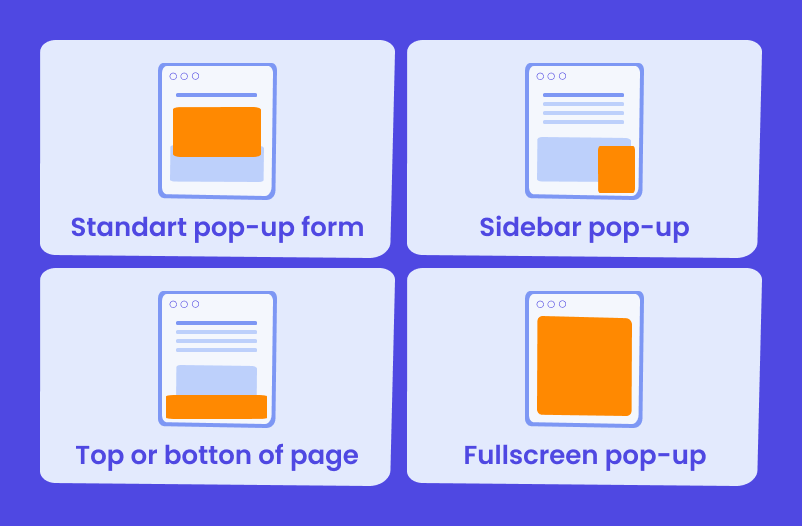
Testing different versions helps you figure out what actually works. You might try different headlines, offers, timing, and designs. Some popup tools include testing features that let you compare different versions automatically, which takes the guesswork out of optimization.
Common elements worth testing include the headline wording, the timing delay, the form fields (one field versus multiple), and the visual design. Small changes can sometimes make a significant difference in conversion rates.
Popup Plugin That We Use at WLA
At White Label Agency, we’ve found Fancybox to be a reliable solution for popup implementation. Natalia, our Head of Production, recommends it as our preferred tool, and we’ve integrated it into our custom themes across client sites.
Fancybox offers a clean, lightweight approach to creating popups without adding bloat to your WordPress site. It handles images, inline content, and forms smoothly, which makes it versatile for different popup needs. The plugin works well for both simple email capture forms and more complex content displays.
WordPress Development Agency
Experience WordPress development with our custom-coded websites. Perfect for agencies, our reliable service ensures timely delivery and client satisfaction.
Wrap Up
The best popup strategy finds a middle ground between aggressive lead capture and respecting visitor preferences. If your bounce rate increases significantly after adding popups, that’s usually a sign you’ve pushed too hard. Monitoring your analytics to track how popups affect overall site performance gives you the data you need to make adjustments.
At White Label Agency, we provide white-label WordPress services to agencies on both a project basis and through dedicated team members. If you need help with WordPress development work, we can support your agency’s capacity without ever appearing to your clients. Contact our sales team to learn more about our services.


