


- Why WordPress Monthly Maintenance is Important?
- Comprehensive WordPress Maintenance Checklist
- WordPress Monthly Maintenance Tasks You Can Outsource
- Benefits of Outsourcing WordPress Monthly Maintenance
- How to Choose the Right Service Provider
- Cost of WordPress Monthly Maintenance
- How to Maintain a WordPress Website
- Secure Your WordPress Website
WordPress monthly maintenance is a practice for keeping your client’s website secure, fast, and performing at its best. It involves a series of regular tasks aimed at ensuring that the WordPress site runs smoothly, remains up-to-date, and provides a positive experience for the users. WordPress requires ongoing care to avoid potential issues and ensure optimal performance.
Regular maintenance is crucial for several reasons: First, it significantly enhances your website’s security by addressing vulnerabilities, updating plugins, themes, and core files, and protecting against malware and hackers. Neglecting maintenance can expose your client’s site to attacks that could compromise sensitive data or bring the site offline.
Second, regular monthly maintenance improves the website’s performance. Over time, websites can become sluggish due to outdated plugins, excessive database bloat, or inefficient code. Routine tasks like database optimization, image compression, and performance monitoring help ensure that your site loads quickly and keeps reducing bounce rates.
Lastly, consistent WordPress monthly maintenance contributes to a better user experience. A well-maintained website offers seamless navigation, fewer errors, and an overall smoother interaction for visitors. This helps in retaining users and also in achieving higher conversion rates, whether your goal is to drive sales, generate leads, or build a loyal audience.
For businesses that lack the time or expertise to handle these tasks, WordPress maintenance outsourcing can be a smart solution. By outsourcing maintenance, you can ensure that all aspects of the WordPress checklist are handled by professionals, allowing your client’s website to stay secure, fast, and optimized without the added workload.

Why WordPress Monthly Maintenance is Important?
Neglecting WordPress monthly maintenance can have severe consequences for your client’s website, impacting security, speed, and SEO. Without regular updates and care, your site becomes vulnerable to various threats, including malware, hacking attempts, and data breaches. Cybercriminals often exploit outdated plugins, themes, or core files, leading to potential compromises that could expose sensitive information or bring the site offline entirely.
In addition to security risks, a lack of maintenance can severely degrade your website’s performance. Over time, issues such as database bloat, unoptimized images, and inefficient code can slow down your site. A slow-loading website not only frustrates visitors but also negatively affects your search engine rankings. Search engines like Google prioritize fast-loading sites in their algorithms, meaning that poor performance could result in lower visibility and reduced organic traffic.
From an SEO perspective, regular monthly maintenance also maintains and improves your site’s rankings. Broken links, outdated content, and technical errors can all contribute to a drop in search engine rankings. Regular maintenance helps identify and fix these issues before they become problematic, ensuring that the site remains competitive in search results.
Improved user experience is another benefit of regular maintenance. A well-maintained site loads quickly, functions smoothly, and provides a seamless experience for visitors. This not only helps in retaining users but also enhances your site’s credibility and professionalism, leading to higher conversion rates and better overall performance.
As you can see, monthly maintenance is not just a routine task – it’s a critical practice that protects your site, enhances its performance, and supports your long-term business goals.
WordPress maintenance plans
WordPress Maintenance Plans ensure site security, performance, and uptime. Choose custom plans with backups, monitoring, and unlimited content edits.
Comprehensive WordPress Maintenance Checklist
Maintaining a WordPress website requires a thorough and consistent approach. Below is a comprehensive checklist that covers all essential aspects of WordPress maintenance, ensuring your client’s site remains secure, fast, and optimized for both users and search engines.
Importance of Keeping WordPress Core Updated
The WordPress core is the backbone of your website. Regularly updating it is crucial to ensure your site remains secure, stable, and compatible with the latest features and security patches. Failing to update the core can expose your site to vulnerabilities that hackers could exploit.
Step-by-Step Guide to Updating
- First, start with backup. Backup your client’s site before making any changes.
- Then, navigate to the WordPress dashboard.
- After that, check for available updates under the “Updates” section.
- Click “Update Now” to install the latest version.
- Finally, test the website to ensure everything functions correctly after the update.
Plugin & Theme Updates
Plugins and themes add functionality and style to your site but can also introduce security risks if not updated regularly. Outdated plugins and themes are common entry points for attackers, making it essential to keep them up to date.
Best Practices for Safe Updating
- Backup the site before updating plugins and themes.
- Update one plugin or theme at a time to identify potential conflicts.
- Test your site after each update to ensure it works as expected.
- Finally, consider using a staging environment to test updates before applying them to the live site.
Security Checks
Regular security scans help identify potential threats and vulnerabilities in your site. Conducting monthly scans ensures that any security issues are caught and addressed promptly. Below, we will provide the common vulnerabilities and how to fix them:
Outdated software: Regularly update WordPress core, plugins, and themes.
Weak passwords: Enforce strong password policies for all users.
Malware: Use a security plugin like Wordfence or Sucuri to scan and remove malware.
Backup Procedures
Backups are your safety net in case of data loss, hacking, or any other unforeseen issues. Regular backups ensure that you can restore the site to a previous state without losing important data. Here’s how to automate backups:
- Choose a reliable backup plugin like UpdraftPlus or BackupBuddy.
- Set up automatic backups on a daily or weekly schedule, depending on your site’s activity level.
- Store backups in multiple locations, such as cloud storage (e.g., Google Drive, Dropbox) and local storage.
Performance Optimization
A fast-loading website enhances user experience and boosts the SEO rankings. Regular performance optimization helps maintain speed and efficiency. In order to use caching, install a caching plugin like W3 Total Cache or WP Super Cache to reduce server load and improve load times.
For image optimization use plugins like Smush or Imagify to compress images without losing quality, reducing load times significantly.
Database Maintenance
Over time, your database can become cluttered with unnecessary data, slowing down your site. Regular database maintenance keeps your site running smoothly. Use plugins like WP-Optimize or Advanced Database Cleaner to remove unnecessary data, such as post revisions, spam comments, and transients. Don’t forget to schedule regular cleanups to keep your database lean and efficient.
Broken Links & 404 Errors
Broken links can frustrate users and harm your SEO. Regularly checking and fixing broken links is essential for maintaining a healthy website. Use tools like Broken Link Checker or online services like Screaming Frog to identify broken links. Redirect 404 errors to relevant pages using a plugin like Redirection.
Content Review
Stale or outdated content can harm your site’s credibility and SEO rankings. Regular content reviews ensure that your site remains relevant and authoritative. Review your content for outdated information and make necessary updates. Refresh old posts with new data, examples, or images. Finally, optimize content for current SEO best practices, including keyword updates and meta descriptions.
User Management
Regularly reviewing user access helps prevent unauthorized changes and potential security breaches. Regular checks include removing inactive users and securing accounts. Start with identifying and removing inactive users to reduce security risks. Ensure that all user accounts, especially those with administrative access, have strong, unique passwords and two-factor authentication enabled.
SEO Maintenance
Regular SEO maintenance helps you stay competitive in search engine rankings. Monthly audits ensure that your site is optimized for current SEO trends and practices. Use tools like Google Analytics, SEMrush, or Ahrefs to track your SEO performance. Regularly update keywords, meta tags, and content based on performance data and trends.
Regular maintenance is not just about fixing issues – it’s about proactively enhancing your site to support your long-term business goals. By following this comprehensive WordPress checklist, you can keep your site secure, fast, and optimized, ensuring a positive experience for your users and strong performance in search engine rankings.

WordPress Monthly Maintenance Tasks You Can Outsource
While some website owners prefer handling maintenance in-house, many choose to outsource these tasks to professionals. Outsourcing monthly maintenance can offer peace of mind, allowing you to focus on growing your business while experts ensure your client’s site remains secure and up-to-date. Below are some key maintenance tasks that are commonly outsourced, along with the benefits of outsourcing and tips on how to choose the right service provider.
Commonly outsourced WordPress maintenance tasks include:
- Core, plugin, and theme updates
- Security monitoring and malware removal
- Backups and website restoration
- Performance optimization
- SEO audits and maintenance
Website as a service
Website As a Service [WAAS] provides complete website solutions including design, hosting, and maintenance through a convenient subscription model for Agencies.
Benefits of Outsourcing WordPress Monthly Maintenance
Outsourcing WordPress maintenance to the right service provider can significantly enhance your website, ensuring it remains secure, fast, and optimized. Some of the outsourcing benefits include:
Expertise and Experience
Professional service providers bring specialized knowledge and experience to the table. They are familiar with the nuances of WordPress and can quickly identify and resolve issues that might be challenging for in-house teams.
Time Savings
Managing website maintenance in-house can be time-consuming, especially for those without technical expertise. Outsourcing frees up your time, allowing you to focus on core business activities while experts handle the technical aspects of your site.
Enhanced Security
Security is a top priority for any website, and outsourcing ensures that your site benefits from the latest security practices. Professional service providers regularly monitor your site for vulnerabilities and implement necessary updates to keep it secure.
Consistent Performance
Regular maintenance tasks like performance optimization and database cleanup are crucial for a fast-loading site. Outsourcing ensures these tasks are done consistently, resulting in a better user experience and improved search engine rankings.
Scalability
As your business grows, so does the complexity of your website. Outsourcing WordPress monthly maintenance allows you to scale the site without worrying about the additional technical burdens that come with growth.

How to Choose the Right Service Provider
By choosing a provider with the right expertise and service offerings, you can focus on growing your business while professionals handle the technical complexities of maintaining the site.
Look for service providers who specialize in WordPress monthly maintenance. They should have a proven track record of managing WordPress sites, with expertise in updates, security, performance optimization, and backups. A reputable service provider will have a portfolio of WordPress sites they maintain. Read client reviews and testimonials to gauge their reliability and the quality of their services.
Next, ensure that the service provider offers a comprehensive maintenance plan that covers all essential tasks:
- updates
- security
- backups
- performance optimization
- SEO.
Good communication is key when outsourcing. Choose a provider that offers responsive customer support and regular communication, so you’re always informed about the status of your client’s website.
While cost is an important factor, it should not be the sole deciding factor. Consider the value offered by the service provider in terms of expertise, reliability, and comprehensiveness of their maintenance plan.

Cost of WordPress Monthly Maintenance
Understanding the costs associated with WordPress maintenance is crucial for making informed decisions about how to manage your website. Whether you’re considering a DIY approach or outsourcing to professionals, it’s important to know what to expect in terms of expenses and how to maximize the value you get from your investment.
Breakdown of Potential Costs
The cost of monthly maintenance can vary widely depending on several factors, including the size of your website, the complexity of its features, and the level of support you require. Here’s a general breakdown of potential costs:
Core, Plugin, and Theme Updates
While updating the WordPress core, plugins, and themes is often included in most WordPress monthly maintenance plans, the costs can range from $50 to $200 per month, depending on the frequency of updates and the number of plugins and themes involved.
Security Monitoring and Malware Removal
Security is a critical aspect of maintenance. Costs for security monitoring and malware removal typically range from $50 to $150 per month. This may include regular scans, firewall management, and immediate response to security threats.
Backup and Restoration Services
Automated backup solutions are usually affordable, costing between $20 to $100 per month, depending on the frequency of backups and the storage options chosen. Restoration services may incur additional costs if a manual restore is needed.
Performance Optimization
Optimizing the website’s performance, including caching, image compression, and database cleanup, can range from $30 to $150 per month.
SEO and Content Updates
SEO maintenance and content updates can vary significantly, with costs ranging from $100 to $500 per month, depending on the scope of work and the competitiveness of your industry.
Balancing DIY Tasks with Outsourcing
While some aspects of WordPress monthly maintenance can be handled in-house, others are better suited for outsourcing to professionals. Balancing DIY tasks with outsourcing can help manage costs while ensuring your website remains in top condition.
- DIY Tasks: Small business owners or website administrators with some technical knowledge may choose to handle basic tasks like updating content, monitoring performance, and running regular backups. These tasks can be done with minimal cost, primarily requiring time and some familiarity with WordPress.
- Outsourced Tasks: More complex tasks such as security monitoring, performance optimization, and advanced SEO are often best left to professionals. Outsourcing these tasks ensures they are handled by experts, reducing the risk of errors and freeing up your time to focus on core business activities.
How to Get the Best Value for Your Money
To get the best value from your investment in maintenance, consider the following strategies:
Compare Maintenance Plans
Not all WordPress monthly maintenance plans are created equal. Take the time to compare what different service providers offer, ensuring that their plans cover all essential aspects of monthly maintenance, such as updates, security, backups, and performance optimization.
Look for Bundled Services
Some providers offer bundled services that combine multiple aspects of maintenance at a discounted rate. This can be a cost-effective way to ensure comprehensive coverage for your website without paying for individual services separately.
Focus on Essential Services
While it may be tempting to opt for the most comprehensive plan available, it’s important to focus on the services that are truly essential for your website’s needs. Tailor your monthly maintenance plan to include only the services that will provide the most benefit to the site.
Consider Long-Term Contracts
Many service providers offer discounts for long-term contracts. If you’re confident in the quality of a provider’s services, signing up for a longer-term plan can save you money over time.
R
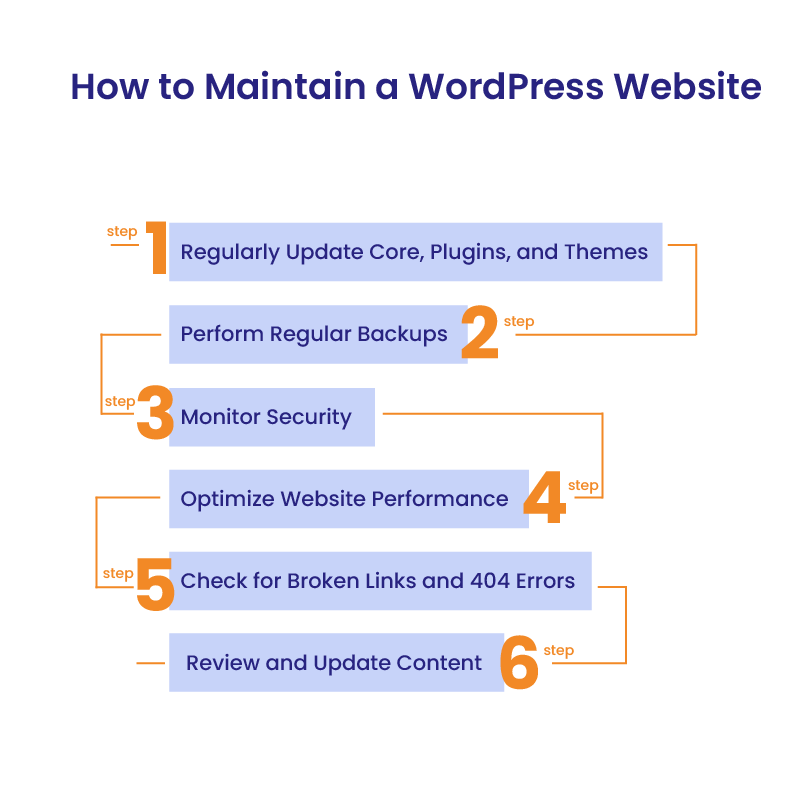
How to Maintain a WordPress Website
Maintaining a WordPress website can seem daunting, especially for beginners. However, with the right approach and tools, you can effectively manage your site and keep it running smoothly. This step-by-step guide will walk you through the essential tasks involved in WordPress monthly maintenance, helping you avoid common pitfalls and make the most of the available tools and plugins:
Step 1: Regularly Update Core, Plugins, and Themes
Step 2: Perform Regular Backups
Step 3: Monitor Security
Step 4: Optimize Website Performance
Step 5: Check for Broken Links and 404 Errors
Step 6: Review and Update Content
Essential Tools and Plugins for Maintenance
To streamline your monthly maintenance, consider using the following tools and plugins:
- UpdraftPlus: For automated backups.
- Wordfence/Sucuri: For security monitoring and malware removal.
- W3 Total Cache: For caching and performance optimization.
- Smush/Imagify: For image compression and optimization.
- Broken Link Checker: For identifying and fixing broken links.
- WP-Optimize: For database cleaning and optimization.
Common Pitfalls and How to Avoid Them
Even with the best intentions, beginners can encounter challenges when managing website. Here are some common pitfalls and tips on how to avoid them:
- Skipping Backups: Always back up your site before making any major changes. This ensures you have a restore point if something goes wrong.
- Delaying Updates: Regular updates are crucial for security and performance. Don’t postpone them, as doing so can expose your site to vulnerabilities.
- Ignoring Security Alerts: Address security alerts immediately to prevent potential breaches.
- Overloading with Plugins: Use only essential plugins to avoid slowing down your site.
Secure Your WordPress Website
WordPress monthly maintenance is not just a routine task – it’s a vital practice that ensures your website remains secure, fast, and optimized for both users and search engines. Regular maintenance protects your site from potential security threats, enhances performance, and keeps your content and SEO efforts up-to-date. Whether you’re a small business owner, website administrator, or digital agency, the importance of consistent monthly maintenance cannot be overstated.
If you haven’t already, now is the time to start implementing a robust maintenance routine for your WordPress site. However, if managing these tasks seems overwhelming or time-consuming, consider outsourcing to professionals who specialize in WordPress maintenance. This not only saves you time and effort but also provides peace of mind knowing that your website is in expert hands.
At The White Label Agency, we offer comprehensive WordPress monthly maintenance services tailored to meet your specific needs. Our team of experienced professionals is dedicated to ensuring your site remains secure, fast, and effective, allowing you to focus on growing your business. Contact the WLA team to learn more about our WordPress maintenance services and how we can help you keep the website running smoothly.


