


- Overview of WordPress vs Squarespace
- Round 1: Best for E-commerce Websites – WordPress vs Squarespace
- Round 2: Best for Portfolio Websites – WordPress vs Squarespace
- Round 3: Best for Business Websites – WordPress vs Squarespace
- SEO Capabilities: SEO Showdown – WordPress vs Squarespace
- WordPress vs Squarespace: Pricing and Value for the Best ROI
- WordPress vs Squarespace: Final Thoughts
- FAQs
Choosing between WordPress vs Squarespace can make or break your online presence. Whether you’re launching an online store, showcasing your creative works, or establishing your business’s digital footprint, the decision between WordPress vs Squarespace can significantly impact your success. Both platforms offer unique advantages, but which one truly aligns with your specific needs and goals?
In this comprehensive guide, we’ll delve deep into the WordPress vs Squarespace debate, examining their strengths and weaknesses across three critical website types: e-commerce, portfolio, and business websites. In addition, we’ll explore their SEO capabilities and pricing structures to help you make an informed decision. Let’s embark on this journey to find the perfect platform for your digital goals.
WordPress Development Agency
Experience WordPress development with our custom-coded websites. Perfect for agencies, our reliable service ensures timely delivery and client satisfaction.
Overview of WordPress vs Squarespace
Before we delve into specific use cases, it’s crucial to understand the fundamental differences between Squarespace and WordPress. This overview will set the stage for our in-depth comparison of these two popular website builders.
What is WordPress?
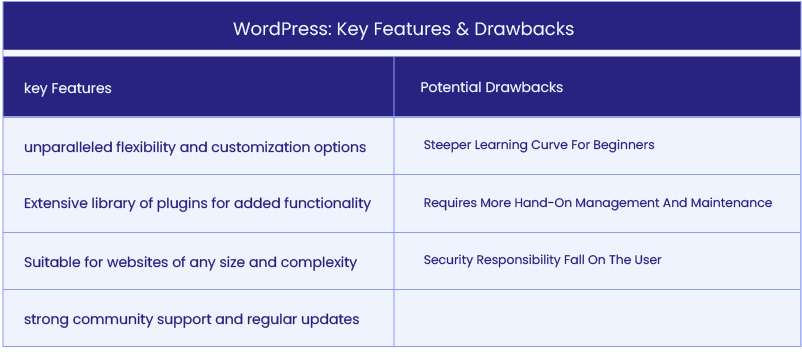
When choosing a platform for your website, WordPress stands out as a highly flexible and customizable solution. With over 40% of all websites powered by WordPress, it’s a go-to choice for many businesses, creatives, and e-commerce stores. However, its open-source nature requires a bit of technical know-how, especially if you’re aiming to make the most of its extensive features.
Here are WordPress’ key features and potential drawbacks you need to consider:
What is Squarespace?
Squarespace has become a favorite for individuals and businesses seeking a streamlined, all-in-one solution for building beautiful, professional websites. Known for its stunning design templates and ease of use, Squarespace simplifies the process of launching an online presence without the need for coding. While it excels in user-friendliness, its simplicity also comes with some limitations. Have a look at the table below to better understand Squarespace’s features and potential cons:

Round 1: Best for E-commerce Websites – WordPress vs Squarespace
Now that we’ve laid the groundwork, let’s dive into the world of online selling. E-commerce has revolutionized the retail landscape, and choosing the right platform can mean the difference between a thriving online store and a digital ghost. In this round, we will do a WordPress vs Squarespace comparison in a head-to-head battle for e-commerce supremacy.
WordPress for E-commerce: WooCommerce Flexibility

WordPress, combined with the WooCommerce plugin, offers a powerful and flexible e-commerce solution. This combination provides merchants with unparalleled control over their online stores, from product presentation to checkout processes.
Strengths:
- Virtually unlimited customization options
- Extensive ecosystem of e-commerce plugins and extensions
- Ability to handle complex product catalogs and pricing structures
- Advanced inventory management and reporting tools
- Integration with numerous payment gateways and shipping providers
Real-world Example: Consider a fashion retailer with a complex inventory of clothing items, each with multiple sizes, colors, and regional pricing. WordPress with WooCommerce can easily handle this complexity, allowing for:
- Dynamic pricing based on customer location
- Advanced product filtering and search capabilities
- Integration with local payment methods in different countries
- Custom checkout flows for different product types
While WooCommerce offers immense power, it does require more technical know-how and ongoing maintenance to keep the store running smoothly and securely.
Are you a digital agency looking for WooCommerce specialists? Check out our guide on hiring WooCommerce developers.
Squarespace for E-commerce: Simple but Effective

Squarespace’s e-commerce solution is designed for simplicity and visual appeal, making it an excellent choice for small to medium-sized businesses that prioritize aesthetics and ease of use.
Strengths:
- Quick and easy setup process
- Beautiful, mobile-responsive product galleries
- Built-in tax and shipping calculators
- Integrated email marketing tools
- SSL security and PCI compliance included
Real-world Example: A boutique candle maker looking to sell their handcrafted products online would find Squarespace ideal. They could quickly set up an elegant store showcasing their products with high-quality images, easily manage inventory, and process orders without worrying about technical details. The built-in marketing tools would help them create email campaigns and promote their products on social media seamlessly.
However, as the business grows, it might find Squarespace’s e-commerce capabilities limiting, especially when it comes to advanced inventory management or integration with external systems like ERPs.
🏆 And the Winner for E-commerce Websites is… WordPress!
While Squarespace offers a more straightforward path to launching an online store, WordPress with WooCommerce provides the scalability and flexibility needed for serious e-commerce growth. The ability to customize every aspect of the store, integrate with a wide range of business tools, and handle complex product catalogs makes WordPress the superior choice for businesses with ambitious e-commerce goals.
Round 2: Best for Portfolio Websites – WordPress vs Squarespace
With our e-commerce showdown complete, let’s shift our focus to the world of creative professionals. A stunning online portfolio can be the key to landing that dream project or client. But the question remains: in the WordPress vs Squarespace dichotomy, which platform will best showcase your masterpieces?
WordPress for Portfolios: Unlimited Customization

WordPress offers creative professionals the ability to build a portfolio that truly stands out, with endless possibilities for customization and functionality.
Strengths:
- Vast selection of portfolio-specific themes
- Ability to create custom post types for different work categories
- Advanced gallery plugins for showcasing work in unique ways
- Integration of dynamic elements like video backgrounds or parallax scrolling
- Option to add a blog, shop, or client area alongside the portfolio
Real-world Example: An architectural firm could use WordPress to create a stunning portfolio that goes beyond simple image galleries. They could implement:
- Interactive 3D models of buildings
- Before-and-after sliders for renovation projects
- A client login area for sharing project progress
- Integration with project management tools for real-time updates
Squarespace for Portfolios: Beautiful and Simple

Squarespace shines when it comes to creating visually striking portfolios with minimal effort, making it a favorite among photographers, designers, and other visual artists.
Strengths:
- Professionally designed templates optimized for visual content
- Intuitive image management with built-in editing tools
- Automatic image scaling and optimization for fast-loading
- Easy creation of password-protected pages for client proofing
- Simple integration with social media platforms
Real-world Example: A freelance photographer could quickly set up a portfolio on Squarespace that showcases their work beautifully. They could:
- Create separate galleries for different photography styles
- Implement a simple print-ordering system
- Display Instagram feed for real-time updates
- Use Squarespace’s scheduling tool for client bookings
While Squarespace offers a quicker path to a professional-looking portfolio, it may feel limiting for those who want to implement unique, custom features.
🏆 And the Winner for Portfolio Websites is… Squarespace!
For most creative professionals who need a beautiful, functional portfolio without the hassle of website management, Squarespace is the ideal choice. Its combination of stunning templates, ease of use, and built-in features allows creatives to focus on their work rather than website technicalities. However, for those who need highly specialized functionality or want complete control over their site’s design and features, WordPress remains a strong contender.
Planning on setting up a portfolio on Squarespace? Have a look at this step-by-step guide on how to make a Squarespace portfolio.
Round 3: Best for Business Websites – WordPress vs Squarespace
As we wrap up our exploration of WordPress vs Squarespace in terms of portfolios, it’s time to tackle the corporate side of web presence. From small startups to large enterprises, we’ll uncover which platform has the tools and features to help your business thrive online. Let’s get down to business and see which contender comes out on top in the WordPress vs Squarespace debate.
WordPress for Business Websites: Power and Flexibility for Any Business

WordPress offers unparalleled versatility for businesses of all sizes, from small local shops to multinational corporations.
Strengths:
- Scalability to grow with your business
- Extensive plugin ecosystem for adding specific functionalities
- Multi-language support for global businesses
- Advanced user management for large teams
- Robust content management capabilities for marketing teams
Real-world Example: A growing tech startup could leverage WordPress to create a dynamic website that evolves with their business:
- Implement a custom API to showcase real-time product data
- Create a knowledge base and community forum for users
- Integrate with their CRM and marketing automation tools
- Add a job board and application tracking system as they expand
- Implement advanced analytics for data-driven decision making
The main challenge with WordPress is the need for ongoing maintenance and potentially higher initial development costs for custom features.
If you are a digital agency seeking ways to refine your website upkeep services, we recommend going through our white paper on WordPress maintenance and downloading our maintenance template checklist.
Squarespace for Business Websites: Simple and Professional

Squarespace provides a streamlined solution for small to medium-sized businesses that need a professional online presence without the complexity.
Strengths:
- Quick setup with professional-looking results
- Built-in features like contact forms and appointment scheduling
- Easy-to-use blogging platform for content marketing
- Basic e-commerce capabilities for selling products or services
- All-in-one solution with hosting and security included
Want to create your business website on Squarespace? Go through this library of business website templates, filter the categories according to your industry niche, and get launched easily.
Real-world Example: A local law firm could use Squarespace to establish a professional online presence:
- Create separate pages for each practice area
- Set up a blog for sharing legal insights and updates
- Implement a contact form for potential clients
- Use the scheduling feature for consultation bookings
- Showcase team members with professional bios
While Squarespace offers a simpler solution, it may lack the advanced features and integrations that larger or rapidly growing businesses might need.
🏆 And the Winner for Business Websites is… WordPress!
In the WordPress vs Squarespace debate, WordPress takes the crown for business websites due to its unmatched flexibility and scalability. While Squarespace is an excellent choice for small businesses with straightforward needs, WordPress’s ability to adapt to complex business requirements, integrate with a wide range of business tools, and scale with the company’s growth makes it the superior option for businesses with long-term digital strategies.
Squarespace to WordPress
Looking to migrate from Squarespace to WordPress? Our experts handle everything, ensuring your design and content make the switch seamlessly!
SEO Capabilities: SEO Showdown – WordPress vs Squarespace
Search engine optimization is crucial for online visibility. In this section, we’ll compare the SEO capabilities of Squarespace vs WordPress to determine which platform gives you the best chance of ranking high in search results.
WordPress SEO: Total Control

In the WordPress vs Squarespace dichotomy, WordPress offers more comprehensive SEO capabilities, giving users full control over their site’s search engine optimization.
Strengths:
- Powerful SEO plugins like Yoast SEO and Rank Math
- Complete control over meta tags, URLs, and site structure
- Ability to implement advanced schema markup
- Customizable XML sitemaps
- Integration with Google Search Console and other SEO tools
WordPress allows for granular optimization of every page and post, making it ideal for businesses with complex SEO strategies or those operating in highly competitive markets.
Squarespace SEO: Simplicity with Limitations

Squarespace provides built-in SEO features that cover the basics, making it easier for non-technical users to optimize their sites.
Strengths:
- Automatic generation of sitemaps
- Built-in SSL for all sites
- Editable page titles and meta descriptions
- Automatic tagging of images with alt text
- Mobile-friendly designs for better search rankings
To briefly sum up the WordPress vs Squarespace debate for SEO, while Squarespace handles many SEO basics automatically, it lacks the depth of control and advanced features that WordPress offers.
🏆 And the Winner for SEO is… WordPress!
WordPress is the clear winner in Squarespace vs WordPress battle for SEO due to its flexibility and the power of its SEO plugins. For businesses that rely heavily on organic search traffic or need to implement advanced SEO strategies, WordPress provides the tools and control necessary to achieve and maintain strong search rankings.
WordPress vs Squarespace: Pricing and Value for the Best ROI
Cost is often a deciding factor when choosing between WordPress vs Squarespace. Let’s break down the pricing structures and overall value of each platform to help you determine which offers the best return on investment for your needs.

WordPress Pricing: A Customizable Investment
WordPress’s cost structure is highly flexible, allowing businesses to scale their investment as they grow.
Costs to Consider:
- Hosting (ranges from $5 to $100+ per month)
- Domain name ($10-$15 per year)
- Premium themes ($30-$100 one-time or yearly)
- Essential plugins ($0-$200+ per year)
- Developer costs for customization (vary widely)
The real value of WordPress lies in its scalability and the ability to add functionality as needed without being locked into a specific plan.
Squarespace Pricing: Predictable and All-Inclusive
Squarespace offers straightforward pricing with bundled features, making it easier to predict costs.
Pricing Plans (as of 2024):
- Personal: $16/month (billed annually)
- Business: $23/month (billed annually)
- Basic Commerce: $28/month (billed annually)
- Advanced Commerce: $52/month (billed annually)
These plans include hosting, security, and customer support, providing a hassle-free solution for businesses that prefer predictable costs.
🏆 And the Winner for Pricing is… It’s a Tie!
In the WordPress or Squarespace clash for pricing, the best value depends on your specific needs and growth plans. WordPress offers more flexibility and potential for cost optimization but requires more management. Squarespace provides a simpler, all-in-one solution with predictable costs, which can be advantageous for small businesses or those with limited technical resources.
WordPress vs Squarespace: Final Thoughts
Both WordPress and Squarespace offer unique strengths. This means that the question “Is WordPress or Squarespace better?” has no definitive answer. WordPress shines in scalability, customization, and SEO, making it the best choice for businesses needing flexibility and growth. For creatives seeking simplicity, Squarespace excels with its beautiful templates and ease of use, making it perfect for portfolios and small websites. The choice between WordPress vs Squarespace depends on your project’s complexity and growth plans.
If WordPress is your platform of choice and you need expert support, White Label Agency (WLA) is here to help. We’ve partnered with over 600 agencies, produced 10,000+ websites, and currently maintain 800+ sites. Contact our sales team today – let’s elevate your services together.
FAQs
Is Squarespace as good as WordPress?
It depends on your needs. Squarespace is a great option for users who want an all-in-one website builder with easy drag-and-drop functionality, beautiful templates, and built-in hosting. However, it has limitations in terms of customization, scalability, and third-party integrations.
WordPress, on the other hand, is far more flexible and powerful. It offers thousands of themes and plugins, full customization capabilities, and better SEO optimization. But it requires more setup and maintenance, including choosing a hosting provider and managing security.
If you need ease of use and simplicity, Squarespace is a solid choice. If you need complete control, scalability, and flexibility, WordPress is the better option.
What is the disadvantage of Squarespace?
While Squarespace is a great website builder, it does have some notable disadvantages:
Limited Customization – Unlike WordPress, Squarespace has a closed ecosystem, meaning you can’t fully customize your site beyond the built-in design options and templates.
Fewer Plugins and Integrations – Squarespace lacks the vast plugin library that WordPress offers. You’re limited to the built-in features and a small selection of third-party integrations.
Higher Cost Over Time – Squarespace has monthly or annual subscription fees, which can become expensive over time, especially for larger websites or businesses.
Less Control Over SEO – While Squarespace has basic SEO tools, it doesn’t offer the same level of optimization as WordPress, where you can install plugins like Yoast SEO or Rank Math for advanced settings.
No Full Ownership – Since Squarespace is a hosted platform, you don’t own your website’s files. If you ever want to move your site elsewhere, you’ll have to rebuild it from scratch.
Limited E-commerce Features – While Squarespace does offer e-commerce functionality, it lacks the depth and flexibility of WooCommerce on WordPress, especially for larger online stores.
If you need full customization, scalability, and ownership, WordPress is the better choice. If you prefer simplicity and ease of use, Squarespace may still be a good option.
Do Professionals Use Squarespace?
Yes, professionals do use Squarespace, but it depends on their specific needs.
Who Uses Squarespace?
Small Business Owners – Those who want a simple, visually appealing website without needing technical skills.
Freelancers & Creatives – Designers, photographers, and artists who need a portfolio site with beautiful templates.
Entrepreneurs – Startups and small e-commerce businesses that want a quick, easy setup.
Bloggers & Content Creators – Those who prioritize aesthetics and ease of use over deep customization.
Who Might Avoid Squarespace?
Developers & Web Designers – Professionals who need full customization prefer WordPress for its flexibility and control.
Large E-commerce Businesses – Stores that require advanced functionality often choose WooCommerce (WordPress) or Shopify instead.
SEO-Focused Websites – Marketers and businesses prioritizing advanced SEO typically opt for WordPress, which offers better optimization tools.
While Squarespace is great for ease of use and design, professionals who need scalability, advanced SEO, or full customization tend to prefer WordPress.


