


- Understanding the Role of a WordPress Developer
- 5 Benefits of Hiring a WordPress Developer
- 3 Key Considerations Before Hiring a WordPress Developer
- How to Find and Select the Right WordPress Developer
- 3 Best Practices for Working with a WordPress Developer
- Alternatives to Hiring a Developer
- Is Hiring a WordPress Developer the Right Choice for Your Business?
WordPress is one of the most powerful and widely used website platforms, powering over 40% of all websites on the internet. Its flexibility, ease of use, and vast ecosystem of themes and plugins make it an excellent choice for businesses, bloggers, and entrepreneurs looking to establish a strong online presence. However, while WordPress allows users to build and manage websites without extensive technical knowledge, achieving a high-performing, secure, and fully customized site often requires professional expertise.
This is where hiring a WordPress website developer becomes a strategic decision. A WordPress developer can help with custom design, functionality, performance optimization, and security enhancements – ensuring that your site meets your specific goals. Whether you need an eCommerce store, a membership platform, or a business website with advanced features, working with a WordPress expert can save time, prevent costly mistakes, and provide a scalable solution tailored to your needs.
In this guide, we’ll explore the key benefits of hiring a developer, important considerations before making a decision, viable alternatives, and best practices for collaboration. By the end, you’ll have a clear understanding of whether hiring a professional is the right move for your website.
Understanding the Role of a WordPress Developer
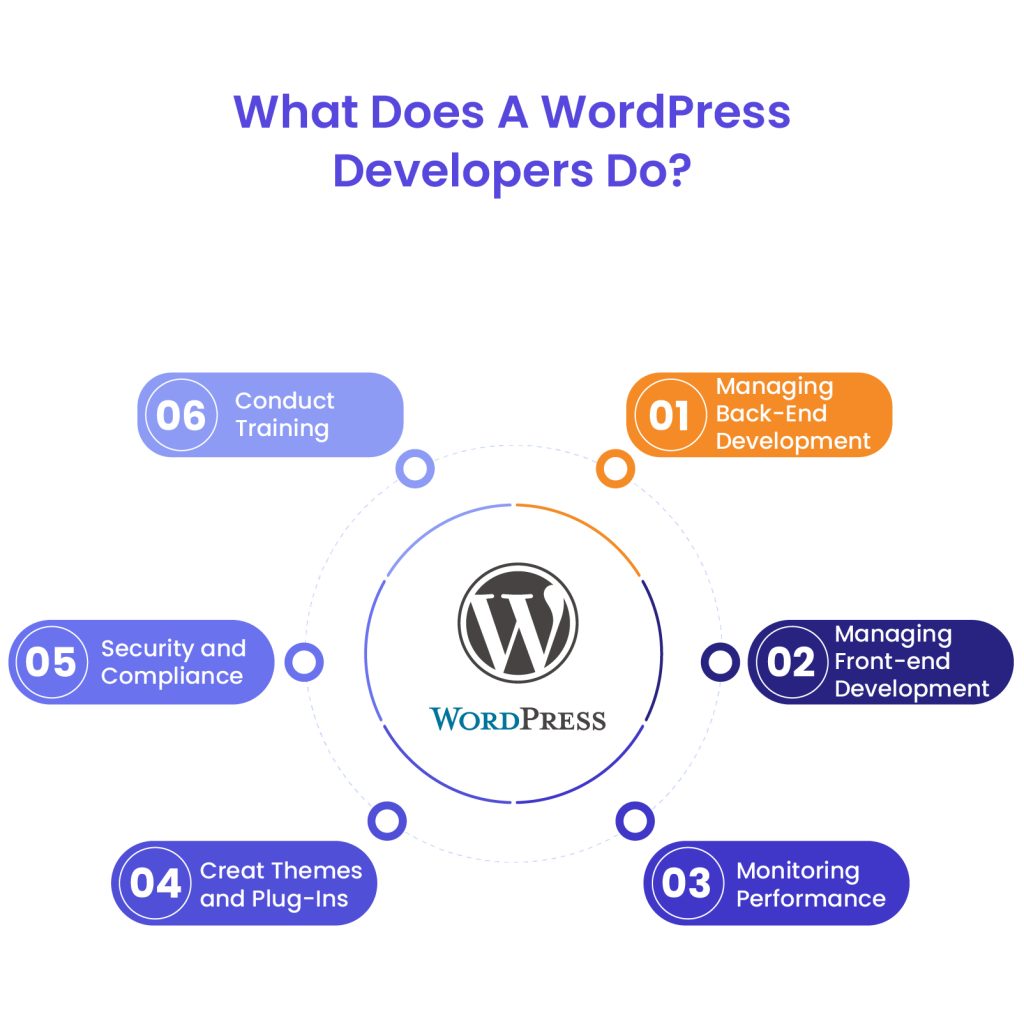
A WordPress website developer is a professional who specializes in designing, building, and optimizing WordPress websites to meet specific business needs. While WordPress offers user-friendly tools for website creation, professional development ensures enhanced functionality, better performance, and long-term scalability.
The Scope of a Developer’s Work
A WordPress developer is responsible for a wide range of tasks, from building custom themes and plugins to improving website speed, security, and SEO. Their expertise ensures that your site is not only visually appealing but also functional, user-friendly, and optimized for conversions. The developer benefits extend beyond technical implementation – hiring an expert allows businesses to focus on growth rather than troubleshooting website issues.
Front-End vs. Back-End WordPress Development
Developers typically specialize in either front-end or back-end development, although some work as full-stack developers, handling both aspects.
- Front-End Development – Focuses on the visual aspects of a WordPress site, including theme customization, page layout, and user experience (UX). A front-end developer ensures that the website is mobile-friendly, visually appealing, and aligned with the brand’s identity.
- Back-End Development – Involves working with WordPress core functions, databases, and server-side operations. Back-end developers handle complex tasks such as custom plugin development, API integrations, and optimizing website speed and security.
- Full-Stack Development – A full-stack developer combines both front-end and back-end expertise, making them ideal for projects that require extensive customization.
Specializations in WordPress Development
When hiring a WordPress expert, it’s essential to understand their specialization to ensure they align with your project requirements. Common areas of expertise include:
- Theme Development – Customizing or creating WordPress themes to enhance the visual appeal and functionality of a site.
- Plugin Development – Building custom plugins to extend WordPress capabilities, such as advanced forms, payment gateways, or membership functionalities.
- Full-Stack Development – Providing end-to-end WordPress solutions, including both front-end design and back-end functionality.
By understanding these roles, you can make an informed decision when hiring a WordPress expert who best fits your needs. In the next section, we’ll explore the key benefits of working with a professional developer.

5 Benefits of Hiring a WordPress Developer
Hiring a professional for WordPress development services provides significant advantages beyond what standard themes and plugins offer. From customization to security, a developer ensures your site is tailored to meet your business goals while delivering high performance and scalability.
Let’s dive deeper into the topic and explore the top 5 WordPress developer benefits:
1. Customization and Unique Design
A generic WordPress theme may not fully align with your brand’s identity or business needs. Custom WordPress development allows you to create a website that is visually unique and functionally robust.
- Tailoring themes to match brand identity – A developer can customize themes or build one from scratch to reflect your branding, ensuring consistency across all digital assets.
- Developing custom plugins for specific functionalities – If off-the-shelf plugins don’t meet your requirements, a developer can build custom plugins to add specialized features such as membership portals, booking systems, or eCommerce enhancements.
2. Enhanced Website Performance
A slow or unresponsive website can drive away potential customers. A developer applies performance optimization techniques to ensure fast loading speeds and seamless functionality.
- Optimizing site speed and responsiveness – Developers use best practices like image compression, caching, and script minimization to enhance speed and mobile responsiveness.
- Implementing best practices for user experience – Custom layouts, intuitive navigation, and interactive features improve engagement and conversions.
3. Improved Security Measures
WordPress sites are common targets for cyber threats, making security a top priority. WordPress development services include security enhancements to protect your site from vulnerabilities.
- Regular updates and security audits – A developer ensures that WordPress core, themes, and plugins are up to date to prevent security breaches.
- Protecting against common vulnerabilities – Implementing firewalls, malware scanning, and data encryption helps safeguard sensitive information.
4. SEO Optimization
Search engine visibility is essential for attracting organic traffic. A custom WordPress development approach ensures your site is structured and optimized for SEO.
- Implementing SEO best practices – A developer can enhance metadata, optimize site speed, and structure content for better rankings.
- Ensuring site structure supports search engine visibility – Custom themes and clean code improve indexability, ensuring that search engines can crawl and rank your site effectively.
5. Ongoing Support and Maintenance
A website requires continuous updates and improvements to stay functional and competitive. Hiring a developer provides long-term technical support and scalability.
- Regular site updates and troubleshooting – From plugin compatibility fixes to performance monitoring, developers keep your site running smoothly.
- Scalability planning for future growth – As your business expands, a developer can integrate new features, enhance server performance, and optimize for increasing traffic.

3 Key Considerations Before Hiring a WordPress Developer
Hiring a developer is a strategic investment, but before making a decision, it’s essential to evaluate your project’s requirements, budget, and timeline. Proper planning ensures you find the right developer who can deliver a solution that aligns with your business goals.
1. Assessing Your Project Needs
Before hiring a developer, clearly define what you need for your website. This will help you choose a developer with the right expertise and avoid unnecessary expenses.
- Determining the complexity and scope of your website – Are you building a simple blog, a business website, or a complex eCommerce platform? The level of customization required will influence your choice of developer.
- Identifying specific functionalities and features required – Make a list of must-have features such as payment gateways, membership systems, multilingual support, or API integrations. A well-defined scope will prevent project delays and scope creep.
2. Budget Planning
Custom development comes with varying costs depending on the project’s complexity and the developer’s expertise. Having a clear budget in mind will help you find the best value for your investment.
- Understanding cost implications of custom development – A fully customized website is more expensive than using pre-built themes and plugins, but it provides greater flexibility and scalability.
- Weighing the investment against potential returns – Consider how a professionally developed website can improve user experience, boost conversions, and generate revenue in the long run.
3. Timeline and Project Management
A well-planned timeline ensures that your project is completed efficiently without compromising quality.
- Setting realistic deadlines – Define clear milestones for different phases of development, from initial design to final launch. Avoid rushed timelines that may lead to quality issues.
- Aligning developer availability with your schedule – Ensure the developer’s availability matches your project deadlines. If you have a strict launch date, confirm that the developer can commit to the timeframe before hiring.
Dedicated team
Scale your agency with a dedicated WordPress developer. With great communication, we make sure to keep your builds on track and on time.
How to Find and Select the Right WordPress Developer
Hiring the right developer requires more than just finding someone with coding skills. You need a professional who understands your project requirements, communicates effectively, and can deliver a high-quality website within your timeline. Here’s how to find and evaluate the right developer for your needs.
1. Where to Look
There are several places to find experienced WordPress website developers, depending on your budget and project complexity.
- Freelance platforms – Websites like Codeable, Toptal, and Upwork specialize in connecting businesses with skilled developers. These platforms often have vetting processes to ensure quality.
- Professional networks and referrals – Asking for recommendations from industry peers or joining WordPress communities can help you find reputable developers with proven experience.
2. Evaluating Candidates
Once you have a list of potential developers, the next step is to assess their experience and expertise.
- Reviewing portfolios and past work – Look at previous projects to see if the developer has experience with similar websites or functionalities. A strong portfolio showcases their skills and design capabilities.
- Checking references and client testimonials – Reach out to past clients or check online reviews to get insights into the developer’s work ethic, reliability, and ability to meet deadlines.
3. Interview Process
An interview is a crucial step to ensure the developer is the right fit for your project.
- Essential questions to assess technical expertise and experience – Ask about their experience with custom themes, plugin development, and troubleshooting common WordPress issues. Inquire about specific tools and technologies they use.
- Discussing communication preferences and project management approaches – Clear communication is essential for a smooth collaboration. Make sure the developer provides regular updates, follows a structured workflow, and aligns with your preferred project management style.

3 Best Practices for Working with a WordPress Developer
Once you’ve hired a WordPress website developer, establishing a productive working relationship is key to ensuring a successful project. Clear communication, well-defined agreements, and an efficient feedback process can help streamline development and prevent misunderstandings.
1. Establishing Clear Communication
Effective communication is the foundation of any successful project. Ensuring that both parties are aligned on goals, expectations, and timelines can prevent delays and scope creep.
- Defining project scope and expectations – Provide a detailed project brief outlining the features, design elements, and functionality you require. Clear specifications help avoid unnecessary revisions.
- Setting up regular check-ins and updates – Schedule consistent meetings or status updates via email, project management tools, or video calls. This keeps both parties informed and allows for course correction if needed.
2. Contractual Agreements
A well-drafted contract ensures transparency and accountability, protecting both you and the developer.
- Outlining deliverables, timelines, and payment terms – Specify milestones, deadlines, and payment schedules to keep the project on track. Consider breaking payments into phases based on project completion.
- Including confidentiality and intellectual property clauses – Ensure that ownership of the final product is clearly defined. A non-disclosure agreement (NDA) may be necessary if sensitive business information is involved.
3. Feedback and Revisions
Providing constructive feedback and allowing room for iterative improvements ensures that the final product meets your expectations.
- Providing constructive feedback – Instead of vague comments like “I don’t like this,” offer specific suggestions on what needs to change and why. Screenshots, examples, or references can help clarify your vision.
- Allowing for iterative improvements – Development is rarely perfect on the first attempt. Be open to refinements, but also set a limit on revisions to keep the project moving forward efficiently.
Alternatives to Hiring a Developer
Hiring a WordPress developer isn’t the only way to build a functional and visually appealing website. If you’re working with a limited budget or prefer a hands-on approach, there are alternative solutions that may fit your needs. Here’s a look at some of the most popular options.
1. Utilizing Pre-Made Themes and Plugins
Many website owners opt for pre-made WordPress themes and plugins to quickly build and customize their sites without needing extensive coding knowledge.
Pros of DIY Website Building:
- Cost-effective – Pre-made themes are significantly cheaper than custom development, with many high-quality options available for free or at a low cost.
- Quick setup – Installing and customizing a theme takes far less time than building a site from scratch.
- No coding required – Page builders like Elementor, Divi, and WPBakery offer drag-and-drop functionality, making customization accessible to beginners.
Cons of DIY Website Building:
- Limited customization – Even premium themes have constraints in terms of design and functionality.
- Potential performance issues – Some themes and plugins come with unnecessary features that slow down site speed.
- Less scalability – As your business grows, you may eventually need custom solutions that off-the-shelf tools can’t provide.
2. Website Builders vs Custom Development
If you’re looking for an alternative to WordPress altogether, website builders provide an easy-to-use solution – but they come with trade-offs compared to self-hosted WordPress with custom development.
| Feature | Website Builders (e.g., Wix, Squarespace) | Self-Hosted WordPress (DIY or Custom Development) |
| Ease of Use | User-friendly, drag-and-drop interface | Requires more technical knowledge but offers greater flexibility |
| Customization | Limited to built-in tools and templates | Full control over design, functionality, and integrations |
| Scalability | Good for small businesses and blogs | Suitable for growing businesses and complex websites |
| SEO Capabilities | Basic SEO tools included | Advanced SEO options, better control over optimization |
| Cost | Monthly subscription fees | Hosting and plugin costs vary, but long-term expenses can be lower |
While website builders are great for those who need a simple website without much customization, self-hosted WordPress remains the best choice for businesses that want full control over their site’s features and growth potential.
By weighing these alternatives, you can determine whether hiring a developer is necessary for your website goals or if a DIY approach will suffice. In the final section, we’ll wrap up with key takeaways to help you make an informed decision.
WordPress Development Agency
Experience WordPress development with our custom-coded websites. Perfect for agencies, our reliable service ensures timely delivery and client satisfaction.
Is Hiring a WordPress Developer the Right Choice for Your Business?
Deciding whether to hire a WordPress website developer depends on your website’s complexity, long-term goals, and available resources. While DIY solutions, pre-made themes, and website builders can work for smaller projects, businesses that require advanced customization, enhanced performance, and long-term scalability will benefit from professional development.
A skilled developer ensures that your website is tailored to your brand, optimized for speed and security, and built with SEO best practices in mind. Additionally, ongoing support and maintenance can save time and prevent costly issues down the road.
Before making a decision, assess your specific needs, budget, and growth plans. If you’re looking for expert WordPress solutions without the hassle of hiring and managing developers, consider working with a trusted partner like White Label Agency. Our team of experienced developers can handle everything from custom WordPress development to ongoing maintenance, helping you focus on what matters most – growing your business. Contact us to learn how we can help.


