


For agencies and freelancers building WordPress websites, managing multiple WordPress sites can be a daunting task. As your client base grows, so does the complexity of keeping each site secure, updated, and performing optimally. This guide will explore various strategies and tools to streamline your WordPress website management process, helping you save time and deliver better results for your clients.
DIY: Manage Multiple WordPress Sites
Before diving into advanced solutions, let’s review the essential tasks involved in maintaining multiple WordPress sites:
- Regular backups (daily, weekly, or monthly)
- Updating WordPress core, themes, and plugins
- Security monitoring and implementation
- Performance optimization
- Content management and updates
- User management
- SEO maintenance
- Uptime monitoring
Performing these tasks manually for each site can be time-consuming and prone to errors. For instance, imagine managing 20 client websites, each requiring weekly updates and monthly backups. That’s potentially 80 separate monthly maintenance tasks, not including addressing security issues or performance optimizations. This workload can quickly become overwhelming, leading to missed updates or overlooked security vulnerabilities.
WordPress maintenance plans
WordPress Maintenance Plans ensure site security, performance, and uptime. Choose custom plans with backups, monitoring, and unlimited content edits.
Different Ways to Manage Multiple WordPress Sites
To address these challenges, several approaches have emerged:
Management Services by the Hosting Provider
Some hosting providers offer management services as part of their packages. These typically include:
- Automatic updates for WordPress core, themes, and plugins
- Regular backups (often daily)
- Security monitoring and firewalls
- Performance optimization through caching and CDN integration
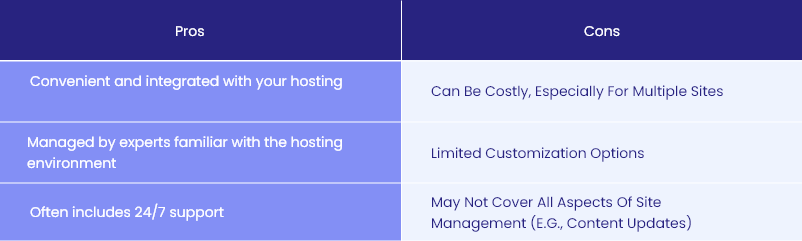
Check the below comparison table for the advantages and disadvantages of management services by the hosting provider:
| Pros | Cons |
| Convenient and integrated with your hosting | Can be costly, especially for multiple sites |
| Managed by experts familiar with the hosting environment | Limited customization options |
| Often includes 24/7 support | May not cover all aspects of site management (e.g., content updates) |
Using Tools to Manage Multiple WordPress Sites
WordPress management tools offer a centralized dashboard to control multiple sites. They provide features like:
- Bulk updates for core, themes, and plugins
- Centralized backups with one-click restore options
- Security scanning and malware removal
- Performance monitoring and optimization suggestions
- Client reporting and white-label options
- Uptime monitoring and alerts
Popular tools like ManageWP, InfiniteWP, and MainWP offer these features, making site management efficient. These tools can significantly reduce the time spent on routine tasks and improve overall efficiency. For example, instead of logging into 20 separate WordPress dashboards to update plugins, you could perform this task for all sites with a single click.
Outsource WordPress Website Management
For those who prefer to focus on core business activities, outsourcing WordPress website management to specialized services is an option. These services typically offer:
- Comprehensive maintenance packages
- 24/7 monitoring and support
- Regular reporting
- Emergency response for critical issues
While this option can be more expensive, it frees up your time to focus on client acquisition and project development.
Why Use Tools to Manage Multiple WordPress Sites
- Time-saving: Perform bulk actions across multiple sites simultaneously. This can reduce maintenance time by up to 90% compared to manual management.
- Improved security: Centralized monitoring allows for quick detection and response to vulnerabilities. Some tools offer real-time security scanning and automatic malware removal.
- Consistency: Ensure all sites are updated and maintained to the same standard, reducing the risk of overlooking any site.
- Client satisfaction: Provide professional reports detailing all maintenance activities, enhancing transparency and demonstrating value.
- Scalability: Easily add new sites to your management portfolio without significantly increasing workload.
- Cost-effective: While there’s an upfront cost, the time saved and potential prevention of security breaches can result in significant long-term savings.
- Improved workflow: Many tools offer features like staging environments and easy site cloning, streamlining development processes.
How to Select WordPress Management Tools
When evaluating tools to manage WordPress websites, consider the following:
- Feature set: Ensure the tool covers all necessary management tasks. List your must-have features and compare them against each tool’s offerings.
- User interface: Look for an intuitive dashboard that’s easy to navigate. A complex interface can negate time-saving benefits.
- Pricing structure: Compare per-site costs and available plans. Some tools offer unlimited sites, while others charge per site. Calculate the total cost based on your current and projected number of sites.
- Scalability: Check if the tool can grow with your business. Will it still be cost-effective and efficient if you double your client base?
- Integration: Ensure compatibility with your existing workflows and tools. Look for integrations with popular plugins and services you already use.
- Security: Verify the tool’s security measures and data handling practices. Remember, you’re granting access to multiple sites, so robust security is crucial.
- Support: Assess the quality and availability of customer support. Look for documentation, knowledge bases, and responsive support channels.
- Trial period: Test the tool thoroughly before committing. Most reputable services offer a free trial or money-back guarantee.
- Community and updates: Check for an active user community and regular updates. This indicates ongoing development and long-term viability.
- Backup and restore features: Ensure the tool offers reliable backup solutions with easy restore options. This is critical for disaster recovery.
Top 5 Tools to Manage Multiple WordPress Websites
1. MainWP
MainWP is a popular self-hosted solution for managing multiple WordPress sites. Here is it’s pros and cons:
| Pros | Cons |
| Free core plugin with extensive features | Requires technical knowledge for setup and maintenance |
| Self-hosted for enhanced privacy and control | Some advanced features require paid extensions |
| Large selection of extensions for customization | Self-hosting means you’re responsible for the tool’s security and updates |
| Open-source code, allowing for modifications | |
| One-time payment option for premium extensions |

Why to use: Best for agencies looking for a customizable, self-hosted solution with granular control. Ideal for those with technical expertise who prioritize privacy and customization. Free core plugin with paid extensions available.
2. ManageWP
ManageWP offers a cloud-based solution for efficient WordPress website management. Pros and cons here:
| Pros | Cons |
| User-friendly interface with a minimal learning curve | Some advanced features require premium add-ons |
| Comprehensive feature set including backups and security scans | Less customizable than self-hosted solutions |
| Flexible pricing with free basic plan | Pricing can become expensive for a large number of sites |
| Regular updates and new feature releases | |
| Excellent uptime monitoring and alert system |

Why to use: Ideal for freelancers and small agencies seeking an easy-to-use, cloud-based solution with a balance of features and simplicity. A free basic plan with premium add-ons starting at $2/site/month.

3. InfiniteWP
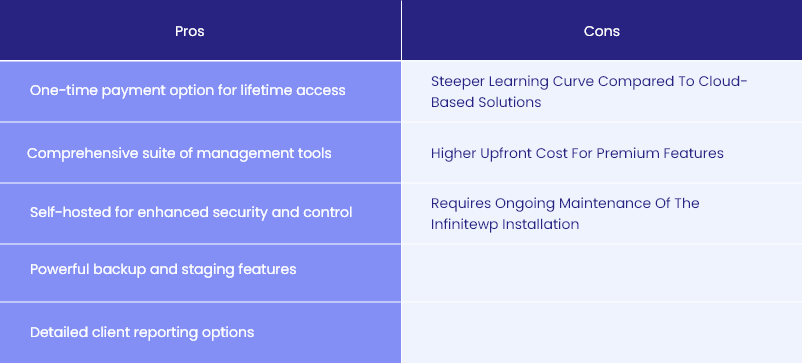
InfiniteWP provides a self-hosted platform to manage WordPress websites with extensive features. Let’s break down the advantages and disadvantages.
| Pros | Cons |
| One-time payment option for lifetime access | Steeper learning curve compared to cloud-based solutions |
| Comprehensive suite of management tools | Higher upfront cost for premium features |
| Self-hosted for enhanced security and control | Requires ongoing maintenance of the InfiniteWP installation |
| Powerful backup and staging features | |
| Detailed client reporting options |
Why to use: Best for larger agencies looking for a powerful, self-hosted solution with one-time pricing. Suitable for those who prefer complete control over their management infrastructure and have the technical resources to maintain it. Plans start at $147/year.

4. WP Remote
WP Remote offers a simple, free solution for basic WordPress management. See the pros and cons below:
| Pros | Cons |
| Free for unlimited sites | Limited features compared to premium tools |
| Easy to set up and use | No advanced security or performance tools |
| Includes basic backup and update features | Lacks sophisticated reporting options |
| Clean, straightforward interface | |
| No installation required on client sites |

Why to use: Ideal for beginners or those managing a small number of sites with basic needs. Perfect for freelancers just starting out or for managing personal projects. Free for unlimited sites.

5. Jetpack
Jetpack, developed by Automattic, offers a suite of tools to manage multiple WordPress sites. Here are the pros and cons of Jetpack:
| Pros | Cons |
| Integrated with WordPress.com for seamless management | Some users find it resource-intensive |
| Comprehensive feature set including security, backups, and performance tools | Advanced features require paid plans |
| Free basic plan available | Can be overwhelming due to the large number of features |
| Regular updates and new features | |
| Strong support from the WordPress.com team |

Why to use: Best for those already using WordPress.com or looking for an all-in-one solution deeply integrated with WordPress. Suitable for users who appreciate a wide range of features and don’t mind some complexity. Free basic plan with premium plans starting at $19.95/month/site.

Comparison of WordPress Management Tools
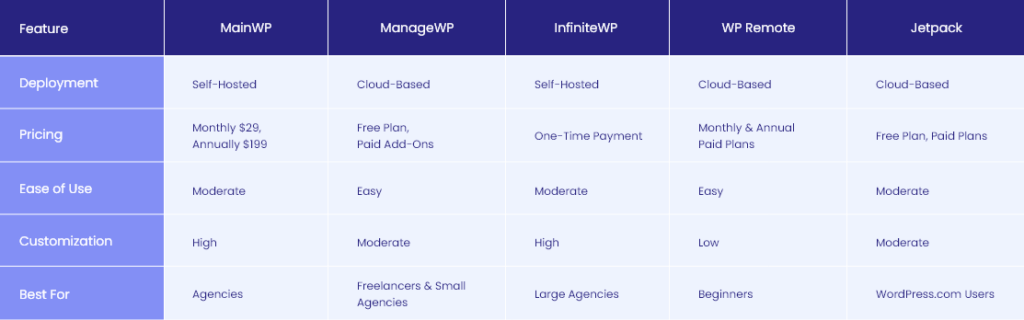
This table provides a high-level overview of the top 5 tools to manage WordPress websites.
Consider these factors when choosing a solution:
- Technical Expertise: Self-hosted options require more technical knowledge.
- Control & Privacy: Self-hosted solutions offer more control over your data.
- Budget: Free and paid plans are available for both deployment options.
Remember: Experiment with different tools to find the best fit for your needs.
Conclusion
Efficiently managing multiple WordPress sites is crucial for agencies and freelancers to scale their business and maintain high-quality service. By leveraging the right WordPress management tools, you can streamline your workflow, enhance security, and improve client satisfaction.
Consider your specific needs, budget, and technical expertise when choosing a solution. Whether you opt for a self-hosted tool like MainWP, a cloud-based service like ManageWP, or decide to outsource your WordPress website management, the key is to implement a system that allows you to focus on growing your business while ensuring your clients’ websites remain secure, up-to-date, and performing optimally.
Remember, as your business grows, your management needs may change. Regularly reassess your tools and strategies to ensure they continue to meet your evolving requirements in the dynamic world of WordPress development and management.
Ultimately, the goal is to find a balance between efficiency, cost-effectiveness, and quality of service. By implementing a robust WordPress management strategy, you can:
- Reduce the time spent on routine maintenance tasks
- Improve the security and performance of your clients’ websites
- Offer more consistent and reliable service
- Scale your business more effectively
- Focus on high-value tasks that drive growth and client satisfaction
As you explore these tools and strategies, remember that the best solution is the one that fits your unique workflow and business model. Don’t be afraid to experiment with different approaches until you find the perfect fit for your WordPress website management needs.
Contact White Label Agency today to discover how our WordPress management services can help your agency deliver exceptional value with confidence.


