


- Types of Multilingual WordPress Sites
- Key Considerations Before Setting Up a Multilingual Site
- Best WordPress Multilingual Plugins (Comparison)
- Optimizing for Multilingual SEO
- Testing and Troubleshooting Common Issues
- Best Practices for Maintaining a Multilingual WordPress Site
- Unlock Global Opportunities with a Multilingual WordPress Site
- Need Help with WordPress Website Development? Team up with WLA!
A multilingual WordPress site – one that offers content in multiple languages – can help you bridge the gap and connect with people across different regions and languages. But what exactly is a multilingual site, and why is it so important?
Simply put, a multilingual WordPress website displays content in more than one language, helping you reach a diverse range of users. This matters because studies show that 76% of consumers prefer shopping in their native language, meaning that having a multilingual site isn’t just helpful – it’s key to breaking down barriers and truly tapping into a global audience.
The web is increasingly multilingual, and businesses that adapt will stay ahead of the curve. Multilingual sites bring benefits like improved SEO, better user experience, and the ability to reach new markets. Fortunately, creating a multilingual WordPress website is now simpler than ever, thanks to easy-to-use tools and plugins that handle the hard work for you.
In this blog, we’ll walk you through everything you need to know about setting up a multilingual site, the benefits it brings, and provide step-by-step guidance on using plugins and best practices to help you reach a global audience effortlessly.

Types of Multilingual WordPress Sites
When setting up a multilingual WordPress site, it’s important to choose the right translation approach and structure for your needs. Here’s an overview of the main types of multilingual sites and how to create one that best serves your audience.
Manual Translation vs. Automatic Translation
A key decision in creating a multilingual WordPress website is whether to use manual or automatic translation.
- Manual translation involves translating content by hand, often by hiring professional translators or handling it yourself. This approach gives you the most control over accuracy, tone, and context, ensuring that your message is culturally appropriate and specific to each audience.
- Automatic translation, on the other hand, uses machine translation tools (such as Google Translate) to quickly translate content into multiple languages. Automatic translation is fast and budget-friendly but may lack the precision and cultural nuances of manual translation.
For many multilingual WordPress sites, a combination of both approaches works well, with automatic translation for simple content and manual translation for critical pages like home pages and product descriptions.
Full Site Translation vs. Specific Content Translation
Next, consider whether you want to translate your entire site or only specific sections.
- Full Site Translation involves translating all pages, menus, and even plugin-generated content. This option creates a seamless experience for users, allowing them to navigate your site entirely in their preferred language.
- Specific Content Translation focuses only on key pages, such as product listings, blog posts, or service pages. This selective approach is useful if you’re just starting out and want to test engagement in other languages without translating every page.
Understanding how to create a multilingual WordPress website means balancing your goals and resources to decide which parts of the site need translation.
Subdomain, Subdirectory, or URL Path for Each Language
Finally, you’ll need to choose the URL structure for each language, which impacts SEO and user experience.
- Subdomain (e.g.,
fr.yourwebsite.com) treats each language as a separate subdomain, ideal for managing large sites with regional distinctions. - Subdirectory (e.g.,
yourwebsite.com/fr) places each language version within a folder on the main site, keeping all versions under the same domain, which can simplify SEO efforts. - URL Path (e.g.,
yourwebsite.com?lang=fr) adds a query parameter for each language. While less popular, it can be a quick setup, though it may not be as SEO-friendly as other methods.
Choosing the right structure depends on your site’s goals and the level of complexity you’re ready to handle. Selecting the best options for your multilingual WordPress site ensures a smooth experience for both users and search engines.

Key Considerations Before Setting Up a Multilingual Site
Creating a successful multilingual WordPress site involves more than just translating content – it requires thoughtful planning and preparation. Here are the key considerations to ensure your multilingual website structure is optimized for both users and search engines.
Determining Your Target Languages
Start by identifying the languages your audience speaks. Analyze your website’s traffic data to understand where your visitors come from and which languages they prefer. Consider the regions you want to expand into and prioritize languages accordingly. Choosing the right target languages ensures your multilingual WordPress website resonates with your global audience.
Ensuring Your Theme and Plugins Are Translation-Ready
Not all WordPress themes and plugins are designed for multilingual functionality. Before setting up your multilingual site, check if your theme is translation-ready and supports popular multilingual plugins like WPML or Polylang. Similarly, ensure any plugins you rely on for features such as forms or e-commerce can be translated without issues. Using a translation-compatible setup prevents technical hiccups later.
Assessing Your Website’s Current Content Structure and Architecture
A clear and organized website structure is crucial for creating a seamless multilingual experience. Review your current content architecture to ensure it’s well-organized and easy to navigate. Clean up outdated or redundant pages and set up a logical hierarchy for your multilingual website structure. This step makes translating and managing content for multiple languages more efficient.
Choosing the Right Translation Approach (Manual or Automatic)
Decide whether you’ll use manual translation for precise, high-quality content or automatic translation for a faster and more affordable option. For most multilingual WordPress sites, a hybrid approach works best: use manual translation for important pages like the homepage and product descriptions, while automatic translation can handle less critical pages.
Importance of Language Switchers and User Experience
A language switcher is essential for guiding users to their preferred language version. Place it in a prominent location, such as the header or navigation menu, and make it intuitive to use. The switcher should be visually appealing and include recognizable language labels or flags. A user-friendly language switcher enhances the overall experience of your multilingual WordPress website, encouraging visitors to explore your content.
By addressing these considerations, you’ll set a strong foundation for a multilingual website structure that is easy to manage, offers a great user experience, and supports your global growth goals.

Best WordPress Multilingual Plugins (Comparison)
Choosing the right plugin is a critical step in creating a successful multilingual WordPress website. Fortunately, WordPress offers several robust plugins that make it easy to translate and manage your content. Below, we’ll explore the best WordPress multilingual plugins, compare their features, and help you find the one that fits your needs.
Overview of Popular Plugins
- Weglot
Weglot is a user-friendly, cloud-based translation plugin that automatically translates your site and provides easy editing tools for fine-tuning. It integrates seamlessly with most themes and plugins and supports over 100 languages. - TranslatePress
TranslatePress allows you to translate your site directly from the front end, making it intuitive and visual. It supports both manual and automatic translation through Google Translate or DeepL, offering flexibility for different use cases. - Polylang
Polylang is a popular free option for creating multilingual sites. It offers manual translation capabilities and works well with many themes and plugins. Its straightforward interface makes it ideal for users seeking a simple solution. - WPML (WordPress Multilingual Plugin)
WPML is a comprehensive solution for larger, more complex websites. It supports manual translation, integrates with professional translation services, and works seamlessly with WooCommerce for multilingual online stores.
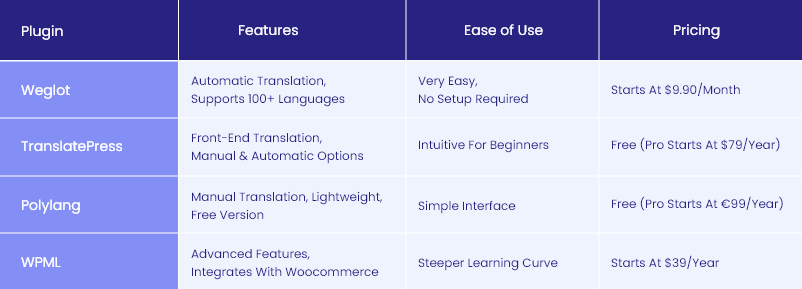
Which Plugin is Best for Your Needs?
- For Quick and Automatic Translation: Weglot is a great choice if you need a fast, hands-off solution to translate your multilingual WordPress site with minimal setup.
- For Visual, Front-End Translation: TranslatePress is ideal for users who want a hands-on approach and a visual interface to manage translations directly.
- For Budget-Friendly Manual Translation: Polylang is perfect for small sites and those looking for a free option to manage manual translations.
- For Complex, Large-Scale Sites: WPML is the best WordPress multilingual plugin for handling more advanced needs, such as WooCommerce integration and multi-user translation workflows.
By selecting the right plugin based on your specific needs, you’ll be well-equipped to build a multilingual WordPress website that is user-friendly, scalable, and optimized for global reach.
WordPress Development Agency
Experience WordPress development with our custom-coded websites. Perfect for agencies, our reliable service ensures timely delivery and client satisfaction.
Optimizing for Multilingual SEO
Creating a multilingual WordPress site is about ensuring that your site is optimized for search engines in every language. A well-optimized multilingual WordPress SEO strategy will help you rank higher, attract a global audience, and improve user engagement. Here’s how to optimize your multilingual website structure for SEO success.
On-Page SEO Best Practices for Multiple Languages
To ensure each language version of your site ranks well:
- Use hreflang tags to inform search engines about the language and regional targeting of your pages. This helps prevent confusion and ensures users see the correct version.
- Optimize meta titles and descriptions in each language, using relevant keywords tailored to the local audience.
- Translate alt text for images to improve accessibility and multilingual WordPress SEO.
Creating Multilingual Sitemaps
Search engines rely on sitemaps to index your site effectively. When building a multilingual website structure:
- Ensure each language version is included in the sitemap and linked to its corresponding pages via hreflang attributes.
- Submit these sitemaps to search engines to ensure all your language pages are indexed properly.
Setting Up Google Search Console and Bing Webmaster Tools for Multiple Languages
Once your multilingual WordPress site is live, register each language version in Google Search Console and Bing Webmaster Tools:
- Verify your site and submit the multilingual sitemaps.
- Monitor how each language version performs in search results.
- Use the search performance reports to identify opportunities to improve rankings for different regions.
Avoiding Duplicate Content Issues with Translations
Search engines can penalize sites for duplicate content, so it’s crucial to differentiate translations:
- Ensure each language version offers unique, high-quality translations instead of machine-generated content alone.
- Use hreflang tags to signal to search engines that the pages are language variations, not duplicates.
Tracking Analytics for Different Languages
Understanding how users interact with your multilingual WordPress website is key to improving performance:
- Use Google Analytics or similar tools to track traffic and engagement for each language version.
- Set up filters or separate views for different languages to analyze region-specific behavior.
- Regularly review metrics like bounce rate, time on page, and conversion rates to identify areas for improvement.
By implementing these strategies, you’ll create a multilingual WordPress site with a strong multilingual website structure that performs well in search engines, attracts the right audience, and delivers an excellent user experience.
WordPress website building
Enhance your agency’s offerings with expert WordPress website building services. We design, develop, and maintain fast and responsive WordPress sites.
Testing and Troubleshooting Common Issues
Once your multilingual WordPress site is set up, thorough testing and troubleshooting are crucial to ensure a seamless experience for your users. This includes verifying that your language switchers, translations, and SEO settings work as intended. Below are steps to identify and resolve common issues in a multilingual website structure.
Testing Language Switchers
The language switcher is a critical component of any multilingual site. Ensure it functions correctly by:
- Testing its visibility and placement: The switcher should be prominently displayed, such as in the header or menu, and easy for users to locate.
- Verifying functionality: Click through each language option to confirm that it leads to the correct version of the page.
- Ensuring consistency: The switcher should remain accessible and functional on every page across all devices.
Verifying Translations Across Different Devices
Translations must look and function properly on all devices and screen sizes:
- Use tools to check how translations render on smartphones and tablets.
- Test the multilingual website structure on multiple browsers, including Chrome, Firefox, and Safari, to ensure compatibility.
- Manually review pages in each language to confirm that all content, menus, and forms are correctly translated and aligned.
Troubleshooting Plugin Conflicts and Translation Issues
Multilingual WordPress SEO plugins and translation tools can sometimes conflict with other plugins or themes. Here’s how to troubleshoot:
- Deactivate other plugins: If your translation plugin isn’t working, deactivate other plugins one by one to identify potential conflicts.
- Check for updates: Ensure all plugins, themes, and WordPress itself are updated to their latest versions.
- Consult plugin documentation: Most multilingual plugins provide support articles and FAQs for common issues, which can save time when troubleshooting.
Fixing Common SEO and Indexing Errors for Multilingual Sites
Errors in multilingual WordPress SEO can harm your site’s performance. Address these issues by:
- Resolving hreflang errors: Use tools like Screaming Frog or Google Search Console to identify and fix incorrect hreflang tags.
- Eliminating duplicate content issues: Ensure all translated pages are unique and properly linked using hreflang attributes.
- Submitting multilingual sitemaps: Regularly update and resubmit your multilingual sitemaps to search engines to maintain proper indexing.
- Checking meta tags: Verify that meta titles, descriptions, and alt tags are translated and optimized for each language.
By thoroughly testing and troubleshooting your multilingual WordPress site, you’ll ensure a polished, user-friendly experience that supports a strong multilingual website structure and maximizes SEO potential.

Best Practices for Maintaining a Multilingual WordPress Site
After successfully creating a multilingual site, maintaining it is essential to ensure it remains functional, user-friendly, and optimized for search engines. Follow these best practices to keep your multilingual website running smoothly and your multilingual WordPress SEO on point.
Keeping Translations Up-to-Date
Content evolves over time, and so should your translations.
- Update translations for new content: Whenever you add blog posts, product descriptions, or service pages, ensure they are promptly translated into all supported languages.
- Review existing translations regularly: Language nuances can change, or translations may need refinement to better resonate with your audience.
- Use professional translators when necessary: For high-priority pages, rely on manual translations to maintain quality and accuracy.
Regularly Updating Plugins to Avoid Conflicts
WordPress plugins are updated frequently to improve functionality and security.
- Keep translation plugins updated: Updates often include fixes for bugs and compatibility issues with other plugins or themes.
- Test after updates: Run a quick check on your multilingual site after plugin or WordPress updates to ensure all features are working correctly.
- Back up your site: Always back up your site before applying updates to prevent data loss in case of conflicts.
Testing Translation Accuracy After Website Updates
Website updates, whether to the theme, plugins, or WordPress core, can sometimes disrupt translations or language-specific settings.
- Manually check translated pages: Ensure content remains accurate and no elements (like buttons or menus) have reverted to the default language.
- Verify language switchers: Test the switcher to confirm it still redirects users to the correct language versions.
- Run automated tests: Use tools like WPML’s or Polylang’s diagnostic features to identify potential translation errors after updates.
Monitoring Multilingual SEO Performance
Maintaining strong multilingual WordPress SEO is critical for ensuring your site performs well in search engines across all languages.
- Track rankings for each language: Use tools like Google Search Console or Ahrefs to monitor how well your content ranks in different regions and languages.
- Analyze traffic patterns: Check Google Analytics to understand how users interact with your multilingual site and identify areas for improvement.
- Optimize based on performance: Update keywords, meta tags, and other on-page SEO elements for underperforming language versions.
By following these best practices, you can maintain a high-performing multilingual WordPress site that delivers a seamless user experience, stays compatible with updates, and maximizes its global reach. Proper maintenance ensures your site remains a valuable asset for reaching audiences worldwide while boosting multilingual WordPress SEO.
Unlock Global Opportunities with a Multilingual WordPress Site
Creating a multilingual WordPress site is a powerful step toward expanding your reach and engaging a global audience. By offering content in multiple languages, you can enhance user experience, improve SEO, and open new opportunities for growth in international markets.
This guide has shown you how to create a multilingual site, from choosing the right plugins and optimizing for SEO to maintaining a seamless multilingual website structure. With the right tools and practices, setting up a multilingual site is more accessible than ever.
Now it’s your turn! Start building your multilingual WordPress website today and unlock the potential to connect with audiences worldwide. For additional support, check out these resources:
- Weglot: A top-rated translation plugin for automatic translations.
- Yoast SEO: Optimize your multilingual site for search engines.
- Polylang: A free and simple solution for manual translations.
Need Help with WordPress Website Development? Team up with WLA!
At White Label Agency (WLA), we’re here to help you unlock the full potential of a multilingual WordPress site. With experience partnering with over 600 agencies, we’ve successfully produced 10,000+ websites and currently provide maintenance for 800 websites across diverse industries.
Whether you need expert guidance in implementing multilingual functionality or ongoing support to keep your site optimized and user-friendly, our team has the expertise and capacity to deliver. Contact WLA today to join hundreds of agencies already thriving with our trusted solutions!


