


- What is headless WordPress?
- What is traditional WordPress?
- Headless WordPress vs traditional WordPress: comparison table
- The hidden trade-offs of using headless
- When to use headless WordPress
- When traditional WordPress makes more sense
- A decision framework for agencies
- Most agency projects do not need headless
The headless architecture conversation has picked up speed over the past few years. Agencies are hearing about it from clients, from developers, and from the broader tech press. And at some point, someone has to decide whether it is the right call for the project.
At WLA, we have built well over 10,000 websites alongside 600+ agencies. The headless question comes up more than it used to, and our honest answer is almost always the same: it depends on the project, the client, and what your agency can realistically support. This blog is our attempt to lay out the trade-offs clearly, so you can make that call with confidence.
What is headless WordPress?

Traditional and headless WordPress share the same core software, but they are organized differently.
In a standard WordPress setup, the content management system and the front end live together. WordPress stores the content, generates the page templates, and delivers everything to the browser as a finished HTML page. Content and presentation are coupled: one system handles both.
A headless setup decouples them. WordPress still manages the content in the back end, but it no longer controls how that content is displayed. Instead, it exposes content through an Application Programming Interface (API), which a separate front-end application reads and uses to render the site. That front end is typically built with a JavaScript framework such as Next.js, React, or Vue.js.
The kitchen analogy is useful here. Traditional WordPress is a restaurant where the kitchen and the dining room are part of the same building. A headless setup turns the kitchen into a delivery-only operation. The food (content) still comes from the same place, but it can now be delivered to different dining rooms: a website, a mobile app, a kiosk, a digital signage system, whatever the project requires.
The appeal is that you get full control over the front-end technology, cleaner separation between content and presentation, and the ability to push the same content to multiple platforms from a single back-end instance. For the right project, those are meaningful advantages.
What is traditional WordPress?
WordPress powers somewhere around 43.4% of all websites on the internet as of 2026, which is a reasonable indication of how practical it is for most use cases. It handles content management, theming, plugins, and page rendering in one integrated system, running on PHP with a MySQL database behind it.
For agencies, the practical advantages are significant. WordPress has a mature ecosystem: tens of thousands of plugins, a large global talent pool, established hosting infrastructure, and a content editing experience that most non-technical clients can use without training. A competent team can take a project from brief to launch in a few weeks for most standard site types, and the client can take over content management immediately after handover.
The Gutenberg block editor, which has matured considerably since its introduction, gives editors a flexible drag-and-drop interface that works without developer involvement. Tools like Advanced Custom Fields (ACF) extend this further, allowing for complex content structures without custom code. Add in a well-chosen theme or page builder, and traditional WordPress can handle everything from a five-page brochure site to a content-heavy media publication.
Its limitations are real too, and it would be misleading to ignore them. Performance can degrade with heavy plugin use if the site is not carefully optimized. The shared architecture means that a poorly configured plugin can create security exposure. And for projects that genuinely require content delivery across multiple platforms simultaneously, the coupled architecture can potentially become a constraint.
Headless WordPress vs traditional WordPress: comparison table
The table below covers the main factors agencies might want to weigh when comparing the two approaches.
| Factor | Traditional WordPress | Headless WordPress |
| Setup time | Days to weeks | Weeks to months |
| Front-end flexibility | Constrained by PHP themes | Full freedom; any JS framework |
| Content editing experience | Native, familiar, visual | Requires custom preview builds |
| Plugin compatibility | Full ecosystem available | Many plugins become unusable |
| Performance ceiling | Good with optimization | Higher ceiling, harder to reach |
| Multi-platform delivery | Requires workarounds | Native via API |
| Developer skill required | WordPress developers | WordPress plus JS framework developers |
| Maintenance complexity | Moderate | Higher: two separate systems |
| Client handover ease | High | Low to moderate |
| Cost to build | Lower | Significantly higher |
Neither approach is universally better. The right choice depends on what the project actually requires.
The hidden trade-offs of using headless
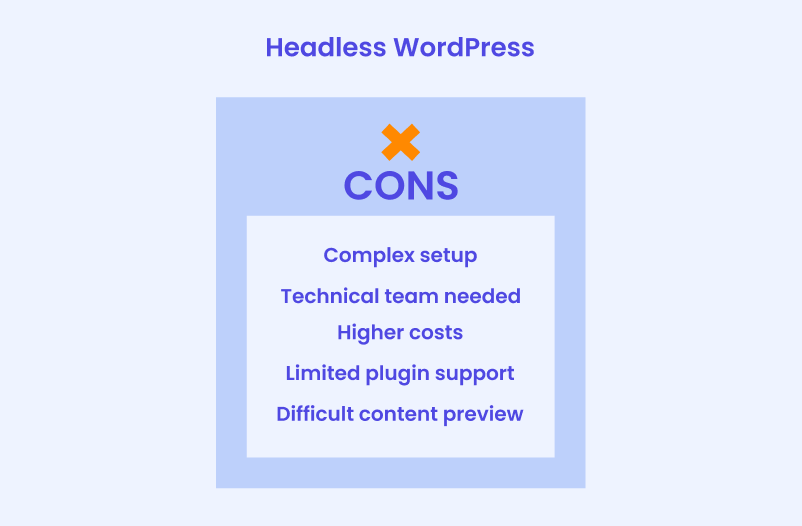
The comparison table above captures the functional differences. What it does not fully capture are the operational costs that headless projects bring for agencies, specifically. We think these are worth thinking through carefully before you commit to an architecture.
Development time
A headless project is not simply a WordPress project with a different front end attached. It is two projects: a WordPress back-end build and a separate front-end application, connected by an API layer. That means two codebases, two deployment pipelines, and two sets of dependencies to manage. Build time is typically two to three times longer than a comparable traditional WordPress project, which has direct implications for how you scope, price, and staff the work.
Maintenance burden
Once the site is live, the maintenance picture changes, too. Updates to WordPress core and plugins can break API responses in ways that only surface on the front end. The front-end framework has its own dependency chain that requires separate attention. Debugging is also harder because issues can originate in either system or in the connection between them.
Anna, our Head of Maintenance at WLA, puts it better than us: “You are maintaining two separate systems that need to stay in sync. A WordPress update can surface a problem on the front end, and a front-end dependency change can break something in the API layer. Neither is hard to handle on its own, but you need to know both sides well to debug them quickly.”
WordPress maintenance plans
WordPress Maintenance Plans ensure site security, performance, and uptime. Choose custom plans with backups, monitoring, and unlimited content edits.
Client handover complexity
Traditional WordPress hands over cleanly. The client logs into a familiar dashboard, edits content visually, sees a live preview, and publishes. With a headless setup, the native WordPress preview does not work out of the box because the front end is separate. And building a usable preview environment for editors requires custom development. Sometimes agencies might underestimate this cost, and clients who expected a straightforward content experience find themselves managing something they did not anticipate.
Profit margins
Headless projects carry higher development costs, more specialized skill requirements, and longer timelines. Unless your agency has priced for all of this, margins can compress quickly. It is also harder to reuse components and templates across projects the way agencies commonly do with traditional WordPress builds. For headless to be financially sustainable for your agency, we think the project scope, client budget, and internal capability all need to align.
When to use headless WordPress

Headless is not the wrong choice. It is just the wrong choice for most projects that most agencies work on. There are specific situations where the investment makes sense, though.
Case 1: When one piece of content needs to appear in multiple places
The clearest case for headless is when the same content needs to appear in multiple places at once. A retail brand publishing to a website, a mobile app, and an in-store display is a practical example. Without a shared back end, each channel needs its own content, which means more work and more room for inconsistency. Headless solves that by letting every platform pull from one source.
Al Jazeera is a useful real-world example. Their editorial team works in WordPress, and that content feeds multiple front-end properties through an API. At that publishing volume and across that many channels, headless makes sense. Most agency clients are not operating at that scale, though, and the overhead that comes with headless rarely pays off for smaller projects.
Case 2: When you are building an application, not a website
Some websites are actually applications: custom dashboards, member portals, interactive data tools, or platforms with deeply dynamic user interfaces. For these, a JavaScript framework handles the interaction model better than WordPress’s PHP-based rendering, and using WordPress purely as a content and data store makes sense. In this case, the front end is doing most of the work, and it needs the freedom that a decoupled architecture provides.
Case 3: When the site handles high traffic volumes
There is a performance ceiling on traditional WordPress that caching and optimization can raise, but not eliminate. For sites with very high traffic, where content changes constantly and slow load times cost the business money, the performance advantages of headless may justify the investment.
TechCrunch, for example, uses WordPress as its content management back end while running a custom front end for exactly this reason: the editorial team keeps their familiar WordPress workflow, and the delivery layer is optimized independently. If your client’s site is genuinely at that scale, headless is worth the investment. Below that scale, traditional WordPress with proper caching typically handles the load without the added complexity.
When traditional WordPress makes more sense
For most agency projects, we believe traditional WordPress is the right fit. We put together a couple of real-world use cases so you can better see the benefits of traditional WordPress.
Case 1: Cost-sensitive projects with standard requirements
Most agency clients, whether small businesses, professional services firms, or mid-sized companies, need a professional website that is reliable, easy to manage, and cost-effective. Headless architecture doubles or triples development costs and sometimes delivers benefits that those clients will never use. Traditional WordPress, built well, meets the brief. The savings can go toward better design, more content, or additional features that the client will actually notice and use.
Case 2: Fast delivery timelines
Agencies work to deadlines. Headless requires more upfront architectural decisions, longer setup, and more coordination between front-end and back-end work. When a client needs a site to go live in six to eight weeks, traditional WordPress is a more realistic path.
As Natalia, our Head of Production at WLA, says, with a standard WordPress build, you can reuse patterns that you have refined across hundreds of projects. “The hosting setup, the plugin stack, the deployment process: it is all familiar. With headless, you are making new decisions at every layer. That adds time and naturally costs,” she notes.
Case 3: Marketing-driven websites built for SEO
A large share of agency work is marketing sites: sites designed to rank in search, generate leads, and communicate clearly. Traditional WordPress handles this category well. WordPress for agencies remains a strong default here because the SEO tooling (Yoast, RankMath), the content editing experience, and the page-building flexibility all support marketing workflows natively. Headless requires rebuilding much of this from scratch: sitemaps, meta tag management, structured data, and content previews all need custom solutions that traditional WordPress provides out of the box.
Case 4: Non-technical clients who manage their own content
A significant portion of agency clients self-manage their content after launch. For those clients, the content editing experience matters a great deal. Traditional WordPress gives them a visual editor, live previews, and a dashboard they can learn without developer support. A headless setup, without substantial investment in a custom editorial interface, can confuse non-technical clients. In our experience working with agencies, client-managed content is one of the most common requirements, and it is one of the clearest arguments for traditional WordPress in most project contexts.
A decision framework for agencies
Insert image #4 “Decision framework: headless vs traditional WordPress”
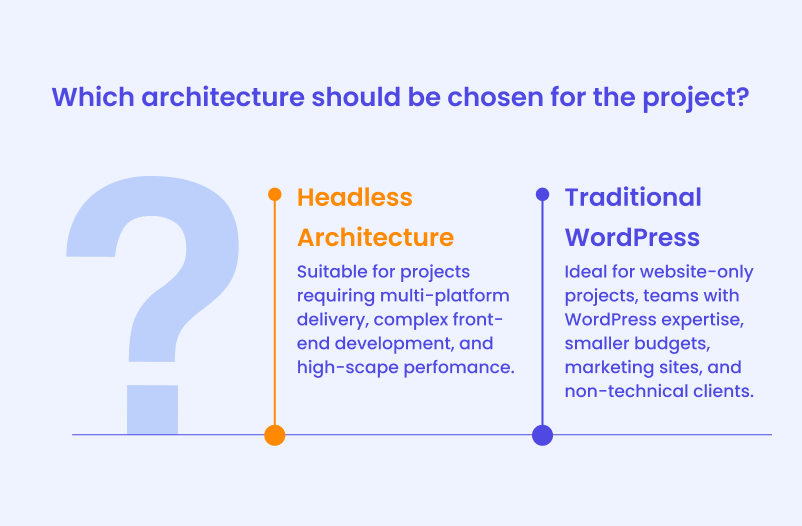
Before committing to either architecture, it is worth working through a short set of questions. The answers usually make the right choice clear. Here is a 6-question framework that can come in handy.
- Does the project require content delivery to multiple platforms simultaneously? If yes, headless is worth considering. If the project is a website and only a website, the multi-platform argument does not apply.
- Does your team have the front-end development capability to build and maintain a JavaScript framework application? Headless requires developers who can work with React, Next.js, or a comparable framework, as well as WordPress developers who understand API configuration. If your team is primarily WordPress-focused, headless might give you a significant skill gap.
- Does the client budget support a significantly longer and more expensive build? Headless projects should be priced accordingly. If the budget is not there, the architecture might not be realistic, regardless of its technical merits.
- Is this a product or a marketing site? Product-like applications with complex interaction requirements may benefit from a JavaScript front end. Marketing sites almost always do better with traditional WordPress.
- Will a non-technical client be managing content? If yes, and if a custom editorial interface is not budgeted for, traditional WordPress is the safer choice for the client relationship.
- Is performance at scale a genuine requirement, or a nice-to-have? There is a difference between wanting a fast site (achievable with traditional WordPress and proper optimization) and needing to handle millions of monthly visits with constant content updates (where headless performance advantages become real). Just give it a thought and consider which situation your client is actually in.
A useful shorthand: if you cannot point to a concrete project requirement that headless solves and traditional WordPress cannot, traditional WordPress is probably the right call. If you need to hire a WordPress developer who can handle either architecture, we can help with that.
Most agency projects do not need headless
For most agency projects, traditional WordPress is the right choice. It is faster to build, easier to hand over, and the client can manage it without help. Headless makes sense when a project genuinely needs it: multiple delivery channels, a product-like application, or traffic at a scale where performance becomes a business problem. Outside those situations, it adds cost and complexity without much to show for it.
Natalia, our Head of Production, summarizes it well: “Headless setup is impressive, there is no question about it. But we’re talking about whether the project actually needs what headless offers. And in our experience, most do not.”
If you are working through this decision on a current project or looking for a development team that can handle both approaches, we are happy to talk through the specifics. Please feel free to reach out our team, and we can discuss how we can help your agency grow.


