


- Benefits of Tracking User Behavior
- Understanding User Behavior Tracking
- 5 Key Features to Look for in a User Behavior Tracking Plugin
- Top 10 WordPress Plugins for Tracking User Behavior
- Comparing Free vs. Premium Plugins
- 4 Advanced Tracking Techniques
- Integrating with Analytics and Marketing Tools
- Privacy and Data Compliance
- Monitoring and Analyzing the Data
- Common Challenges and Solutions in Tracking User Behavior
- Conclusion: Empower Your Website with the Right Tracking Tools
To create a successful website, it’s crucial to understand how visitors interact with your pages. Tracking user behavior on WordPress provides powerful data insights, helping you enhance user experience, boost site performance, and improve conversion rates.
Finding the right WordPress plugin to track user activity is essential, whether you’re new to WordPress or a seasoned pro. This guide serves as a comprehensive resource, covering everything you need to know to choose and use the best plugins for tracking user behavior, including key features, pricing, compatibility, and unique strengths.
Benefits of Tracking User Behavior
The right WordPress tracking plugin has become fundamental for any website owner looking to make data-driven improvements. With a robust WordPress user tracking plugin, you can monitor how visitors engage with your site, from clicking on links to scrolling through content. This data provides insights that empower you to optimize content, design, and functionality to improve user experience and increase conversions.
3 Benefits of Tracking User Activity
- Enhanced User Experience: By implementing a WordPress plugin to track user activity, you can make adjustments that create a more engaging and seamless browsing experience.
- Optimized Content: Your chosen WordPress tracking plugin shows what content resonates with users, allowing you to refine your strategy.
- Improved Conversion Rates: Data insights from your WordPress plugin to track user activity highlight friction points in your conversion funnel, helping you make changes that boost lead generation and sales.
WordPress Development Agency
Experience WordPress development with our custom-coded websites. Perfect for agencies, our reliable service ensures timely delivery and client satisfaction.
Understanding User Behavior Tracking
To make meaningful improvements to your WordPress site, it’s essential to understand how visitors interact with it. User behavior tracking provides valuable insights that can guide data-driven adjustments, helping you refine your site’s design, content, and overall functionality. This section explains what user behavior tracking is, why it’s important for WordPress site owners, and how it impacts both SEO and user experience.
What is User Behavior Tracking?
User behavior tracking through a WordPress tracking plugin is the process of monitoring how visitors interact with various elements on your site. This includes tracking pageviews, session duration, clicks, form submissions, heatmaps, scroll depth, and conversions. Each metric provides a piece of the puzzle that helps you understand user preferences, enabling you to tailor your site to meet their needs.
Why User Behavior Tracking Matters for WordPress Site Owners
Understanding user behavior allows you to make data-informed decisions that enhance your site’s usability and engagement. By tracking interactions with the tracking plugin, you can discover areas where users drop off or lose interest, allowing you to make precise adjustments. For instance, if a page has a high bounce rate, tracking can reveal if the problem lies with navigation, content relevance, or page load time.
How Tracking Supports SEO and UX
User behavior tracking impacts SEO by helping reduce bounce rates, increase time on site, and encourage deeper navigation. When users easily find what they’re looking for, they’re more likely to stay longer and engage more fully. This enhanced engagement boosts SEO rankings, as search engines prioritize sites with high user satisfaction.
Additionally, understanding behavior helps improve UX, as it reveals how users navigate, what they engage with, and what they ignore.

5 Key Features to Look for in a User Behavior Tracking Plugin
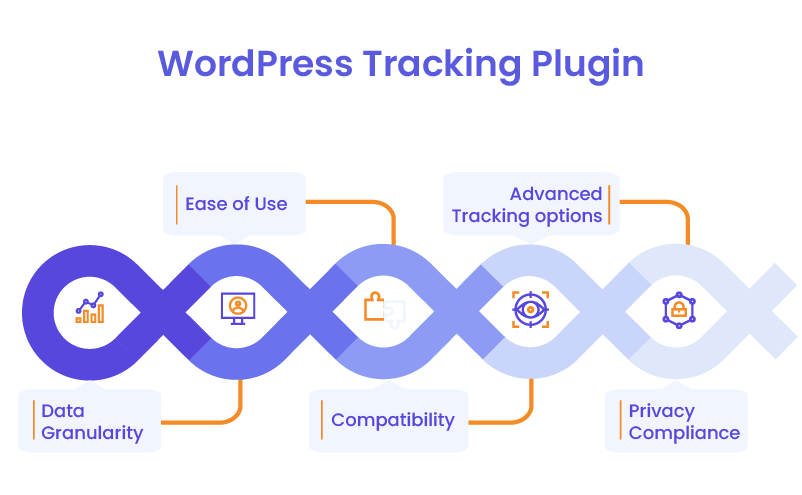
Choosing the right WordPress tracking plugin involves understanding which features are critical for your goals. Here are the top features to consider:
- Data Granularity: A plugin should offer a balance between real-time and historical data. Real-time data provides immediate insights, while historical data allows for trend analysis. Look for options that include segmentation and filtering, so you can isolate specific user behaviors.
- Ease of Use: A user-friendly dashboard, clear reports, and simple integration with WordPress are key to a hassle-free experience. If a WordPress user tracking plugin has an overwhelming interface or requires extensive customization, it may complicate your workflow.
- Compatibility: Make sure the plugin is compatible with your theme, mobile devices, and any other plugins in use. Compatibility ensures the WordPress user behavior tracking plugin doesn’t slow down or conflict with other site functionalities.
- Advanced Tracking Options: Advanced features, like heatmaps, session recordings, event tracking, A/B testing, and conversion goals, provide deeper insights and allow for more sophisticated tracking.
- Privacy Compliance: Data protection laws like GDPR and CCPA require websites to handle user data responsibly. Choose plugins that offer compliance features, including data anonymization and privacy policies, to avoid legal issues and build trust with your users.
Top 10 WordPress Plugins for Tracking User Behavior
Below is a curated list of the top 10 WordPress plugin to track user activity, chosen based on features, ease of use, and user feedback. This selection covers a range of functionalities, from basic analytics to advanced behavior tracking.
1. Formidable Forms
Formidable Forms isn’t just a form builder; it’s also excellent for tracking user interactions within forms. With custom event tracking and detailed reporting, this plugin lets you capture behavior specific to form submissions, which can be invaluable for sites relying on lead capture or complex form workflows.
2. HubSpot Plugin
HubSpot’s WordPress plugin to track user activity is a comprehensive tool for tracking visitor behavior, lead generation, and user insights. It offers integrated analytics, which makes it ideal for marketing-focused sites. With its user-friendly dashboard and in-depth behavior tracking, HubSpot is a solid choice for those looking to understand and convert leads.
3. WP Statistics
WP Statistics provides a wide array of tracking features, including real-time visitor tracking, page views, and country-specific data. Its custom reporting options make it easier to visualize trends, and its straightforward interface is well-suited for users at all experience levels.
4. Mouseflow
Known for its in-depth heatmaps and session recordings, Mouseflow enables you to capture detailed user actions. Custom event tracking also allows you to pinpoint the precise behaviors that impact conversions, making Mouseflow a robust tool for behavioral analysis.
5. Crazy Egg
Crazy Egg offers heatmaps, scroll maps, and A/B testing tools that help you see exactly how users interact with pages. It’s particularly useful for optimizing page layout and content by revealing where visitors click and how far they scroll.
6. Google Site Kit
Google Site Kit integrates Google Analytics, Search Console, and Ads into your WordPress tracking plugin dashboard, providing a centralized view of user activity. While it doesn’t offer the same granular tracking as some plugins, it’s ideal for users who want a general overview of site performance without additional setup.
7. Heap Analytics
Heap is a unique plugin that provides automatic event tracking. You don’t need to manually configure events to start capturing data, making it easy to gather insights on user interactions and segment data for detailed analysis.
8. Hotjar
With heatmaps, feedback polls, and session recordings, Hotjar is one of the best tools for visualizing user behavior. Hotjar’s focus on feedback collection also allows you to directly ask users about their experience, adding a qualitative element to your analysis.
9. Clicky
Clicky stands out for its real-time analytics, which is valuable for sites that need instant feedback on user behavior. Its interface is easy to navigate, and it includes core WordPress tracking plugin features, making it a good option for real-time insights.
10. Simple History
Unlike the other plugins on this list, Simple History focuses on tracking backend activities. It logs admin actions and tracks security events, making it useful for sites that need to monitor internal activity in addition to user interactions.
Comparing Free vs. Premium Plugins
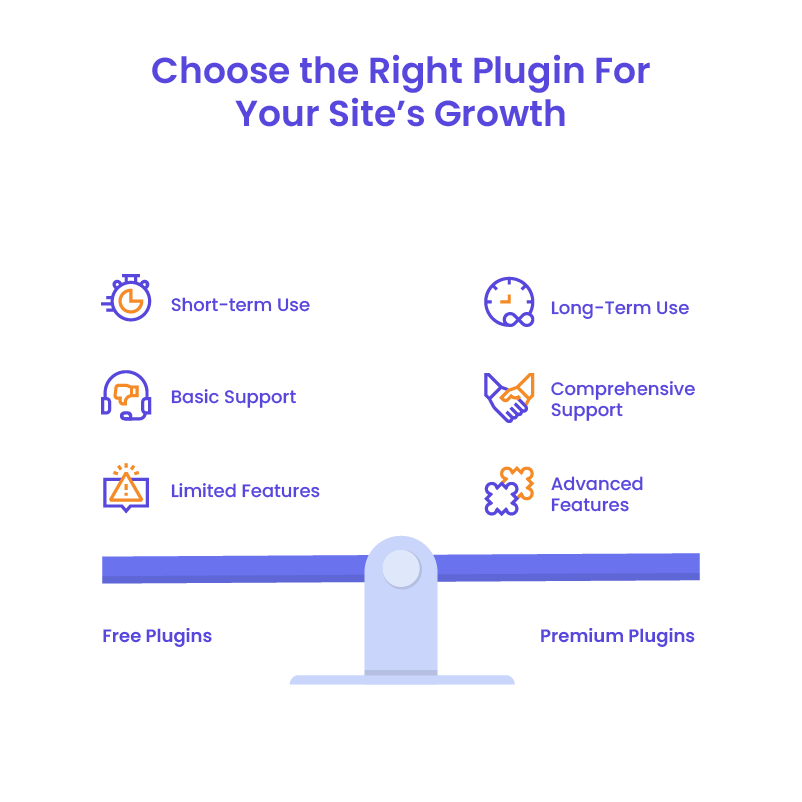
Free plugins are fantastic for getting started with the basics of user behavior tracking, especially for small sites or those just testing the waters. But as your site grows, these tools can start to feel limiting. Think of it like test-driving a compact car: it’s reliable for short trips, but if you’re gearing up for a cross-country journey, you’ll want a vehicle built for long-haul performance. Free plugins often restrict data retention, have fewer features, and lack comprehensive support.
So, when does it make sense to upgrade?
Consider going premium if:
- Your site attracts high traffic and requires deeper insights. In-depth analytics can offer transformative insights, such as tracking how users interact with dynamic content or complex forms.
- You need advanced features like heatmaps, A/B testing, and conversion funnels, which clarify what design, content, or calls-to-action drive the best results.
- Support and customization matter to your team. Premium plugins often include dedicated customer support, which can be invaluable for quickly troubleshooting issues or tailoring the tool to suit specific needs.
For anyone serious about conversion optimization and a seamless user journey, investing in a premium plugin could be the key to unlocking more meaningful data and, ultimately, more growth.
4 Advanced Tracking Techniques
If you’re ready to go beyond pageviews and session duration, advanced tracking techniques can improve your understanding of user behavior, helping you tailor your site even more effectively.
- Behavior Flows
Imagine watching a movie of your user’s journey on your site. With behavior flows, you can do just that. This feature maps each user’s path through your pages, highlighting exactly where they’re drawn in and where they exit. High-exit pages, for instance, might signal content that doesn’t engage or needs improvement, giving you a clear direction for enhancing retention. - Event Tracking
Want to know how often users click that enticing “Buy Now” button? With event tracking, you can pinpoint specific user interactions—whether they’re watching a video, downloading a resource, or clicking a crucial link. Plugins like Heap Analytics and Mouseflow make event tracking easy, allowing you to track these custom actions without manual setup. - Heatmaps and Scroll Maps
Visualize your site from a user’s perspective with heatmaps and scroll maps. These tools reveal exactly where users click, how far they scroll, and which parts of your pages grab the most attention. By identifying “hot spots” on your pages, you can fine-tune layouts and ensure important elements, like call-to-action buttons, are placed where they’re most effective. - A/B Testing
Want to try a new page design but aren’t sure if users will love it? A/B testing allows you to test different versions of a page, revealing which layout or content drives better engagement or conversion rates. Tools like Crazy Egg make this easy by running tests on live traffic and providing data on what works best.
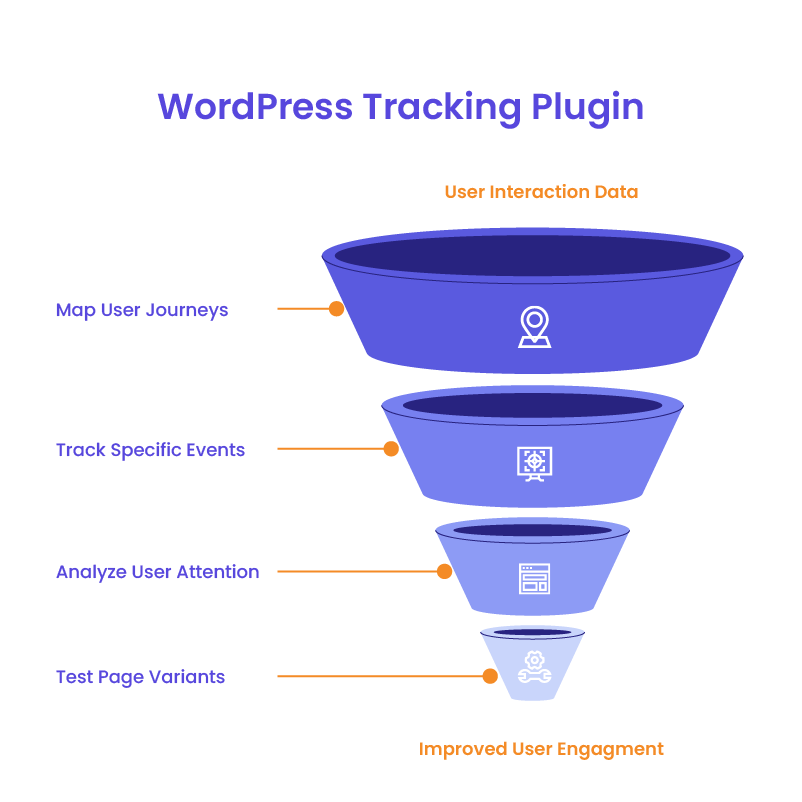
These advanced techniques offer more than just numbers—they provide actionable insights that let you optimize the site for an intuitive, effective user experience.
Integrating with Analytics and Marketing Tools
For a 360-degree view of your user data, consider integrating your tracking plugin with other analytics and marketing tools. Google Analytics, HubSpot, CRMs, and email marketing platforms can all enhance your tracking data, providing richer insights and allowing you to drive personalized, targeted campaigns.
For instance, if you know certain visitors frequently visit specific pages or show interest in particular products, you can segment these users and tailor marketing efforts accordingly. With detailed tracking and unified data, your retargeting efforts become laser-focused, enhancing the likelihood of conversions and customer retention.
Privacy and Data Compliance
Compliance with privacy laws, such as GDPR and CCPA, is essential for websites that collect user data. The WordPress tracking plugin should offer features for data anonymization and help you adhere to privacy policies, keeping your users’ information safe. Configuring plugins to align with these standards not only protects your site from legal risks but also fosters trust among your visitors.
Monitoring and Analyzing the Data
Once your WordPress tracking plugin is up and running, it’s time to turn raw data into actionable insights. Start by setting up dashboards focused on KPIs like conversion rate, bounce rate, and session duration—metrics that matter most to your specific goals. Customized reports can make it easy to visualize these insights and track performance over time.
By analyzing user behavior trends, you can make well-informed, data-backed decisions. Maybe a particular content style leads to longer engagement, or a specific page layout results in more conversions. Each insight offers an opportunity to refine UX, boost engagement, and improve your sales funnel.
WordPress maintenance plans
WordPress Maintenance Plans ensure site security, performance, and uptime. Choose custom plans with backups, monitoring, and unlimited content edits.
Common Challenges and Solutions in Tracking User Behavior
User behavior tracking is invaluable, but it’s not without its challenges. Here’s how to tackle the most common hurdles:
- Data Overload: With so much data available, it’s easy to get overwhelmed. Focus on the metrics that align with your site goals to keep analysis manageable.
- Technical Issues: Tracking plugins can slow down your site or cause compatibility issues with other plugins. Choose a WordPress tracking plugin known for performance optimization and test it thoroughly.
- Data Interpretation Pitfalls: Misinterpreting data can lead to incorrect conclusions. Avoid assumptions and use contextual analysis to get a clearer picture of user behavior.
Conclusion: Empower Your Website with the Right Tracking Tools
Selecting the right WordPress plugin to track user activity enables you to gain insights into visitor interactions, helping you optimize UX, SEO, and conversions. With the right WordPress tracking plugin, you can create a seamless experience that encourages user engagement and supports your growth goals.At White Label Agency, we specialize in crafting custom WordPress solutions tailored to your clients’ unique needs. Our expertise ensures seamless integration of advanced tracking tools, empowering you to deliver data-driven insights and superior user experiences. Partner with us.


