


- Ease of Use & Setup
- Design, Themes & Customization
- Ecommerce Functionality & Core Features
- SEO Capabilities
- Performance, Speed & Scalability
- Security & Maintenance
- Pricing & Cost Analysis
- Integrations, Apps & Automation
- Customer Support & Community Resources
- Use Cases & Ideal Business Scenarios
- Pros & Cons Comparison Summary
- Shopify vs WordPress: Which One Truly Fits Your Needs?
Choosing the right platform for your online business is a critical decision that can significantly impact your store’s success. The choice between Shopify and WordPress with WooCommerce is one of the most debated topics in eCommerce. Both platforms offer powerful tools and features, but they cater to different needs and business models.
Shopify is known for its user-friendly interface, all-in-one solution, and streamlined setup, while WordPress with WooCommerce offers greater flexibility, control, and customization. Each platform has distinct advantages and trade-offs that influence how businesses operate online.
The purpose of this guide is to provide a detailed, side-by-side comparison of Shopify vs WordPress, helping entrepreneurs, eCommerce store owners, and website builders determine which platform best aligns with their business goals. We will explore key aspects such as ease of use, customization, pricing, SEO, performance, security, and support.
For entrepreneurs and small business owners, this guide will provide clarity on which platform is best suited for building and growing an online store. ECommerce store owners considering a platform switch will gain insights into the strengths and limitations of each option. Bloggers and content creators looking to expand into eCommerce will find valuable information on how these platforms support content-driven selling. Developers and website builders seeking deeper customization and scalability options will also benefit from the detailed analysis provided.
By the end of this guide, you will have a comprehensive understanding of WordPress vs Shopify and be equipped to decide on the best platform for your eCommerce needs.
Ease of Use & Setup

When deciding between Shopify or WordPress, ease of use and setup are major considerations. The right choice depends on your level of technical expertise, how much control you want over your store, and how quickly you need to launch your business.
WordPress with WooCommerce
WordPress is a self-hosted platform, meaning you must purchase web hosting separately and install WordPress before setting up your store with WooCommerce. While some hosting providers offer managed WordPress hosting with one-click installations, the process still involves:
- Choosing a web host and setting up your domain.
- Installing WordPress and configuring settings.
- Adding WooCommerce as a plugin and customizing your store.
The learning curve for WordPress is steeper, requiring some technical know-how. You’ll need to handle website maintenance, updates, and security on your own (or hire a developer). However, this greater control is ideal for businesses wanting full customization over their site.
Shopify
Shopify offers a fully hosted, all-in-one solution that eliminates the need for separate hosting. The setup process is streamlined and beginner-friendly:
- Sign up for an account.
- Choose a theme from Shopify’s library.
- Customize your store using a simple drag-and-drop builder.
- Add products and set up payment options.
The Shopify dashboard is intuitive, making it easy for non-technical users to manage products, process orders, and track performance without dealing with coding or backend configurations.
Head-to-Head Comparison: Which Platform is Easier to Use?
The difference between Shopify and WordPress in terms of ease of use comes down to experience and preference:
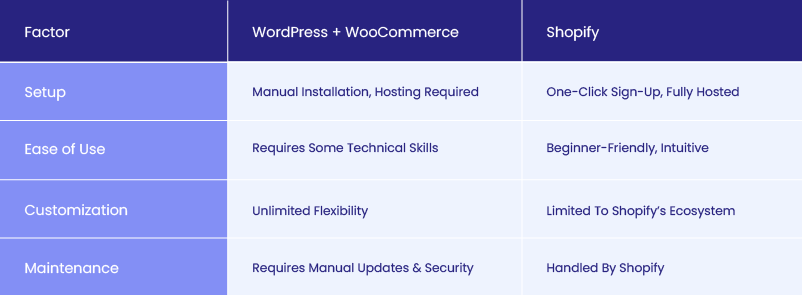
- For beginners and small businesses: Shopify is the easier choice with its guided setup and low technical requirements.
- For developers and advanced users: WordPress provides more customization and control but requires more effort to set up and maintain.
If you prefer an all-in-one solution with minimal setup, Shopify is the best choice. If you’re comfortable with some technical work and want greater control over your store, WordPress with WooCommerce is the way to go.
Design, Themes & Customization
When choosing an eCommerce platform, design and customization play a crucial role in shaping your brand identity and user experience. The ability to create a visually appealing and unique storefront can make a significant impact on conversions. So, is WordPress better than Shopify when it comes to design flexibility? Let’s break it down.
Theme Selection & Quality
Both Shopify and WordPress offer free and premium themes to help businesses get started with a professional-looking website.
- WordPress has thousands of themes available through the official WordPress repository, theme marketplaces like ThemeForest, and independent developers. Many themes come with built-in customization options, and advanced users can tweak themes through custom CSS, HTML, and PHP edits.
- Shopify offers a smaller selection of themes, with both free and premium options in the Shopify Theme Store. While these themes are highly polished, mobile-responsive, and optimized for eCommerce, the selection is limited compared to WordPress.
In terms of theme quality, both platforms ensure modern, responsive designs, but WordPress offers a wider variety due to its open-source nature.
Customization Flexibility
Customization is one of the biggest differences between WordPress and Shopify.
- WordPress (WooCommerce):
- Shopify:
- Uses Liquid (its proprietary coding language), limiting deep customization for non-developers.
- Provides customization options within its theme editor, allowing users to tweak colors, fonts, and layouts.
- Supports Shopify apps to add features, but these are often paid add-ons.
Overall, WordPress is better than Shopify for deep customization, while Shopify prioritizes ease of use and simplicity over flexibility.
Visual Branding & UX Considerations
A strong brand identity and seamless user experience (UX) are essential for eCommerce success.
- WordPress with WooCommerce offers endless possibilities for branding. Businesses can create truly custom designs without restrictions, ensuring their site stands out.
- Shopify, while sleek and well-optimized, relies on templates, meaning many Shopify stores have a similar look and feel unless heavily customized.
If you need a store that reflects a unique brand identity, WordPress is better than Shopify due to its customization freedom. However, if you prefer a ready-made, polished design with minimal effort, Shopify is the easier option.
Shopify to WordPress
Migrate from Shopify to WordPress easily, enjoying powerful features, full customization, and advanced control. Begin your store’s new journey today!
Ecommerce Functionality & Core Features
When comparing WordPress and Shopify, the core eCommerce functionality of each platform plays a crucial role in determining which is the best fit for your business. From store management to payment gateways, shipping, and checkout experience, each platform offers distinct features and trade-offs.
Store Management
Managing an online store requires efficient product catalog organization, inventory control, and seamless order processing.
- Shopify:
- Offers a centralized, beginner-friendly dashboard to manage products, inventory, and orders.
- Supports bulk product uploads, making it easier to scale.
- Automated stock tracking ensures you don’t oversell.
- Integrated order fulfillment options like Shopify Fulfillment Network.
- WordPress with WooCommerce:
- Provides greater flexibility in product management but requires additional plugins for automation.
- No built-in inventory management, but can be expanded with plugins like WooCommerce Stock Manager.
- Ideal for businesses needing custom product attributes or complex inventory structures.
If you need a plug-and-play solution with minimal setup, Shopify is easier. If you want full control over inventory and store functions, WordPress is better.
Payment Gateways & Transaction Fees
One of the biggest differences between Shopify or WordPress is the payment processing structure.
- Shopify:
- Supports Shopify Payments (no additional fees) and third-party gateways like PayPal and Stripe (with extra transaction fees).
- Shopify charges 0.5% to 2% transaction fees if you use an external payment gateway.
- WordPress with WooCommerce:
- Supports PayPal, Stripe, Square, and over 100 other payment gateways.
- No additional transaction fees beyond what the payment gateway charges.
If avoiding extra transaction fees is a priority, WordPress (WooCommerce) is the better option.
Shipping, Tax & International Sales
Handling shipping, tax calculations, and cross-border eCommerce is essential for scaling your business.
- Shopify:
- Built-in real-time shipping rates from major carriers (UPS, FedEx, DHL).
- Automated tax calculations based on location.
- Supports international pricing and multiple currencies with Shopify Markets.
- WordPress with WooCommerce:
- Requires shipping plugins like Table Rate Shipping or WooCommerce Shipping for advanced options.
- Taxes must be set up manually or with add-ons like WooCommerce Tax.
- Greater flexibility but more manual setup is needed.
For hassle-free shipping and tax automation, Shopify is the better choice. For more customization and cost savings, WordPress is better.
Checkout & Customer Experience
A smooth checkout experience improves conversions.
- Shopify:
- Uses a standardized, optimized checkout process (cannot be fully customized unless on Shopify Plus).
- Offers Shop Pay for a faster checkout experience.
- WordPress with WooCommerce:
- Fully customizable checkout with plugins like WooCommerce Checkout Field Editor.
- More flexibility to create custom checkout flows and A/B test conversions.
If you want a fast, optimized checkout without technical work, Shopify wins. If you want full control over the checkout experience, WordPress is better.
Additional eCommerce Tools
Both platforms offer tools to improve sales and optimize the store:
| Feature | Shopify | WordPress (WooCommerce) |
| Abandoned Cart Recovery | Built-in on all plans | Requires plugin (e.g., WooCommerce Recover Abandoned Cart) |
| Analytics & Reporting | Advanced built-in reports | Requires plugin (Google Analytics, MonsterInsights) |
| Discounts & Coupons | Built-in | Built-in with WooCommerce |
| Product Reviews | Requires an app | Built-in |
Final Verdict
- Shopify is best for ease of use and built-in eCommerce features.
- WordPress (WooCommerce) is better for customization and lower transaction fees.
Ultimately, if you want a simple, scalable solution with built-in eCommerce tools, Shopify is the better choice. If you want customization, control, and lower long-term costs, WordPress with WooCommerce is the way to go.
SEO Capabilities
Search Engine Optimization (SEO) plays a crucial role in driving organic traffic to an online store. When comparing Shopify or WordPress for SEO, both platforms offer strong capabilities, but they approach optimization differently. WordPress vs Shopify in terms of SEO comes down to flexibility, built-in features, and customization options.
Built-In SEO Features
- Shopify:
- Provides basic SEO features out-of-the-box, including editable meta titles, descriptions, and URLs.
- Automatically generates a robots.txt file and an XML sitemap to help search engines crawl the site.
- Mobile-responsive themes and clean code ensure strong technical SEO without additional setup.
- Lacks deep on-page SEO customization unless third-party apps like SEO Manager or Yoast for Shopify are used.
- WordPress with WooCommerce:
- No built-in SEO settings, but Yoast SEO, Rank Math, and All-in-One SEO plugins provide advanced optimization tools.
- Full control over meta descriptions, alt tags, canonical tags, and structured data.
- Unlike Shopify, WordPress allows custom URL structures, which helps with SEO-friendly URLs.
- More flexibility to tweak SEO elements at a deeper level.
If you want built-in SEO with minimal setup, Shopify is the better option. If you prefer full control and advanced optimization, WordPress wins.
Customization & Optimization
Proper SEO requires optimizing metadata, sitemaps, and schema markup.
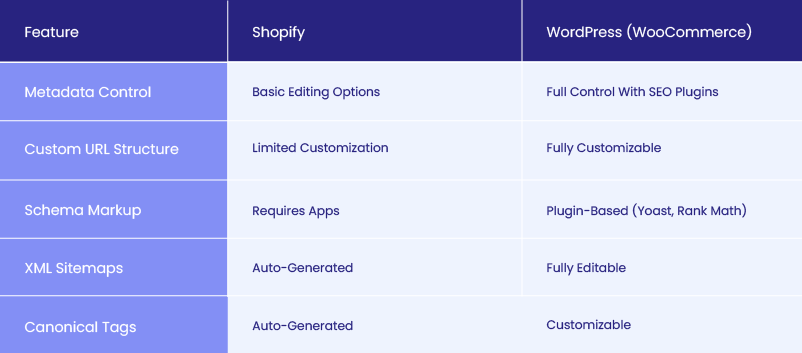
Shopify’s structured SEO settings are beginner-friendly, but WordPress allows greater customization and deeper technical SEO control.
Performance Impact
Site speed and mobile optimization are critical for SEO rankings.
- Shopify:
- Uses a global CDN (Content Delivery Network) to improve load times.
- Themes are optimized for mobile performance and speed.
- Limited access to backend optimizations for image compression, caching, and database optimization.
- WordPress:
- Performance depends on hosting choice, theme selection, and caching plugins.
- Requires speed optimization plugins like WP Rocket or Autoptimize to compete with Shopify’s built-in performance advantages.
- With proper setup, WordPress can be faster and more optimized than Shopify.
If you want fast load speeds without extra setup, Shopify is the better choice. If you’re willing to fine-tune performance for maximum SEO benefits, WordPress can outperform Shopify.
Advanced SEO Strategies
Both platforms integrate with SEO and analytics tools, but WordPress provides more advanced SEO strategies:
- Shopify:
- Direct Google Search Console and Google Analytics integration.
- Built-in redirects and structured data for products.
- SEO-focused apps like SEO Booster and Plug in SEO help improve rankings.
- WordPress:
- Full access to Google Tag Manager, Google Analytics, and Search Console.
- Advanced schema markup support for rich snippets.
- Better content marketing capabilities with optimized blogs for organic traffic.
Final Verdict
- Shopify is great for beginner-friendly, automated SEO.
- WordPress (WooCommerce) is better for advanced, in-depth SEO control.
If you need basic SEO with minimal effort, Shopify wins. But if you want maximum SEO flexibility and content-driven rankings, WordPress is the clear winner.
Performance, Speed & Scalability
When comparing Shopify vs WordPress, performance and scalability are crucial factors. A fast, reliable store improves user experience, SEO rankings, and conversion rates. The way each platform handles hosting, speed optimization, and high-traffic scenarios varies significantly, impacting long-term business growth.
Hosting & Infrastructure
The WordPress-Shopify debate in terms of hosting comes down to control versus convenience. Shopify provides a fully managed hosting solution, handling performance, security, and server maintenance. This means users don’t have to worry about selecting a hosting provider, configuring servers, or managing uptime. The infrastructure is optimized for eCommerce, ensuring stable performance even during peak traffic periods.
WordPress, on the other hand, requires external hosting, giving store owners more flexibility in choosing their provider. This allows greater control over server configurations, but also means managing hosting-related issues like uptime, caching, and bandwidth. Managed WordPress hosting services such as Kinsta, WP Engine, and SiteGround help optimize performance, but the responsibility of site maintenance still falls on the store owner.
Recommendation
Check out our ultimate guide to the best WordPress hosting providers this year.
Site Speed & Optimization Options
A store’s speed affects both customer experience and SEO rankings. Shopify has built-in speed optimizations, including automatic image compression, global content delivery networks (CDNs), and minimal server response times. Since Shopify manages the hosting environment, store owners don’t need to worry about optimizing performance manually. However, customization options for speed improvements are limited due to Shopify’s controlled infrastructure.
WordPress offers more flexibility but requires manual optimization. Store owners can install caching plugins like WP Rocket or W3 Total Cache, use CDNs such as Cloudflare, and optimize images with Smush or ShortPixel. While this level of customization can lead to superior performance when properly configured, it also requires technical knowledge to maintain and optimize the site over time.
Handling High Traffic & Scalability
Scalability is a key difference in Shopify vs WordPress. Shopify’s cloud-based infrastructure ensures smooth scaling as traffic increases, automatically handling server resources during peak sales periods. There’s no need for manual intervention when dealing with traffic spikes, making Shopify a reliable choice for high-growth stores. However, transaction fees and pricing tiers increase as a store scales, leading to higher costs for larger businesses.
WordPress offers virtually unlimited scalability but requires proactive resource management. High-traffic stores must invest in powerful hosting plans, optimize database performance, and implement caching solutions. While WordPress can handle enterprise-level traffic with the right setup, it demands ongoing technical maintenance to prevent slowdowns or downtime. Businesses that prioritize full control over their infrastructure will benefit from WordPress’s flexibility, but Shopify’s hands-off scalability is better suited for store owners who prefer a managed solution.
Final Verdict
Shopify is the better option for businesses seeking hassle-free performance, automatic scaling, and built-in speed optimization. WordPress, while requiring more effort to optimize, offers greater flexibility in managing speed and scalability. The right choice depends on whether a business prioritizes convenience and reliability (Shopify) or control and customization (WordPress).
Security & Maintenance
When evaluating Shopify vs WordPress, security and maintenance are crucial factors that affect the long-term stability of an online store. A secure platform protects customer data, prevents cyber threats, and ensures compliance with industry standards. While both Shopify and WordPress offer security features, they approach it in different ways, impacting the level of responsibility store owners have in maintaining their sites.
Security Features & Protocols
Security in the WordPress-Shopify debate comes down to managed security versus self-managed protection. Shopify is a fully hosted platform that takes care of security automatically. It is PCI DSS Level 1 compliant, meaning it meets the highest security standards for handling credit card transactions. Shopify includes SSL certificates by default, encrypts all customer data, and regularly runs security audits to detect and patch vulnerabilities. Since Shopify manages its infrastructure, users do not need to worry about securing their hosting environment or updating security measures manually.
WordPress, being a self-hosted platform, relies on the store owner to implement security measures. The level of security depends on the hosting provider, installed plugins, and ongoing maintenance. Store owners need to configure SSL certificates, install security plugins like Wordfence or Sucuri, and enable features like two-factor authentication (2FA) and firewall protection. Without these proactive measures, WordPress sites can be vulnerable to hacking attempts, malware, and brute-force attacks.
Maintenance Responsibilities
Maintenance is another key difference between Shopify and WordPress. Shopify handles all updates automatically, ensuring that stores always run on the latest software version with up-to-date security patches. Store owners do not need to manually update themes, plugins, or the core platform, reducing the risk of security breaches caused by outdated software.
WordPress requires active maintenance, as store owners must update the core WordPress software, WooCommerce plugin, third-party themes, and additional extensions regularly. Backups, performance monitoring, and vulnerability patching are essential, and failing to maintain these updates can leave the site exposed to cyber threats. Managed WordPress hosting providers can automate some of these tasks, but the responsibility still falls on the site owner to ensure security best practices are followed.
Best Practices
Regardless of the platform, maintaining a secure eCommerce store requires proactive measures. Using strong passwords, enabling two-factor authentication, setting up regular backups, and monitoring for suspicious activity are critical for both Shopify and WordPress users. Shopify simplifies security by managing it on behalf of store owners, while WordPress requires a hands-on approach to ensure protection against evolving threats.
Final Verdict
For businesses that want a low-maintenance, fully secure solution, Shopify is the better option. It removes the need for manual updates and security configurations, making it ideal for those who prefer a hands-off approach. WordPress offers greater flexibility and control, but security is the responsibility of the store owner, requiring ongoing monitoring, updates, and proactive protection. The right choice depends on whether a business prioritizes convenience and automatic security (Shopify) or hands-on security management with full control (WordPress).
Pricing & Cost Analysis
When comparing Shopify vs WordPress, cost is a significant factor that influences the decision. While Shopify follows a subscription-based model with predictable pricing, WordPress offers greater flexibility but requires multiple cost considerations. Understanding the total cost of ownership, including hidden expenses, is crucial when determining which platform aligns with your budget and business goals.
WordPress Cost Structure
Unlike Shopify, WordPress itself is free, but building and maintaining a WooCommerce store involves several costs:
- Domain Name: Typically costs $10–$20 per year.
- Hosting: Shared hosting can be as low as $5/month, while managed WordPress hosting (recommended for performance and security) ranges from $25–$100/month.
- Premium Themes: Free themes are available, but premium themes cost between $50–$150 for advanced design and features.
- Plugins & Extensions: Essential plugins for SEO, security, caching, and eCommerce features can add up to $100–$500 per year.
- Developer Costs: If customization is required, hiring a developer may cost hundreds to thousands of dollars, depending on complexity.
WordPress offers a flexible pricing structure, allowing businesses to start with minimal investment and scale over time. However, the need for third-party services and ongoing maintenance can increase costs.
Shopify Subscription Plans
Shopify’s pricing is more straightforward, with fixed monthly fees:
- Basic Shopify: $39/month (for small businesses).
- Shopify Plan: $105/month (for growing businesses).
- Advanced Shopify: $399/month (for scaling businesses).
- Shopify Plus: Starts at $2,000/month (for large enterprises).
Additional costs include:
- Transaction Fees: Shopify charges 0.5% to 2% per transaction if using third-party payment gateways. Shopify Payments eliminates these fees.
- Themes & Apps: Free themes are available, but premium themes range from $100–$350. Shopify’s app ecosystem provides add-ons for advanced features, but many apps come with monthly fees, increasing overall costs.
Total Cost of Ownership
The long-term cost implications of WordPress vs Shopify depend on business needs.
- Shopify offers predictable pricing, but transaction fees and app costs can add up, especially for scaling businesses.
- WordPress can be more cost-effective, but expenses vary based on hosting, plugins, and custom development.
For businesses looking for a simple, all-in-one solution, Shopify’s structured pricing is appealing. Those needing full control over costs and customization may find WordPress more budget-friendly in the long run.
ROI Considerations
The best platform depends on how pricing aligns with business scale, customization needs, and revenue goals.
- Shopify suits businesses wanting fast setup and predictable costs. It’s ideal for entrepreneurs who prioritize convenience and are comfortable with ongoing subscription fees.
- WordPress benefits businesses that require long-term customization and control. Although initial setup may require more investment, avoiding transaction fees and expensive apps can improve ROI over time.
For small businesses and startups, Shopify’s simplicity and support make it a strong contender. For growing businesses or enterprises that want complete ownership of their site and pricing flexibility, WordPress is a more scalable and cost-efficient choice.
Website as a service
Website As a Service [WAAS] provides complete website solutions including design, hosting, and maintenance through a convenient subscription model for Agencies.
Integrations, Apps & Automation
When comparing Shopify vs WordPress, the ability to extend functionality through integrations, apps, and automation tools is a major consideration. Both platforms offer extensive ecosystems, but they differ in approach, flexibility, and cost. While Shopify provides a curated selection of apps within its marketplace, WordPress, with WooCommerce, boasts a vast library of plugins that cater to every aspect of eCommerce and digital marketing.
Plugin & App Ecosystems
The WordPress vs Shopify debate in terms of integrations often comes down to customization versus convenience. WordPress offers an open-source environment where users can install thousands of free and premium plugins. From WooCommerce for eCommerce to Yoast SEO for optimization and Mailchimp for email marketing, WordPress provides limitless expansion opportunities. Many plugins are free, while premium versions offer advanced features at a one-time or annual cost.
Shopify’s App Store follows a more structured model, ensuring that all apps are fully optimized and compatible with Shopify’s ecosystem. Shopify’s apps focus on enhancing store management, marketing, and automation, with many requiring monthly subscriptions. While Shopify’s closed ecosystem ensures stability, it also limits flexibility compared to WordPress, which allows custom-built solutions tailored to unique business needs.
Workflow Automation
Automation plays a key role in improving efficiency, and both Shopify and WordPress support integrations with tools like Zapier to streamline processes. Shopify’s native automation tools, such as Shopify Flow for order management and marketing, make it easy to automate repetitive tasks without technical expertise.
WordPress, being highly customizable, allows deeper automation through plugins like Uncanny Automator and WP Fusion, which connect WooCommerce with CRM, email marketing, and customer engagement platforms. Both platforms support extensive automation, but WordPress provides more granular control for businesses that require highly customized workflows.
Third-Party Services & APIs
For businesses that rely on CRM systems, email marketing platforms, analytics tools, and social media integrations, Shopify and WordPress present distinct differences. Shopify offers seamless connections with platforms like Klaviyo, HubSpot, and Google Analytics, but deeper API access is limited to Shopify Plus users.
WordPress, being open-source, allows full integration with any third-party service through custom API development, giving businesses full control over their data and integrations. While Shopify simplifies the process with pre-built integrations, WordPress enables businesses to create tailored solutions that adapt to their unique operational needs.
Impact on Business Efficiency
A well-integrated platform enhances efficiency by automating processes, centralizing data, and improving customer engagement. Shopify is ideal for businesses that want ready-to-use, managed integrations with minimal setup, while WordPress is better suited for businesses that require advanced customization and full ownership over integrations. The decision between these two platforms depends on whether a business values convenience and curated apps (Shopify) or full control and unlimited scalability (WordPress).
Recommendation
Looking for effective ecommerce solutions? Have a look at our blog on white label ecommerce and learn how to leverage this business model.
Customer Support & Community Resources

When evaluating Shopify vs WordPress, the availability of customer support and learning resources plays a crucial role in determining which platform is easier to manage. Shopify offers dedicated customer support with direct access to a support team, while WordPress relies on its vast community and third-party resources for troubleshooting and learning. The difference between these two approaches impacts how quickly users can resolve technical issues and get assistance when needed.
Shopify provides 24/7 customer support through live chat, phone, and email, ensuring that store owners receive direct help whenever they encounter a problem. In addition to its official support channels, Shopify has a robust help center with guides, video tutorials, and a growing ecosystem of Shopify Experts who offer professional assistance for store setup, customization, and troubleshooting. The centralized nature of Shopify’s support system makes it ideal for users who prefer immediate and structured assistance without needing to rely on external sources.
WordPress operates as an open-source platform, meaning there is no centralized customer support team. Instead, WordPress users rely on community-driven resources, including official forums, developer blogs, and extensive documentation. WooCommerce has its own support structure for paid extensions and themes, but free plugins and themes typically require users to seek help through community forums or hire a developer. While WordPress offers unmatched flexibility, troubleshooting technical issues often requires more research and technical understanding.
Learning resources for both platforms are abundant, but they cater to different user needs. Shopify has an extensive library of tutorials, including Shopify Academy, blog content, and official guides that simplify store management for beginners. WordPress, being open-source, has a much larger volume of tutorials, courses, and third-party documentation covering everything from basic setup to advanced development. Platforms like Udemy, YouTube, and WordPress-focused blogs provide a wealth of knowledge, but the lack of official one-on-one support can make troubleshooting more challenging for non-technical users.
The level of support directly affects user experience and platform adoption. Shopify’s dedicated support ensures quick issue resolution, making it a reliable choice for entrepreneurs who want an easy-to-use system with guaranteed help when needed. WordPress, while offering more flexibility and a larger knowledge base, requires users to be proactive in finding solutions through forums, documentation, and third-party services. Businesses that prefer a structured, guided experience may find Shopify’s customer support system more appealing, while those who enjoy independent problem-solving and a vast global community may appreciate the self-reliant nature of WordPress.
Use Cases & Ideal Business Scenarios
Choosing between Shopify vs WordPress depends on the specific needs of a business, its growth strategy, and the level of customization required. Both platforms cater to different types of users, making it essential to evaluate which one aligns best with long-term goals.
Who Benefits Most from WordPress
WordPress is the best choice for businesses that require extensive customization, content-driven marketing, and flexibility in design and functionality. It is ideal for:
- Businesses that need complete control over their website – WordPress allows full customization with themes, plugins, and custom code.
- Content-heavy websites that integrate eCommerce – Companies focusing on SEO, blogging, or membership sites benefit from WordPress’s superior content management capabilities.
- Brands requiring advanced eCommerce features – Businesses that want custom checkout flows, unique product pages, or complex integrations can achieve this with WooCommerce.
- Developers and agencies looking for scalability – WordPress provides unlimited flexibility for agencies managing multiple sites or businesses planning to expand their digital footprint.
Who Benefits Most from Shopify
Shopify is ideal for businesses that want a fast, simple, and scalable eCommerce solution without dealing with technical complexities. It works best for:
- Retailers looking for an all-in-one eCommerce platform – Shopify’s built-in hosting, payment gateways, and security make it a turnkey solution.
- Small businesses and startups that want a quick launch – The easy setup and user-friendly interface allow businesses to start selling immediately.
- Brands with minimal technical expertise – Shopify’s managed environment eliminates the need for coding, security updates, and performance optimization.
- Businesses focused on selling physical or digital products – Shopify’s seamless inventory management and fulfillment options make it an excellent choice for eCommerce-focused brands.
Industry Examples & Case Studies
Many well-known brands use both WordPress vs Shopify, depending on their business model.
- WordPress (WooCommerce) Use Cases: Large-scale content-driven businesses like BBC America, TechCrunch, and The New Yorker leverage WordPress for their publishing needs while integrating WooCommerce for product sales. Service-based businesses, educational platforms, and SaaS companies also rely on WordPress for its flexibility.
- Shopify Use Cases: eCommerce brands such as Gymshark, Allbirds, and Kylie Cosmetics use Shopify due to its seamless sales process, built-in marketing tools, and ability to scale quickly with minimal technical effort.
Future-Proofing Your Choice
Selecting the right platform requires thinking beyond immediate needs and considering long-term growth and evolving technology trends.
- Shopify is future-proof for businesses that want a hands-off approach to scaling with automatic updates, built-in security, and continuous platform improvements. Its ecosystem ensures businesses always have access to the latest tools without requiring additional technical management.
- WordPress is future-proof for businesses that need complete ownership of their website and want the ability to customize every aspect as they grow. It allows brands to adapt to new technologies, integrate emerging tools, and maintain total control over their online presence without platform restrictions.
Both platforms offer powerful features, but choosing between Shopify vs WordPress depends on whether a business prioritizes ease of use and scalability (Shopify) or flexibility and customization (WordPress).
Pros & Cons Comparison Summary
Deciding between Shopify vs WordPress requires a clear understanding of their strengths and weaknesses. Below is a side-by-side comparison table summarizing the key factors that influence the choice between the two platforms.
Side-by-Side Comparison
| Feature | Shopify | WordPress (WooCommerce) |
| Ease of Use | Beginner-friendly, all-in-one solution | Requires more setup and technical knowledge |
| Customization | Limited to Shopify themes and Liquid code | Fully customizable with themes, plugins, and code |
| Ecommerce Features | Built-in store management, payments, and tools | Requires plugins for advanced eCommerce features |
| SEO Capabilities | Basic SEO features, requires apps for advanced SEO | Full control over SEO with plugins like Yoast or Rank Math |
| Performance & Speed | Optimized hosting and CDN built-in | Performance depends on hosting and optimization |
| Security & Maintenance | Managed security and automatic updates | Requires manual updates and security management |
| Pricing | Fixed monthly fees, potential app costs | Flexible pricing, lower transaction fees |
| Integrations & Apps | Curated app store with easy integrations | Wide range of plugins and API access for customization |
| Customer Support | 24/7 dedicated support via chat, phone, and email | Community-driven support with extensive documentation |
| Scalability | Easily scalable with Shopify’s infrastructure | Highly scalable but depends on hosting quality |
Shopify vs WordPress: Which One Truly Fits Your Needs?
Choosing between Shopify vs WordPress requires careful consideration of business needs, technical expertise, and long-term growth plans. Both platforms offer powerful eCommerce capabilities, but they cater to different types of users.
Shopify provides a streamlined, all-in-one solution that is easy to set up and manage, making it ideal for businesses that want to focus on selling without dealing with technical complexities. WordPress with WooCommerce, on the other hand, offers unmatched customization and flexibility, making it the preferred choice for businesses that want full control over their website, SEO, and integrations.
The decision between WordPress vs Shopify ultimately depends on what matters most to your business. If ease of use, built-in hosting, and dedicated support are top priorities, Shopify is the better option. If customization, ownership, and cost control are more important, WordPress provides the best solution. Businesses should consider factors such as how much customization they need, whether they have the technical expertise to manage a self-hosted platform, and how much they are willing to spend on monthly subscriptions or one-time development costs.
Looking ahead, both platforms continue to evolve, with Shopify introducing new automation and AI-driven eCommerce tools and WordPress expanding its capabilities through advanced plugins and improved hosting solutions. Industry trends such as headless commerce, omnichannel selling, and AI-driven SEO are shaping the future of eCommerce, and each platform is adapting to meet these demands.
Businesses should evaluate not just their current needs but also how their chosen platform will support future growth and technology advancements. Understanding the core differences in Shopify vs WordPress will help business owners make an informed decision that aligns with their eCommerce goals and long-term vision.
If you are a digital agency in need of a fully customized WordPress WooCommerce store, White Label Agency has the expertise to help you build, optimize, and scale your client’s online store. Our team of WordPress developers can handle everything from custom theme development, plugin integrations, and performance enhancements to ongoing maintenance and support. Contact us to discuss your project and get the best eCommerce solution tailored to your client’s business needs.


