
- Recommended structure for a law firm website
- Law firms need features that regular business sites do not
- Recommended design for a law firm website
- Recommended language for practice area pages
- State bar advertising rules that directly affect what goes on the site
- Non-negotiables on a law firm website
- 5 mistakes we frequently see on legal websites
- How we help agencies build law firm websites
Law firm website development is a niche we have worked in for years. Across the 600+ agencies we partner with, legal clients come up regularly, and the volume of law firm projects we have handled now runs well past 100 sites. That kind of repetition teaches you things you cannot pick up from a brief or a style guide.
This blog pulls together what we have learned from those builds: what law firm websites need structurally, how they should be designed, where agencies tend to go wrong, and why experience in this niche makes a real difference.
Recommended structure for a law firm website
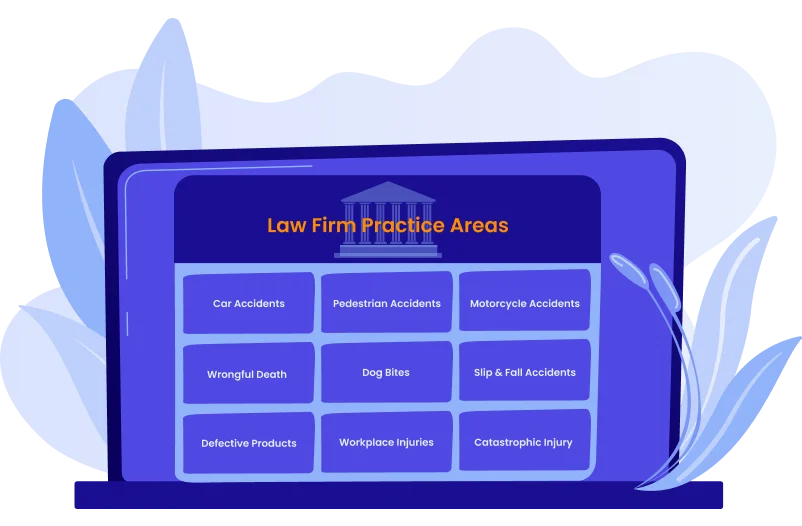
The homepage of a law firm website rarely drives serious search traffic. But practice area pages do. That’s why we always make sure that each service gets its own dedicated page, and in most cases, several sub-pages beneath it. This is where law firm website development differs most from other verticals.
Practice area pages bring in most clients
A firm that handles personal injury, estate planning, and business law cannot fit all three under a single “Services” page. You probably agree that it would be too much. Each practice area needs room to explain what it covers, because legal terminology is unfamiliar to most visitors.
Then you go a level deeper. Under “Personal Injury,” you would have separate pages for car accidents, medical malpractice, and slip and fall cases. Under “Family Law,” separate pages for divorce, child custody, and adoption. This structure helps search engines understand the site’s scope, and it helps visitors quickly confirm whether the firm handles their specific situation.
We think each practice area page should include three core elements:
- Clear structure: an introduction in plain language, how the firm approaches that area of law, what the process looks like, common questions, and a clear next step
- Local optimization: references to the specific state or city, local court names, and location-relevant search terms
- Conversion elements: a visible phone number, a consultation form, and a clear call to action
Attorney profile pages
Where to place attorney profiles is a question that comes up on most law firm website design projects. Some firms want them prominent; others prefer them deeper in the navigation. From what we have seen, visitors usually want to know who they would be working with fairly early in their visit, so burying profiles tends to hurt conversion. They do not need to lead the page, but they should not require three clicks to find.
Law firms need features that regular business sites do not
WordPress powers a significant share of law firm websites, and there are practical reasons for that. Natalia, our Head of Production at WLA, puts it this way: “When someone fills out a contact form on a law firm site, the attorney needs to know what they are dealing with before calling back. Is it a car accident? A divorce? How long ago did it happen? For this, you need forms that ask the right questions and a way to book a consultation. With WordPress, we have a variety of plugins to build all of that in from the start.”
Below are the three main reasons WordPress continues to be the platform we recommend for attorney website development.
Plugin ecosystem
Law firms need functionality that goes beyond a standard business site. As Natalia pointed out, WordPress has reliable plugins for all of it:
- Intake forms that collect the case details before anyone picks up the phone
- Online booking tools, such as Calendly or Acuity, so potential clients can schedule a consultation at any hour, not just during office hours
- Live chat handled by intake staff, not attorneys: basic questions only, no legal advice
- A separate client portal for document sharing: this is distinct from the contact form and needs to be scoped and built as its own feature
Content management
Law firms generate ongoing content: blog posts about new legislation, updates to attorney bios, case results, and firm news. The attorney or a member of their team needs to be able to update this without calling a developer every time. WordPress makes that possible without requiring technical knowledge. For a legal website that stays current and relevant, this matters more than it would on a static brochure site.
Security
Law firms handle sensitive client information, which makes them a target. WordPress, when configured properly, handles this well. Security plugins like Wordfence add firewall protection, and real-time threat monitoring. Combined with a suitable hosting environment and a regular update schedule, it covers what a legal site needs. Natalia notes: “We always configure security plugins. That said, hosting matters too. If a client is in a poor hosting environment, there is only so much the plugins can do. It is worth having that conversation early.”
WordPress Development Agency
Experience WordPress development with our custom-coded websites. Perfect for agencies, our reliable service ensures timely delivery and client satisfaction.
Recommended design for a law firm website
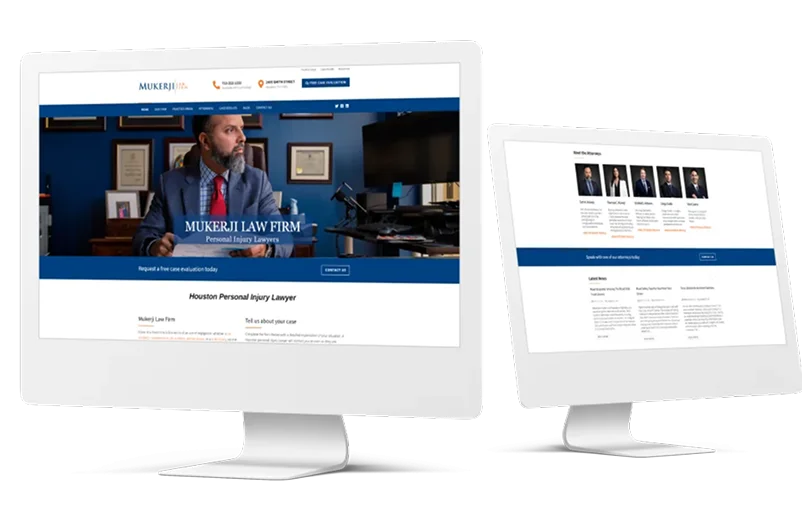
Law firm website design is sometimes tricky to get right. Too outdated and the firm looks out of touch. Too flashy and it does not feel serious enough for legal work. Karina, our Head of Design at WLA, describes the challenge: “Most people visit a law firm website because something has gone wrong in their life. The design has to say two things at once: this firm knows what it is doing, and you can talk to us.”
Fonts
Font choices set much of the tone on a legal website. Traditional serif fonts carry a sense of authority; clean sans-serif fonts read as more contemporary and approachable. Many law firm sites use both: a serif for headlines and a sans-serif for body text, which tends to be easier to read on screens. The combination can work well when done with restraint.
Colors
Blue is common in legal design because it reads as trustworthy and stable, but it is not the only option. A criminal defense practice might call for something bolder and darker. Web design for family lawyer practices often benefits from warmer tones that feel less institutional. The color palette should reflect what the firm does and how they want a first-time visitor to feel.
Photography
Stock photography is something many law firms go for. But in our experience, images of suited professionals shaking hands or pointing at documents can sometimes look staged. When the budget allows, real photos of the attorneys in their actual office make a significant difference to how the site reads. If stock photography is unavoidable, choosing photos that feel like candid moments rather than posed compositions will produce better results.
Karina has one more thing to note: “Attorneys often want to fill every available space with information. But leaving room on the page makes a site feel calmer and more professional. It also makes the important information easier to find.”
WordPress Webdesign
Enhance your agency’s offerings with our WordPress website design services. Get custom, high-quality designs that fit your client’s needs.
Recommended language for practice area pages
The words on a legal website have to do several things at once: support search rankings, demonstrate the firm’s expertise, and help a visitor with no legal background understand whether this firm can help them. That is a harder brief than it looks.
Practice area pages are probably the most important pages on the site after the homepage. They need to explain the area of law in plain terms, show that the firm has handled this type of case before, and make the next step obvious. Here is a structure that tends to work:
| Section | What Goes Here | Roughly How Long |
| Introduction | What is this legal issue in plain language | 2-3 paragraphs |
| How This Firm Approaches It | Their experience and philosophy | 2-3 paragraphs |
| What the Process Looks Like | What happens if you work with them | 3-4 paragraphs |
| Common Questions | The things everyone asks about | 4-6 short Q&As |
| How to Get Started | Clear next step to take | 1 paragraph |
As for the blogs, this content on legal sites serves two purposes. It helps with search engine rankings by creating fresh content. And it positions the firm as knowledgeable about current developments. But these posts should be written for regular people, not for other lawyers. If the writing relies on Latin phrases or references to specific statutes without explanation, most visitors will not follow it.
State bar advertising rules that directly affect what goes on the site
Law firm websites are regulated differently than other business websites. State bar associations govern attorney advertising, and websites fall under those rules. This is one of the areas where agencies without experience in legal website development can run into problems late in a project.
Three things come up on almost every legal website build:
- Disclaimers: Many states require specific language such as “previous case results do not guarantee the same outcome” or “using this website does not create an attorney-client relationship.” These need to be visible, though footer placement usually works without disrupting the design.
- Testimonials and reviews: Some states do not allow client testimonials at all. Others allow them with specific disclaimer language. Some have no restrictions. This needs to be checked for the specific state before any testimonials are added to the site.
- Case results: Similar restrictions apply. Some states allow detailed information about past cases; others require disclaimers that effectively reduce the value of sharing that information. Worth researching early in the project, not at the end.
Getting this wrong can create compliance issues for the firm. So it’s always better to go through these issues with the firm before starting to work on the websites.
Non-negotiables on a law firm website

A large share of legal searches happens on phones, often in urgent situations. Someone looking for a criminal defense attorney may have been arrested hours earlier. Someone searching for a personal injury lawyer may be in the hospital. The mobile experience on a legal website is therefore one of the biggest priorities.
Here are four extra factors that you can consider when building law firm websites:
- A tappable phone number, immediately visible on mobile. We mean not just displayed text, but a button that initiates a call when tapped. In an urgent situation, that can matter a lot.
- Forms that are genuinely usable on a phone screen. This means the right input types so the correct keyboard appears, multi-step forms that break long intake questions across screens, and buttons large enough to tap accurately.
- Prominent location information. Many people searching on mobile are trying to determine whether the firm is close enough to visit. That’s why having address and map information should not require scrolling to find.
- Fast page load times. Mobile connections are often slower, and people in urgent situations have no patience for a slow site. Compressed images, minimal unnecessary code, and caching are all standard practice on a legal website.
Recommendation
Check out our comprehensive blog on how to build mobile-first websites.
5 mistakes we frequently see on legal websites
After building 100+ law firm websites, we have a clear picture of where things tend to go wrong. Most of the issues are preventable. We asked Mark, one of our account managers at WLA, to share some of the mistakes he’s seen on legal websites and here’s what he recalled:
- The copy reads like a legal brief. This one is not really a development issue, but it is probably the most common thing we notice. Attorneys write the way they were trained to write: precise, formal, and thorough. On a website, though, it tends to lose people who are already overwhelmed.
- There is no obvious next step. This is an easy thing to miss. A visitor reads through a practice area page and genuinely wants to get in touch, but the only contact option is in the footer. A lot of people will not scroll that far. Something as simple as a visible consultation button mid-page can make a real difference.
- Trust signals get treated as optional. Bar memberships, years in practice, peer recognition, client reviews where local bar rules allow: these are often the details that tip someone from “maybe” to “I’ll call.” They tend to get added late in the project, or get dropped entirely. Worth noting that anything in this category should still follow the advertising rules of the relevant state bar.
- Analytics do not get set up at handover. The site looks great at launch, and then three months later the attorney is not sure it is working. Without Google Analytics and configured from the start, there is nothing to look at when that conversation happens. It is a small thing that takes maybe an hour, but it is one of the more useful things an agency can do for a client on any handover.
- The site is built around the attorney, not the visitor. This one comes up more than you would expect. The attorney wants the homepage to open with the firm’s founding story, a full list of awards, and a letter from the managing partner. That is understandable; they are proud of what they have built. But the person landing on that page after a car accident wants to know if this firm handles their type of case and how to reach someone. So all this should be balanced.
How we help agencies build law firm websites
We have built 100+ law firm websites across the agencies we work with, and that experience is available to any agency that partners with us. We work as a white label back office: your agency handles the client relationship, and we handle the development. Your client never knows we are involved.
What that means in practice for legal projects:
- We know the structural requirements: practice area pages, sub-pages, attorney profiles, intake forms, scheduling integration, and secure client document areas.
- We understand the design standards for legal websites and can work within them or thoughtfully depart from them when the brief calls for it.
- We can provide ongoing law firm maintenance so the site stays secure, updated, and functional after launch.
- We scale with your workload, so whether you have one legal client or ten, our capacity adjusts accordingly.
If your agency works with law firms and you want a development partner with real experience in this niche, get in touch with our team to talk through how we can support your projects.